Getting Started
Chapter 7 Setup / Change Connection PC – Emulation System
MCU-AN-391005-E-V17 - 36 - © Fujitsu Microelectronics Europe GmbH
7.3.3 Configuring Operating System “Windows
TM
”
1 Within your Windows
TM
-directory (e.g. C:\windows or
C:\WINNT\system32\drivers\etc) you should find three files:
Î services
Î hosts
Î lmhosts[.sam]
(Note: The files may not have a file-extension!)
2 Make a copy off all three files, like for an example: services to sevices.old ,
etc.
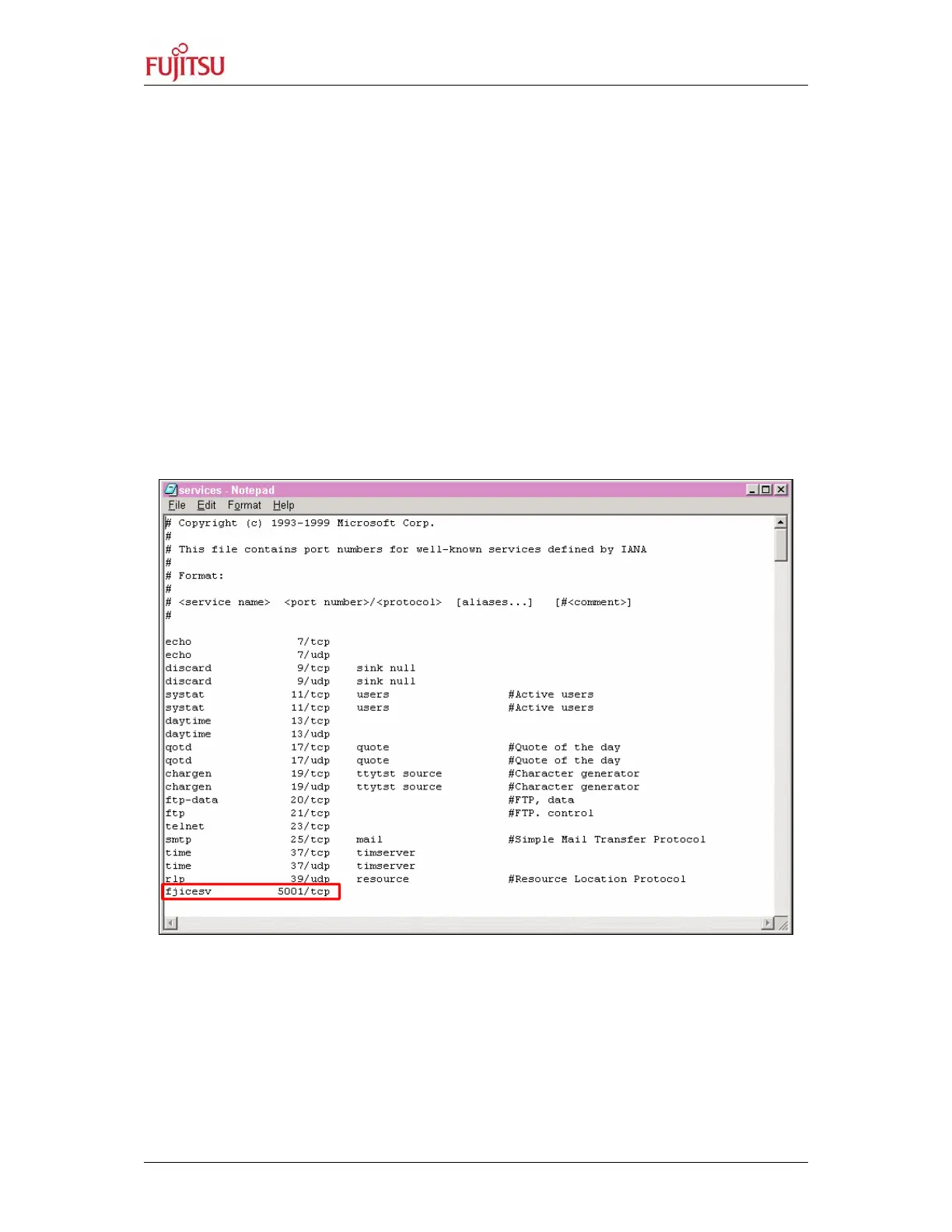
Edit file services and add the following line:
fjicesv 5001/tcp # Fujitsu emulator
Figure 24: Add a Service
(Note: if 5001/tcp is already contained in the file services, use an unused
number beginning with 5002 or greater, e.g. fjicesv 5002/tcp. In that
case also the emulator address given by the program „LAN address“(see
above) has to be changed!


 To Next Page