Getting Started
Chapter 7 Setup / Change Connection PC – Emulation System
© Fujitsu Microelectronics Europe GmbH - 37 - MCU-AN-391005-E-V17
3 When saving again the file Services be sure that your editor (e.g. notepad) will
not add any extension, e.g. .txt, to your file. To get sure, use quotation marks
for the filename:
File save as: ”services”
4 The file hosts is used to make a redefinition of the complex IP-number with a
simple name within your global network. This may be important if you use a
DNS-Server. Of course, you can define different names for the same IP-
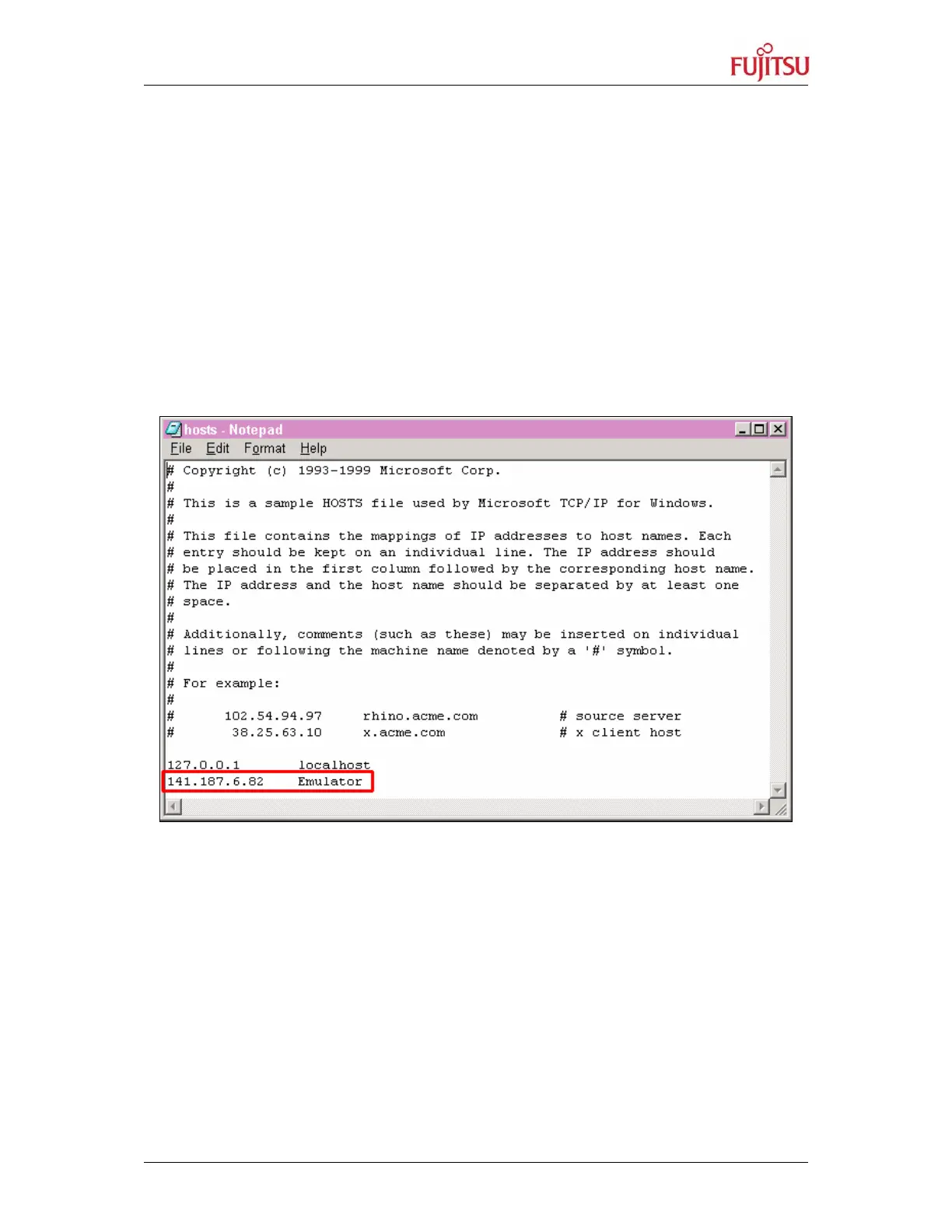
Address, as shown below. Edit file hosts and add the following line:
„The unique IP address (as set by LAN-Address, see above)“ „Nickname of
emulator“
e.g. 141.187.6.82 Emulator
Figure 25: Add a Host
When saving again the file Hosts be sure that your editor (e.g. notepad) will not
add any extension, e.g. .txt, to your file. To get sure, use quotation marks for
the filename:
File save as: ”hosts”
5 The file lmhosts (or lmhosts.sam) is used to make a redefinition of the
complex IP-number with a simple name within your local network.
Of course, you can define different names for the same IP-Address, as shown
below. Edit file lmhosts and add the following line:


 To Next Page