3.1 Flow of Operations
ScanSnap S510 Operator's Guide 37
Using the ScanSnap
3
Operation
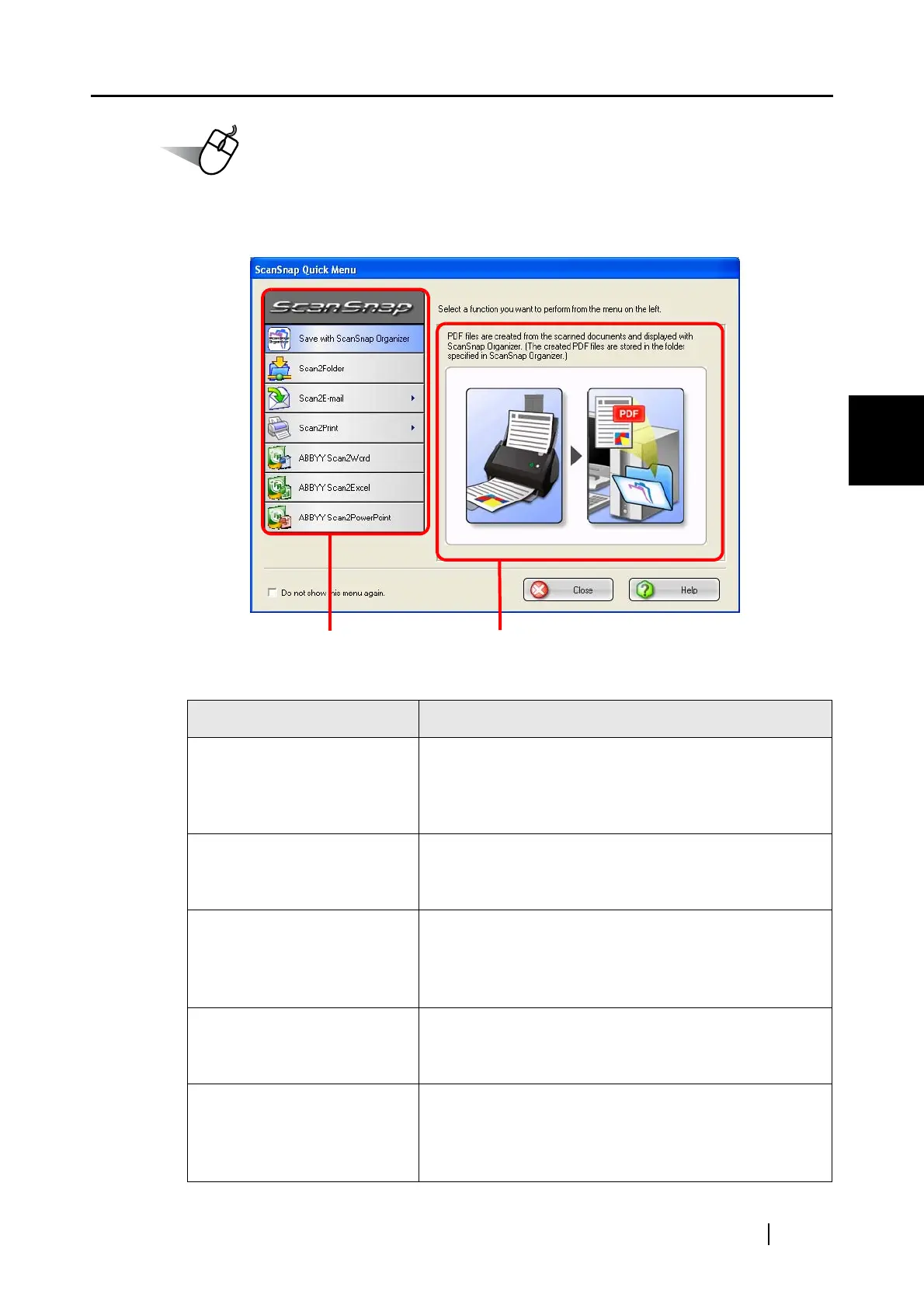
5. Select an action you want to perform in the Action List on the left side of the
ScanSnap Quick Menu.
Action List
Action Description
Save with ScanSnap
Organizer *1
PDF files are created from the scanned images, and
ScanSnap Organizer is started to display the scanned
images. Those files are saved in a folder (on your
personal computer) specified in ScanSnap Organizer.
Scan2Folder PDF files are created from the scanned images and
saved in a specified folder (shared folder).
⇒ "5.2 Saving Data in the Specified Folder" (page 115)
Scan2E-mail PDF files are created from the scanned images and an
e-mail program is started with the PDF files attached to
e-mail.
⇒ "5.3 Sending Files by E-Mail" (page 127)
Scan2Print Scanned images are printed with a printer.
⇒ "5.4 Using the ScanSnap as a Copy Machine" (page
143)
ABBYY Scan2Word *2 The scanned images are processed through OCR and
converted into Word files.
⇒ "5.5 Converting into Word / Excel / PowerPoint
Files" (page 153)
Action List Descriptions of the selected action



 To Next Page
 Loading...