If Locaon Services are enabled in iOS, the eld automacally populates with the address
based on the current GPS coordinates. Alternavely, the user can tap the eld and search
for the specic locaon, such as the name of a golf course or business.
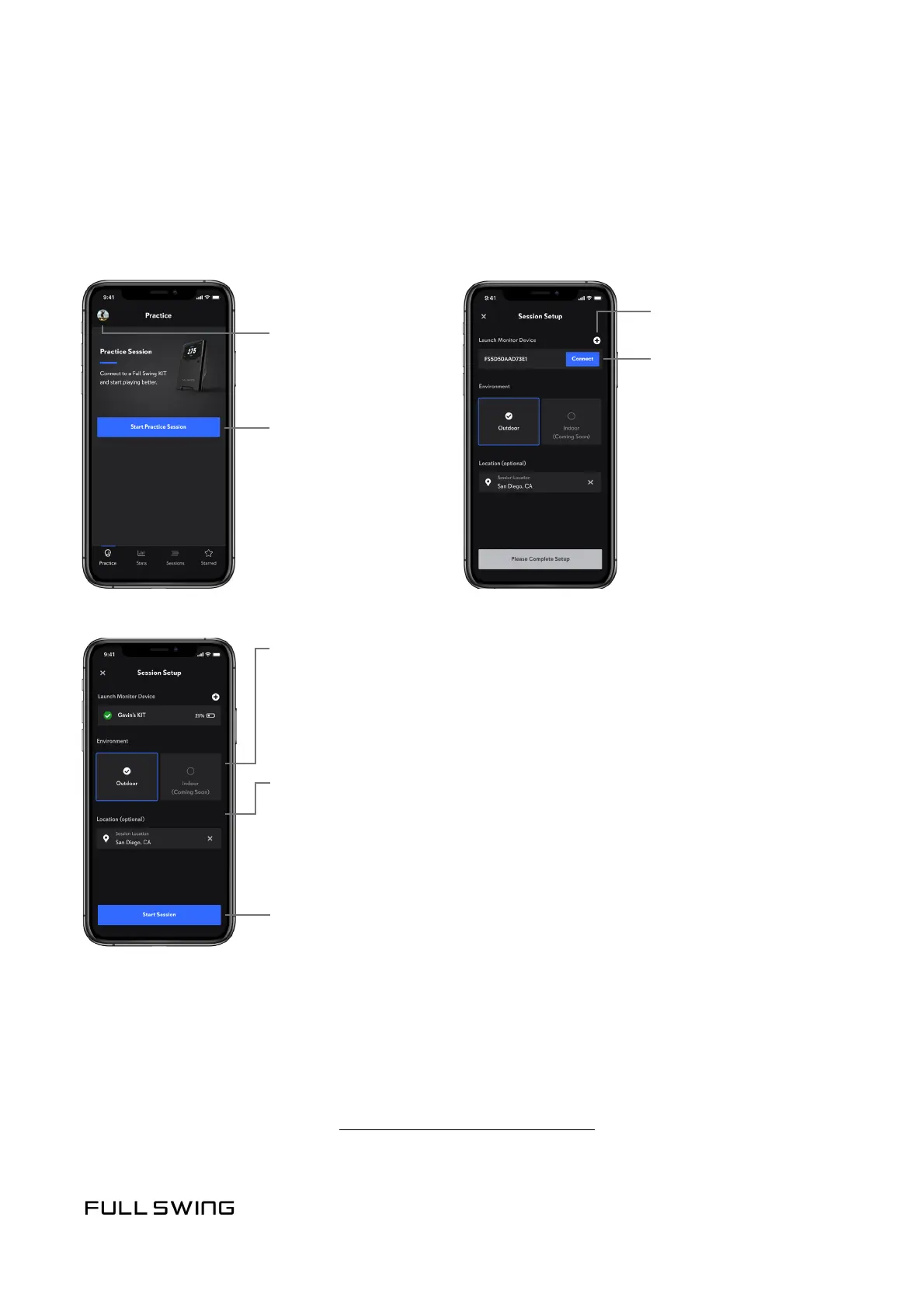
When starng a pracce session, the player can choose to connect to an exisng unit or pair
with a new unit.
• To connect with an exisng unit, use the following steps
• To pair with a new unit, see Pracce Session with a New KIT
USING THE APP
STARTING A PRACTICE SESSION
Start Pracce Session
User Account
and Preferences
Tap the Connect
buon to connect with
an exisng KIT
Tap the (+) buon
to pair with a new KIT
Environment
Locaon
Tap the Start Session
buon to begin the pracce
session
Outdoor: Use at outdoor ranges and golf courses
Indoor: (Coming Soon)
If Locaon Services are enabled in iOS, the eld automacally
populates with the address based on the current GPS coordinates.
Alternavely, the user can tap the eld and search for the specic
locaon, such as the name of a golf course or business.


 To Next Page