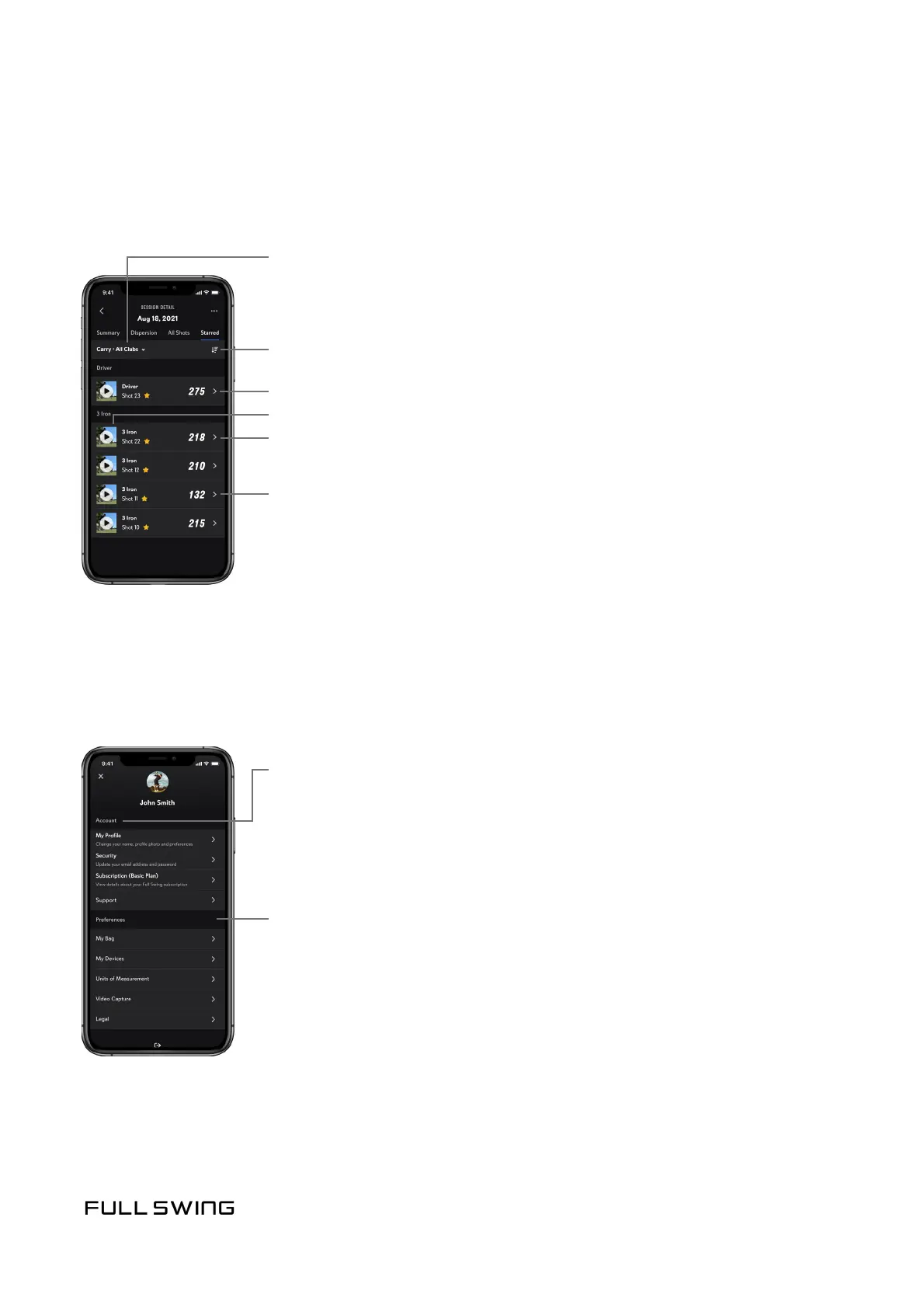
STARRED
Use the Starred tab to view all starred shots within a selected meframe. Starring a shot
permanently saves session videos to the user account.
USER ACCOUNT AND PREFERENCES
Tap the User Account and Preferences icon in the upper le corner to manage the user
prole subscripon sengs and user preferences.
Change selected Timeframe, Data Point,
or Club Category
Account
• My Prole – Modify personal informaon
• Security – Modify email address and password
• Subscripon – Manage Your Full Swing Subscripon
• Support – Provide Feedback, Visit Our Help Center, and Contact Us
Preferences
• My Bag – Add, remove, and modify clubs
• My Devices – Manage the KIT(s) paired with the app
• Units of Measurements – Modify the Units of Measurement
for Distance, Speed, and Apex
• Video Capture – This is a privacy seng. Turn video capture o
to prevent swing videos from being captured and stored in the
cloud. The camera will sll acvate during shot alignment.
• Legal – View Terms of Service and Privacy Policy
Session averages for a selected data point
Swipe to un-star, edit club, or delete shot
Sort Starred Shots by selected data points
Tap the thumbnail to play back video
Tap to view all data points for this shot


 To Next Page