MY DEVICES
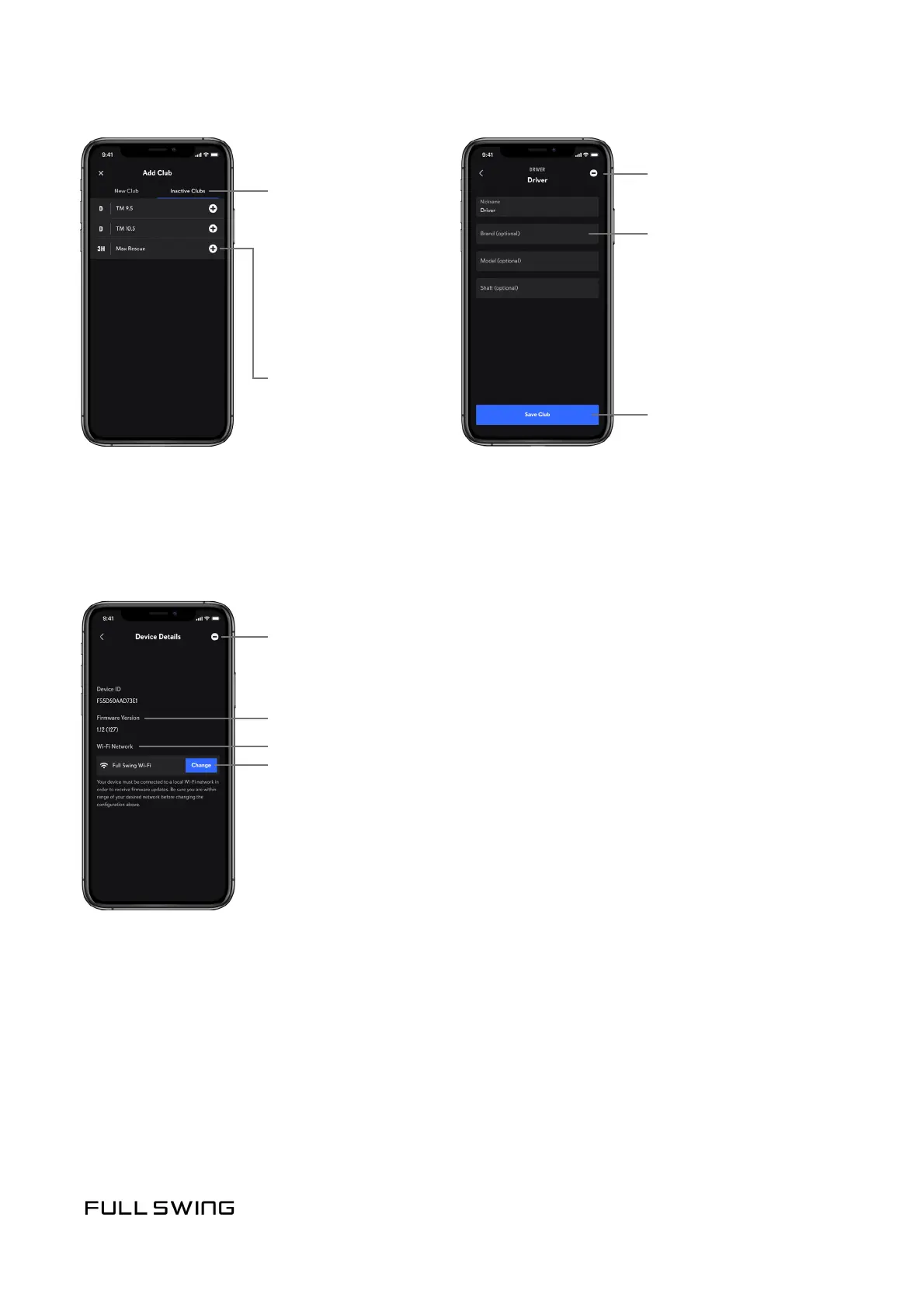
Contains technical informaon such as the KIT Device ID and current rmware version.
Users can also congure or change Wi-Fi networking for the KIT.
Firmware Version
Current Wi-Fi Network
Tap the Change buon or Congure buon
to update Wi-Fi sengs
Tap the (-) buon to remove the KIT from the app
Note: When removing the KIT from the app, it is also highly
recommended the KIT be removed from the iOS Bluetooth
Sengs. Visit the Help Center for more informaon.
Tap the (-) buon
to deacvate the
club
Tap the Save Club buon
to save the club details
Tap in the eld to edit:
• Nickname
• Brand
• Model
• Sha
Inacve Clubs
Note: When a club is
deacvated, all data for
the club is not included in
the stats. Add the club to
My Bag to reacvate the
club and view data for
the club.
Tap the (+) buon
to reacvate and add the
club to My Bag


 To Next Page