3
EN
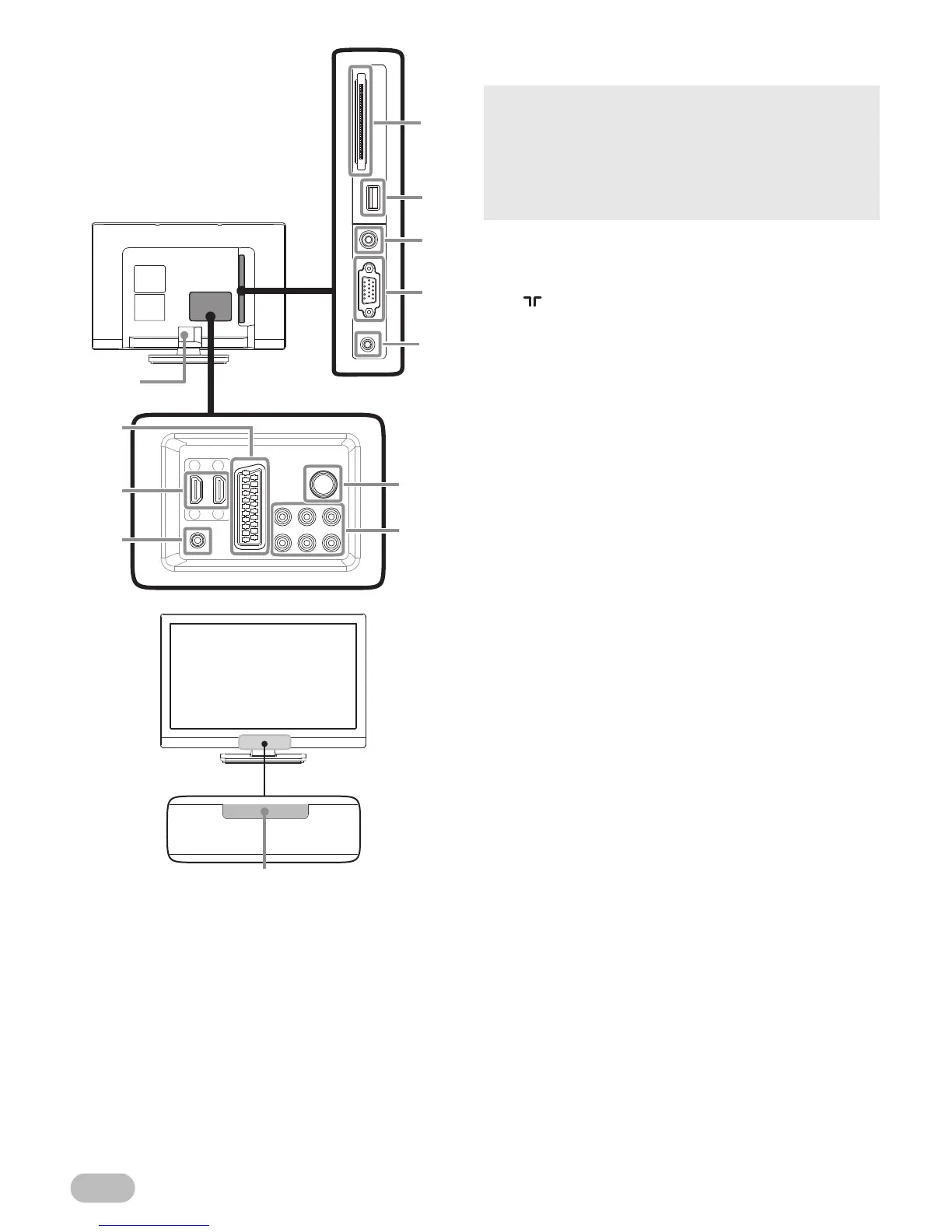
24. CI slot
25. USB terminal (p. 7, 8)
26. Coaxial digital audio output jack
27. PC (VGA) input jack
28. Audio input jack for PC connection
29. (Aerial) input jack
30. Component video, Composite video and
Audio (L/R) input jacks
31. AC power cord inlet
32. SCART jack
33. HDMI (HDMI 1 / HDMI 2) input jack
34. Headphone audio output jack
35. Standby / Power indicator
Lights up red when the unit goes into standby
mode.
Light off when power is on.
36. Infrared sensor window
Receives the infrared rays transmitted from the
remote control.
• Data input from USB flash memory only.
• User should not connect any devices to the USB terminal
such as digital camera, keyboard, mouse, etc. (because
these will not work.)
• The software update is, in most cases, handled by an
authorised service person or in some circumstances the
user may be asked to do the software update themselves.


 To Next Page