2
EN
Remote Control / TV
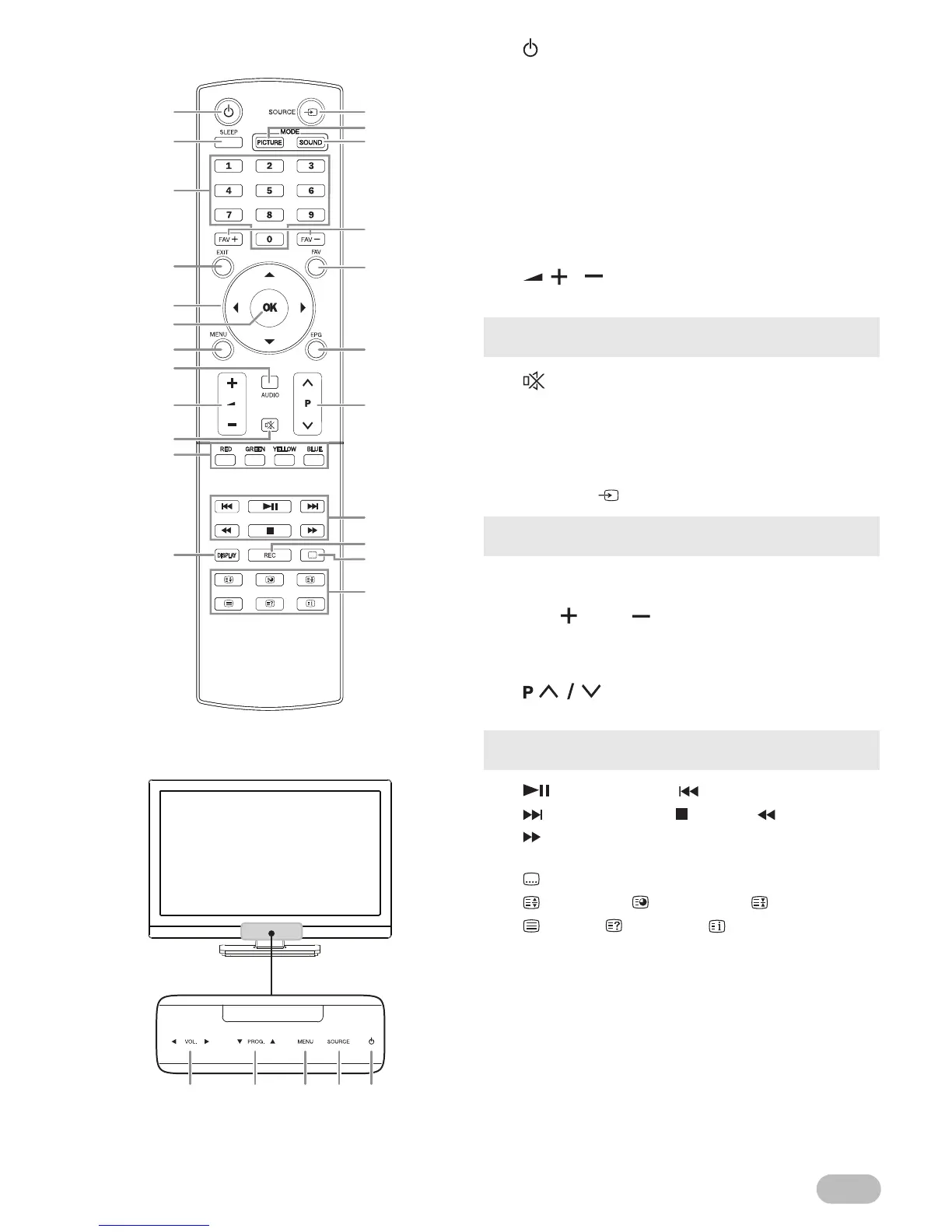
1. (Power)
Turns the unit on and go into the standby mode.
2. SLEEP (p. 6)
3. Number buttons
Selects the desired channel in TV mode and
enters the password in the PIN code input field.
4. EXIT (p. 5)
Returns to the previous display.
5. ▲ / ▼ / ◄ / ► (Cursor) (p. 5)
6. OK
7. MENU (p. 10)
8. AUDIO (p. 6)
9. / (p. 5)
To adjust the volume.
10. (Mute) (p. 5)
11. RED / GREEN / YELLOW / BLUE
Uses for
“EPG (Electronic Programme Guide)” (p. 5) /
“[Programme Edit]” (p. 11).
12. DISPLAY
Display the channel number or input source.
13. SOURCE (p. 6)
14. PICTURE MODE (p. 13)
15. SOUND MODE (p. 14)
16. FAV / FAV (p. 5)
17. FAV (p. 5)
18. EPG
“EPG (Electronic Programme Guide)” (p. 5)
19. (p. 5)
To select a channel.
20. (Play / Pause) / (Skip backward) /
(Skip forward) / (Stop) / (Rewind) /
(Fast-forward)
21. REC (Record)
22. (Subtitle) (p. 6)
23. (Expand) / (Subpage) / (Hold) /
(Text) / (Reveal) / (Index) (p. 6)
• VOL. ◄ / ► (Front panel) works the same function as ◄ /
► (cursor) on the menu.
• SOURCE (Front panel) works the same function as OK to
determine the setting menu.
• PROG. ▲ / ▼ (Front panel) works the same function as ▲
/ ▼ (cursor) on the menu.


 To Next Page