1. INITIAL SETTING AND ADJUSTMENT
1-22
8. Check the checkbox of [Channel No.].
9. Set the items referring to the table shown below.
Item Remarks
[Data Cate-
gory]
Sets the data category. Settings: [ALERT], [ACK], [BUZZER STOP], [OP-
ERATOR FITNESS], [OTHER], [GYRO SELECTOR], [MOB].
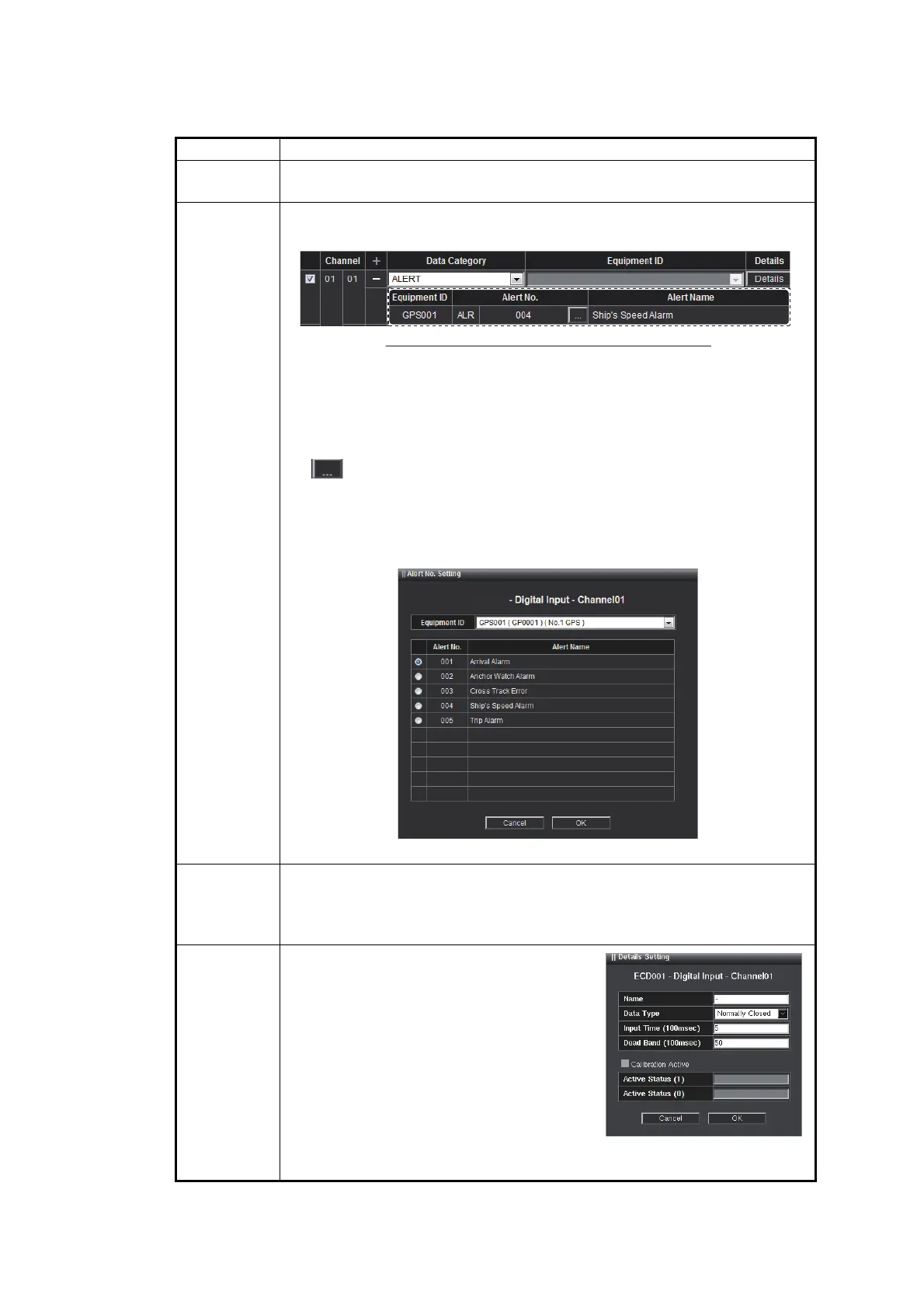
[+] button This appears when the [Data Category] is set to [ALERT]. Click to show
the configuration of the alert input.
• [Equipment ID]: The Equipment ID is shown.
• [Alert ID]: The alert notification sentence* (ALF or ALR) and alert num-
ber are shown. When the alert notification sentence is ALF, the in-
stance ID is shown.
*: According to the connected sensors.
• [ ] button: Opens the [Alert No. Setting] window to select the input
alert. The following example uses the alert notification sentence ALR.
Select the Equipment ID for the connected sensors from the [Equip-
ment ID] pull-down list. Then check the radio button of the desired alert
and click the [OK] button.
• [Alert Name]: The alert name is shown.
[Equipment
ID]
Select the Equipment ID from the pull-down list. This appears when the
[Data Category] is set to [ACK] or [BUZZER STOP].
The pull-down list options change according to the setting at [Sensor Set-
ting].
[Details] • [Name]: Enter the appropriate sensor
name.
• [Data Type]: Set the contact input ([Nor-
mally Open] or [Normally Closed]).
• [Input Time (100msec)]: Set the input
time (recommended value: 5).
• [Dead Band (100msec)]: Set the dead
band after input (recommended value:
50).
• [Calibration Active]: Keep the default
setting. (Default: without check)
• [Active Status (1)], [Active Status (0)]: Keep the default setting.
Example: ALR is the alert notification sentence.
㻱㻯㻰㻜㻜㻝


 To Next Page