1. INITIAL SETTING AND ADJUSTMENT
1-76
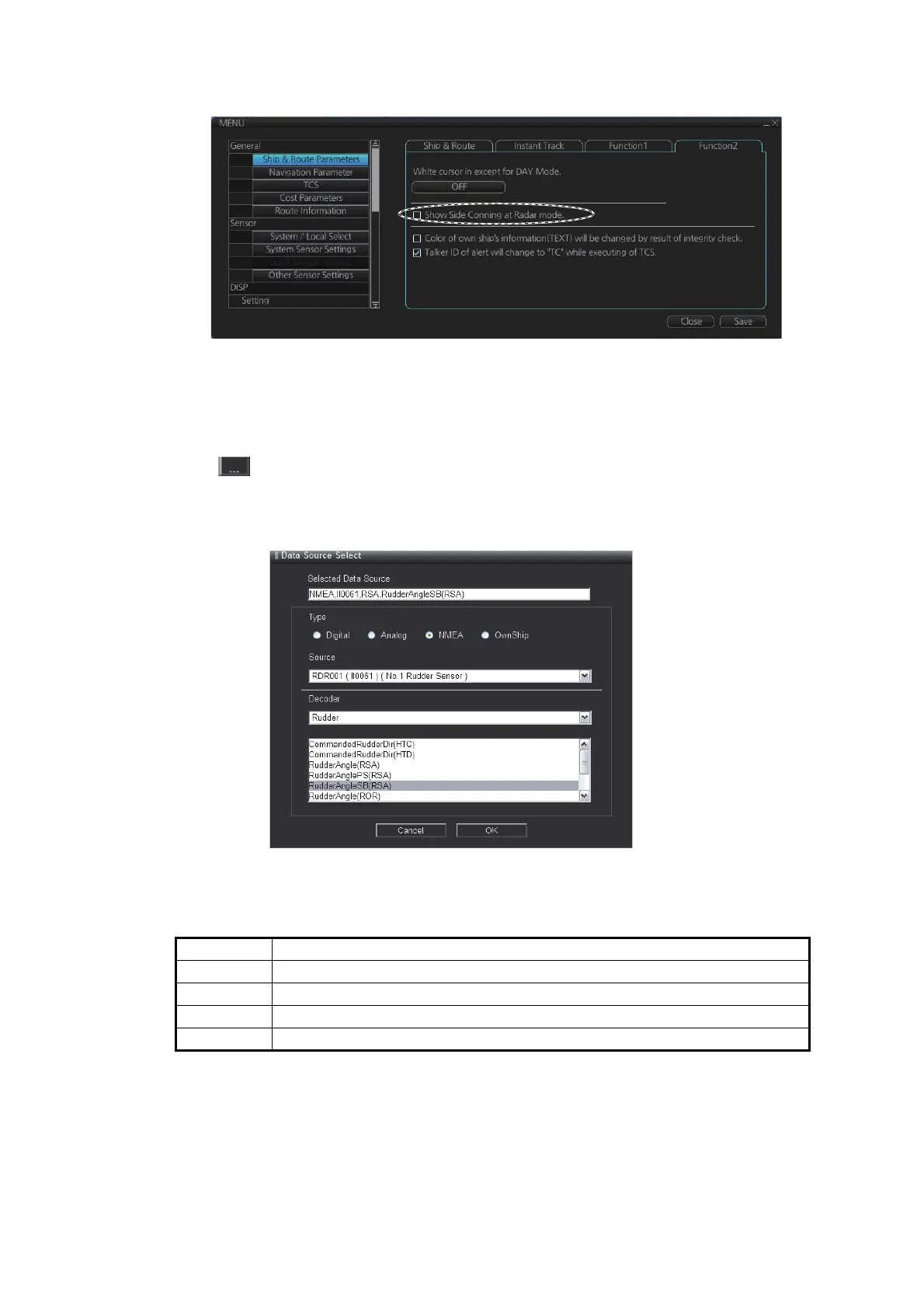
4. Click [Ship & Route Parameter], then open the [Function2] tab.
5. Check the checkbox of [Show Side Conning at Radar mode].
6. Click the [Save] button.
1.14.1 How to select the data source
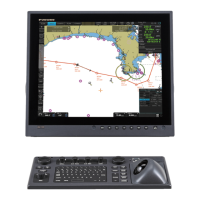
Click on the advanced settings window (see section 1.14.2.) to display the [Data
Source Select] window. Select the data source in the [Data Source Select] window to
show the respective data on the conning display.
• [Selected Data Source]: This is automatically generated when [Type], [Source] and
[Decoder] are selected.
• [Type]: Select the data source type.
• [Source]: Select the sensor from which the data will be sourced.
• [Decoder]: Select which data from the source sensor to use.
Setting Description
[Digital] Displays contact input data.
[Analog] Displays analog input data.
[NMEA] Displays data received directly from NMEA device.
[Own Ship] Displays Own Ship data received from own ship management program.


 To Next Page