1. INITIAL SETTING AND ADJUSTMENT
1-58
1.7.4 Other setting window
This section provides a description for the contents of the [Other Setting] window.
Open the [AMS] menu and select [Other Setting] on the menu bar, then select an ap-
propriate setting item.
Item Remarks
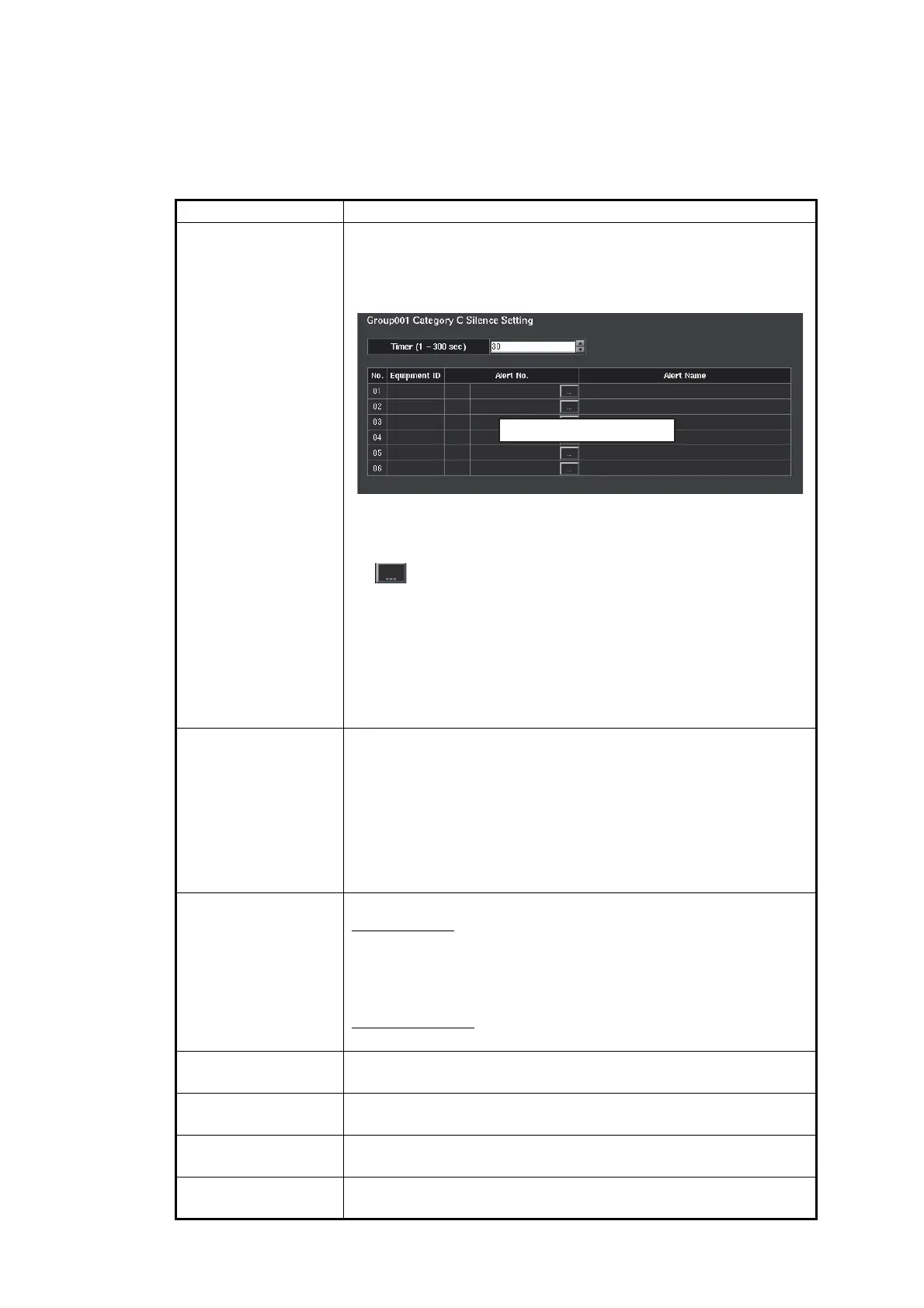
[Category C Silence
Setting]
Set the alert silence time for Category C alerts and register
alerts. A maximum of ten groups ([Group001] to [Group010]) can
be created, and a maximum of six alerts can be registered to one
group. Different alert silence time can be set for each group.
• [Timer]: Set the time for which the alert is silent. Aural alerts
are not generated during the time set here (setting range: 1 to
300 sec).
• [ ] button: Opens the [Alert No.Setting] dialog box to reg-
ister an alert to a group. For how to register the alert on the
[Alert No.Setting] dialog box, see page 1-57. After registering
the alert, Equipment ID, alert no. and alert name appear on
the alert registration field.
Note: The text in the alert registration field is changed to red
when registered alert is not Category C or the alert is regis-
tered to the other group.
[BR-2000 Connec-
tion Setting]
Set this item when a FEA-217 is replaced with a FMD-300 and
the BR-2000 is connected to the FMD-300. Set the FMD-300
with the same setting selected in [Message Type] in the [Alarm
Inputs+Outputs/AMWSS] dialog box of the FEA-217. When a
BR-2000 is not installed, select [Not Connected].
Note: When you use the BR-2000, connect the BR-2000 to the
serial port of the EC-3000 directly. If the BR-2000 is connected
through the Sensor Adapter, the BR-2000 cannot output data.
[ACK Send/Receive
Setting]
Set the options for the alert ACK signal.
[Send Setting]
• [ACK Type]: Select the sentence to use when transmitting the
alert ACK signal (ACN, ACM, ACN/ACM).
• [Periodic Interval ACK sentence]: Select the transmission in-
terval for the alert ACK signal.
[Receive Setting]
• [Monitoring Interval]: Keep the default setting.
[Silence Time Set-
ting]
Set the time for which the alert is silent. Aural alerts are not gen-
erated during the time set here.
[Responsibility
Transfer Setting]
Keep the default setting.
[Alert Managed Log
Setting]
Keep the default setting.
[Change Active Alert
Setting]
Select [YES] to switch to the [ACTIVE ALERT] window automat-
ically when a new alert occurs.
Alert registration field



 To Next Page