1. INITIAL SETTING AND ADJUSTMENT
1-35
1.4.9 Customized sensor setting
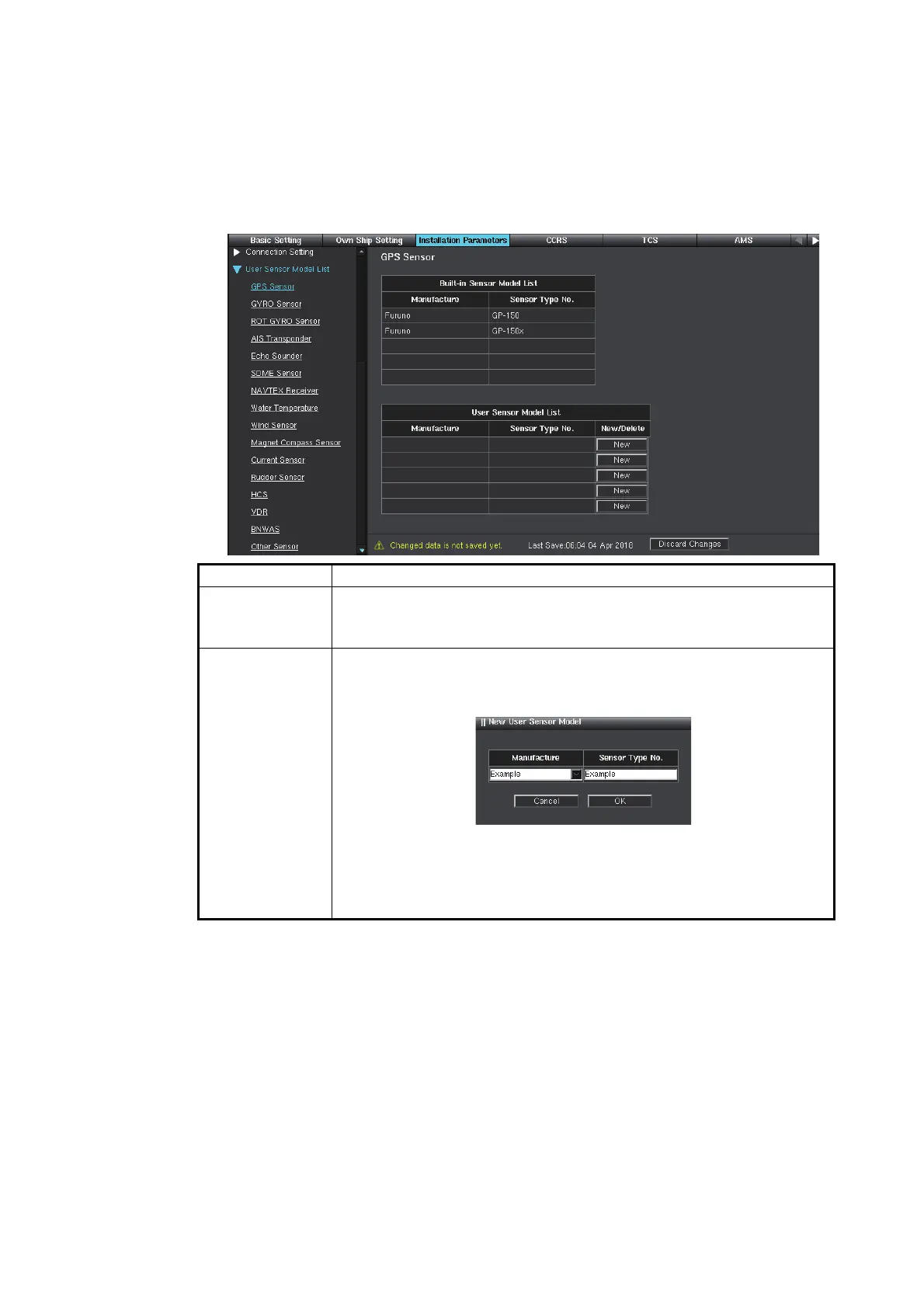
Set the sensor types and manufacturers in the [Sensor Setting] menu.
1. Click [User Sensor Model List] on the menu bar.
2. Click the appropriate sensor to edit. The figure below shows an example where
the [GPS Sensor] is selected.
3. To save the configuration, perform a consistency check, then save the configura-
tion data on the [Save and Sync] menu.
Item Remarks
[Built-in Sensor
Model List]
Displays the sensor types and manufacturers preset already.
[Manufacture]: Manufacturer of sensor
[Sensor Type No.]: Type of sensor
[User Sensor
Model List]
Click the [New] button to add a new type or manufacturer of sensor.
Enter the desired manufacturer name and the desired type of sen-
sor, then click the [OK] button.
Click the [Delete] button to delete the added contents. The confirma-
tion message appears, then click the [OK] button.
Note: The contents added or deleted in this setting are applied to the
[Sensor Setting] menu. See section 1.4.1.



 To Next Page