1. INITIAL SETTING AND ADJUSTMENT
1-38
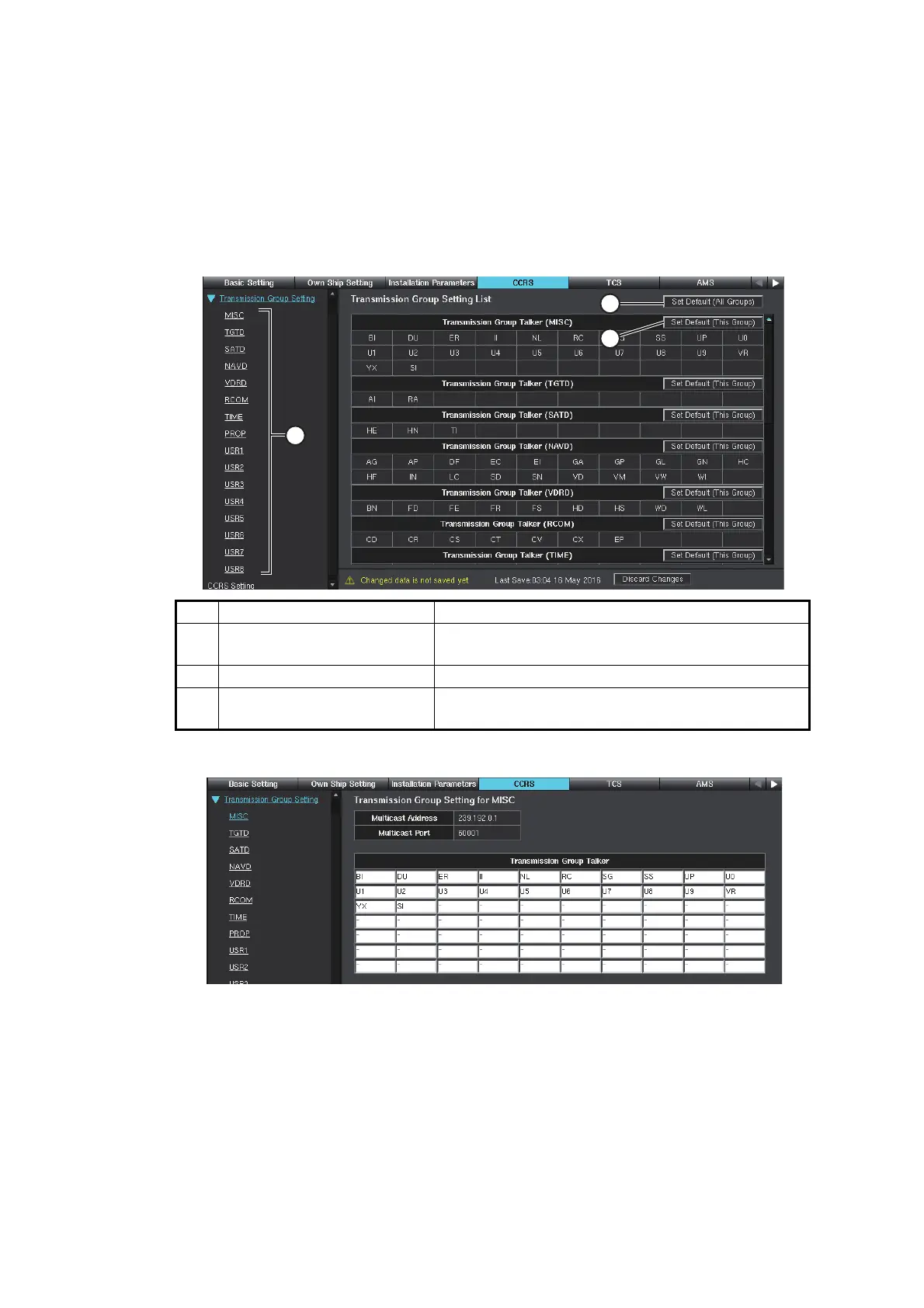
1.5.2 How to set [Transmission Group]
When connecting IEC61162-450 compatible sensors, you may need to adjust [Trans-
mission Group Setting]. Under normal circumstances, you do not need to adjust these
settings. When adjusting items in [Transmission Group Setting] menu, you will need
to configure for all devices in the configuration.
1. Access the [Common Installation Setting] menu, then click [CCRS] on the tab bar.
2. Click [Transmission Group Setting] on the menu bar.
3. Select a Transmission Group from the menu bar.
Example: Transmission Group Settings for MISC.
4. In the [Transmission Group Talker] fields, remove or add entries as appropriate.
5. Select and adjust other Transmission Group settings as appropriate.
6. To save the configuration, perform a consistency check, then save the configura-
tion data on the [Save and Sync] menu.
No. Item Description
1
[Transmission Group name] Click the Transmission Group name to show the
Setting List.
2 [Set Default (All Groups)] Revert all Transmission Groups to default settings.
3
[Set Default (This Group)] Revert the selected Transmission Group to default
settings.



 To Next Page