1. INITIAL SETTING AND ADJUSTMENT
1-41
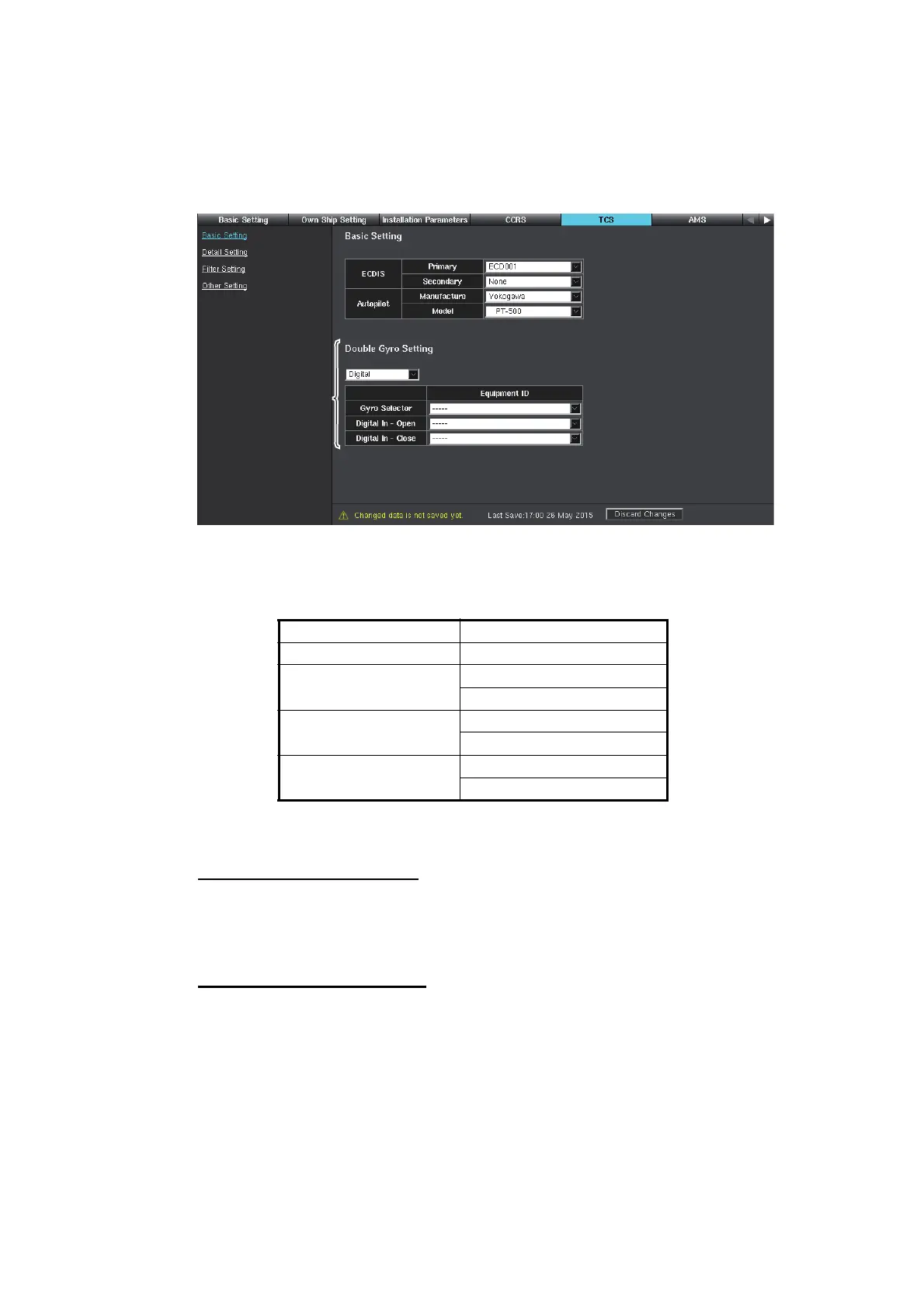
1.6 [TCS] Menu
The [TCS] menu adjust the settings relevant to the TCS (Track Control System). The
TCS is available with the FMD-3200/FMD-3300/FMD-3200-BB only. For Chart Ra-
dars, only the settings on the [Other Setting] window are required (see section 1.6.7).
The autopilots shown below are available for the TCS with the FMD-3200/FMD-3300/
FMD-3200-BB.
1.6.1 Preparation
Notice for the sensor data
Connect the sensor data shown below to the serial port of the ECIDS directly.
Confirmation of the dongle
Connect the TCS-compliant dongle to use the TCS. For how to confirm if the dongle
is TCS-compliant or not, see the [System] tab of [About] screen or [Self Test] page.
Manufacture Model
Raytheon Anschutz NP-5400
Yokogawa Electric
Corporation
PT-500A
PT900
TOKYO KEIKI PR-6000
PR-9000
EMRI FAP-2000
FAP-3000
• Gyro • GPS • LOG • Autopilot
*
*
: Shown when [YOKOGAWA] is selected for [Manufacture].


 To Next Page