1. INITIAL SETTING AND ADJUSTMENT
1-27
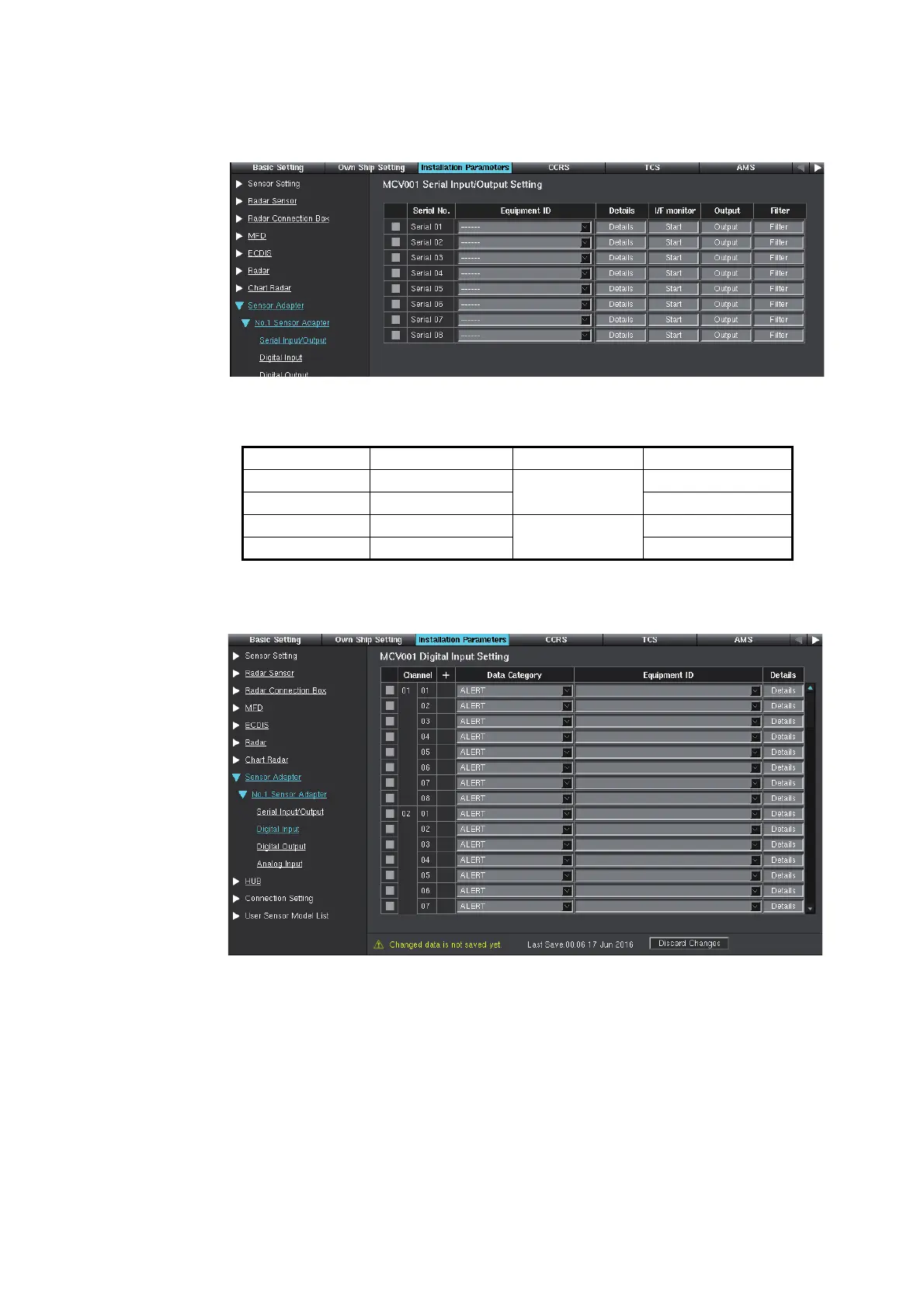
5. Click [Serial Input/Output]. There are eight ports in the Serial Input/Output. [Serial
01] to [Serial 04] can input/output at 38,400 bps for the AIS and Gyro or TTD out-
put.
The connector no. on the MC-3000S board and the corresponding serial port no.
are shown below.
6. Set the items referring to step 6 of section 1.4.2.
7. Click [Digital Input] on the menu bar.
[Channel 01-01] to [Channel 01-08] are shown on the display. Each Sensor
Adapter MC-3020D has eight input ports. When one Sensor Adapter MC-3020D
is connected to the MC-3000S, [Channel 01-01] to [Channel 01-08] can be used.
When ten Sensor Adapters MC-3020D are connected, [Channel 01-01] to [Chan-
nel 10-08] can be used.
The connector no. on the MC-3020D board and the corresponding channel port
no. are as follows:
Connector No. Serial Port No. Connector No. Serial Port No.
J4 Serial 01
J8
Serial 05
J5 Serial 02 Serial 06
J6 Serial 03
J9
Serial 07
J7 Serial 04 Serial 08


 To Next Page