62
• Select I/D to Connect Server.
• I/D can be Add, Change or delete at Setup.
TIP ※ Multi DVR Client: 4EA DVRs can control the live view, search or backup data and setup each
channel at the same time.
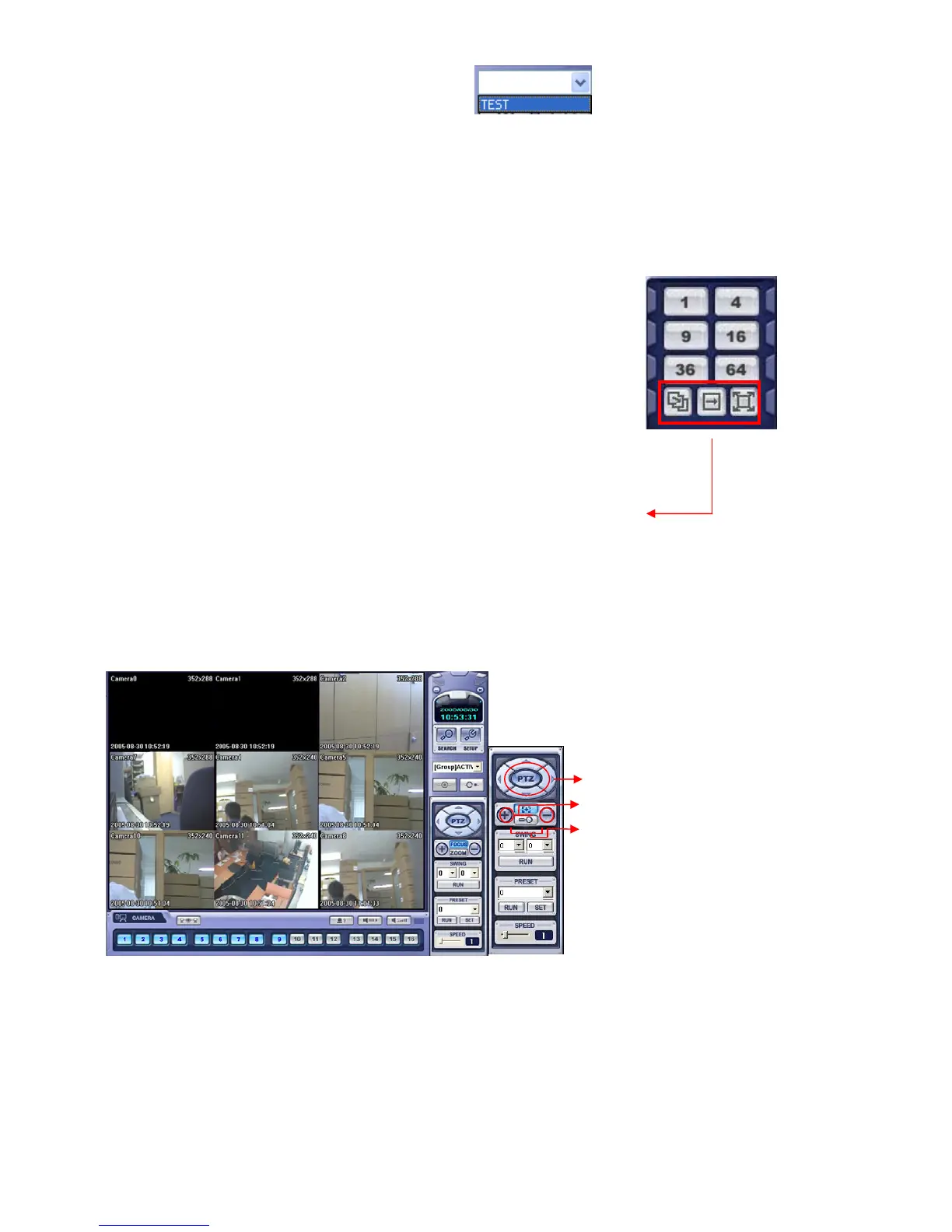
Screen Division Selection
• 1*1 View: Showing One (1) Video which User Selected.
(Video Selection by Camera Selection Button)
• 4*4 View : 4 Screen Division Mode.
• 9*9 View: 9 Screen Division Mode.
• 16*16 View: 16 Screen Division Mode
• 32*32 View: 32 Screen Division Mode
• 64*64 View: 64 Screen Division Mode
• Auto switch: Screen Mode Showing One by One (Same as division mode)
• Manual switch: Screen Mode showing One by One by clicking manually.
• Full Screen View: Present Video to Full Screen Mode.
Double Click the mouse to return to previous.
* Double Click Mouse to make the same function as Full Screen.
PTZ CONTROL
AVI File Conversion
• P/T/Z Controller: Camera P/T/Z Control
by Direction Keys
• FOCUS/ZOOM Select Button: Focus or
Zoom Control by +, - Button
• +, - Control Button: Focus or Zoom Control


 To Next Page
 Loading...






