RTxxx LEDlighting controllers - User Manual
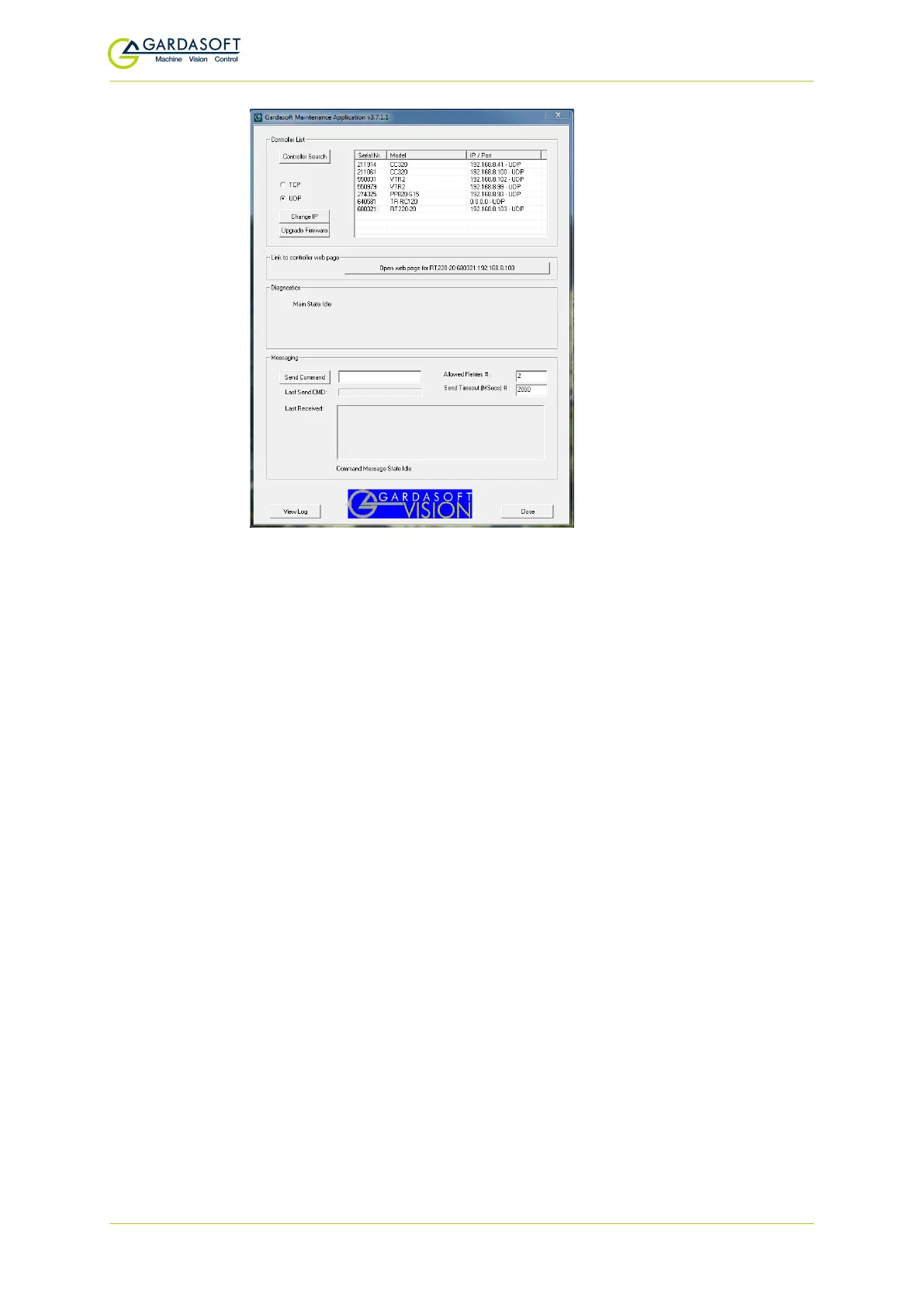
GardasoftMaint allows you to view the controllers on your network,
change their IP addresses and upgrade their firmware if it becomes
necessary. In the messaging section of GardasoftMaint, you can
communicate with your controller using the commands explained in
Section 12, Command configuration. You can also open the selected
controller's web pages at the click of a button. For more information
about the RTxxx's web pages, see Section 11, Webpage configuration
(RT220, RT420, RT820F).
10.2.1 DHCP
Most networks use a DHCP server. If there is a PC on the network, you
may be able to find out whether a PC on the same network uses DCHP
as follows:
i.
Right-click on the Windows 10™ icon at the left of your PC's task bar.
ii. Select Network Connections.
iii. In the Status pane, click View your network propereties.
DHCP enabled will be set to 'yes' if DHCP is in use.
You can find out what IP address is being used by a PC at any time by
following the steps below:
i.
Right-click on the Windows 10™ icon at the left of your PC's task bar.
ii. Select Network Connections.
— 51 —


 To Next Page