Selecting a Page
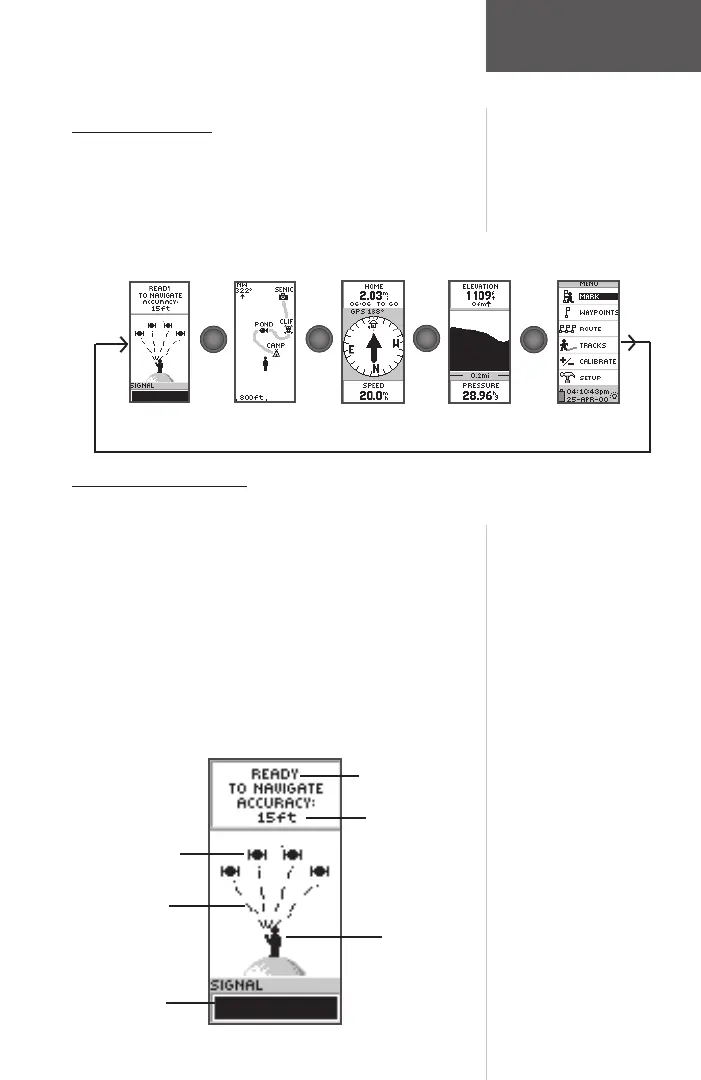
All of the information needed to operate the eTrex
Summit is found on fi ve main “pages” (or display screens).
These pages are The SkyView, Map, Pointer, Elevation and
Menu. Simply press the PAGE Button to switch between
pages.
SkyView Page Basics
The SkyView Page displays the eTrex Summit’s
receiver status. It also shows the strength of the satellite
signals that are being received. If the signals are weak you
may need to try a different location for better reception.
The shorter the signal strength bar, the weaker the signals.
At the top of the page the unit displays the status of the
receiver. The eTrex Summit displays the message ‘Ready
to Navigate’ when the receiver has gathered enough satel-
lite information to begin navigation.
“You”; Your
Location
Status Message
Satellites
The SkyView Page
Satellite Signal
Strength Bar
Satellite
Signals
Location Accuracy
(estimated)
Map Pointer
Menu
SkyView
Elevation
PAG E
PAG E
PAG E
PAG E
PAG E
PAG E
PAG E
PAG E
Page Basics
190-00193-00_0D.indd 02/12/01, 10:08 AM11













 To Next Page