6
Introduction
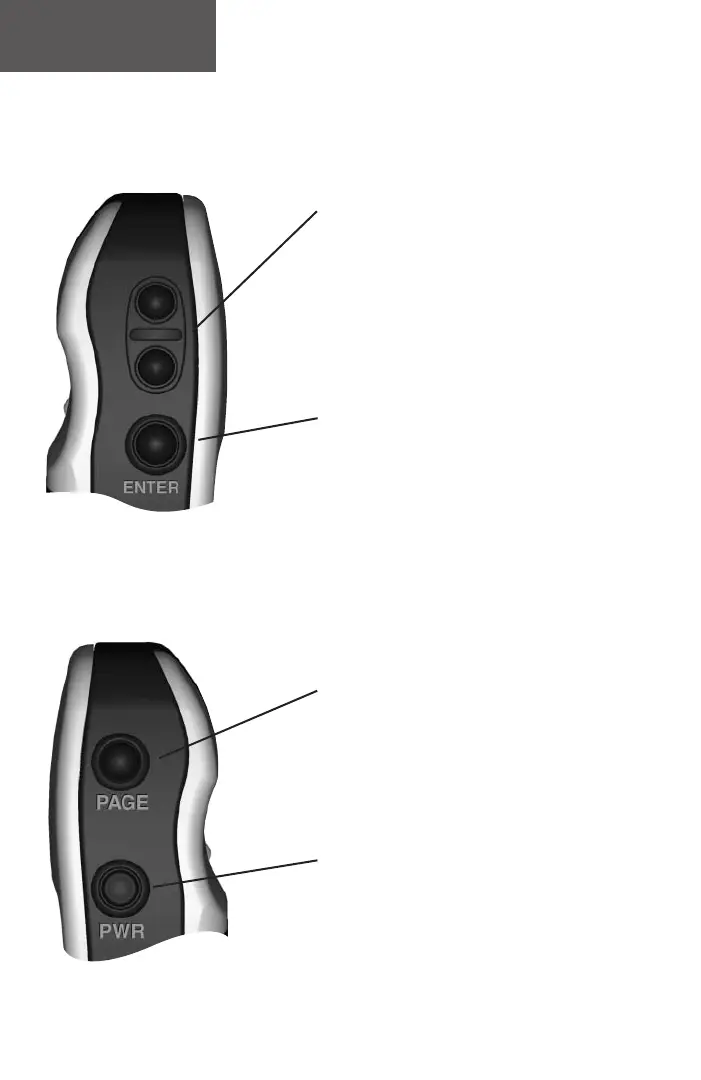
The UP/DOWN Button:
• Select options on pages and menus
• Adjusts Contrast on SkyView Page
• Zoom in and out on Map Page
• Cycles through trip computer data
• Cycles through elevation computer data
The ENTER Button:
• Confi rms data entry or menu selections
• Displays Options on main pages
• Pressing and holding the ENTER Button
activates the ‘Mark Waypoint’ page
The PAGE Button:
• Switches display pages.
• Allows you to quit a function.
• Pressing and holding the PAGE Button
will turn on the Electronic Compass and
display the Pointer Page.
The POWER Button:
• Turns the unit on and off
• Turns the display backlight on and off
eTrex Summit
Buttons
190-00193-00_0D.indd 02/12/01, 10:07 AM6













 To Next Page