,
select it with
.
4. FR 620: Select one of the three options according to your preference.
FR 220: Select with
one of the three options according to your preference.
4.2 AUTO LAP
4.3 AUTO PAUSE
1
1
2
2
3
3
4
The Auto Lap feature marks a lap at every kilometer, and you can mark laps manually for comparing
performance over longer runs for an one kilometer segment.
Auto Pause stops the timer automatically when you stop moving. This is helpful if your run includes
stop lights or other places with frequent stops removing those involuntary breaks from your activity.
CHAPTER 4: FORERUNNER
®
220 / 620 CHAPTER 4: FORERUNNER
®
220 / 620
5. FR 620: Select On
to activate or Off to
deactivate Auto Lap.
FR 220: Select On
to activate or Off to
deactivate Auto Lap
with
.
5
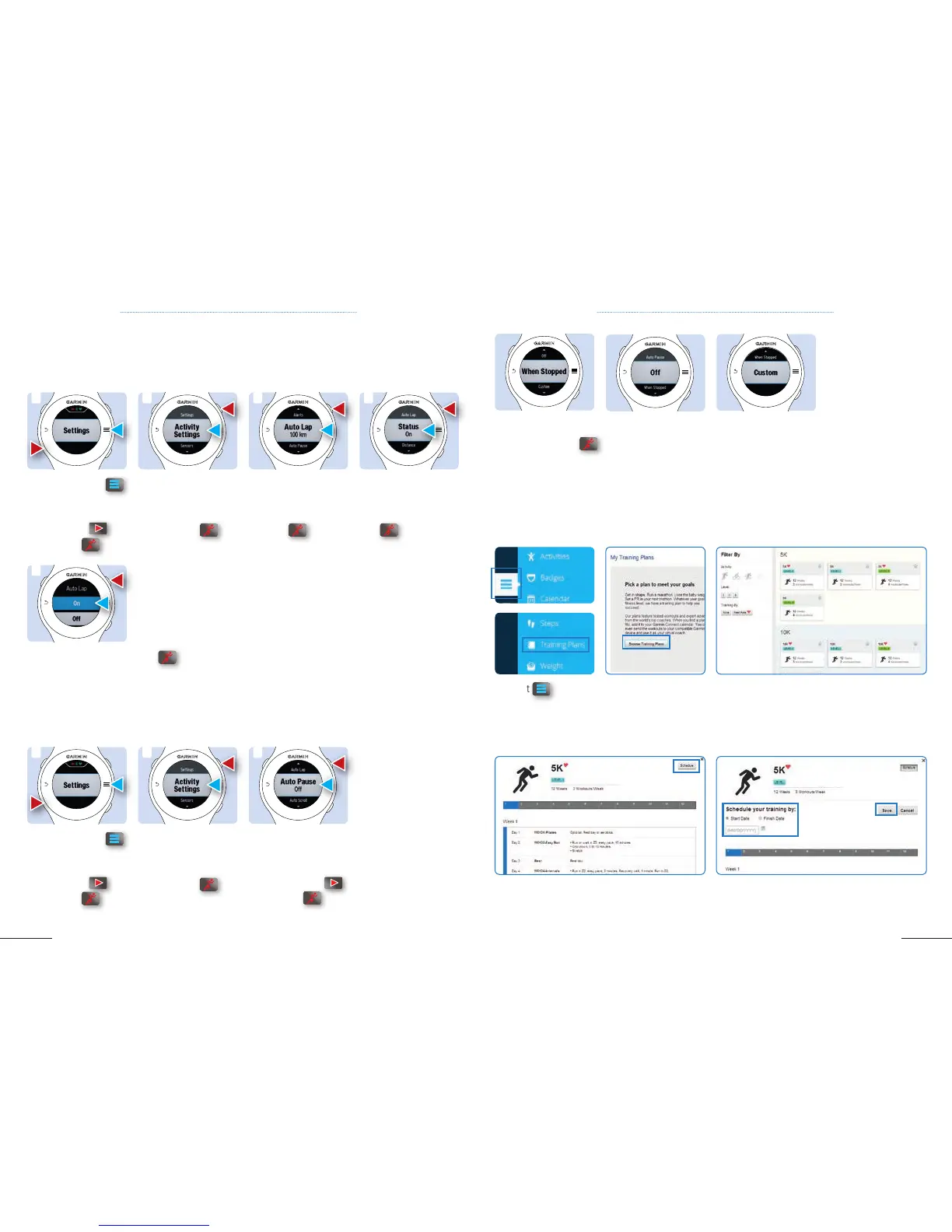
4.4 TRAINING CALENDARS
Training Calendars allows you to download training plans directly to your device once you create them on
Garmin Connect.
TRAINING PLAN FIRST STEP: select a Training Plan
1. Select
on the left
side of Garmin Connect.
2. Select Training
Plans.
5. Select Schedule. 6. Determine when you want to start and end your
training program.
7. Select Save. (continue on p 22 )
3. Click on Browse
Training Plans.
4. Choose your activity, level, HRM or non-HRM
supported training, and the kind of program you
want.



 To Next Page