EasyManua.ls Logo

Garmin Forerunner 620 - Chapter 4: Forerunner 220; 620; Configurable Data Screens

Garmin Forerunner 620
25 pages
Print Icon
To Next Page IconTo Next Page
To Previous Page IconTo Previous Page
Loading...
1918
CHAPTER 4: FORERUNNER
®
220 / 620 CHAPTER 4: FORERUNNER
®
220 / 620
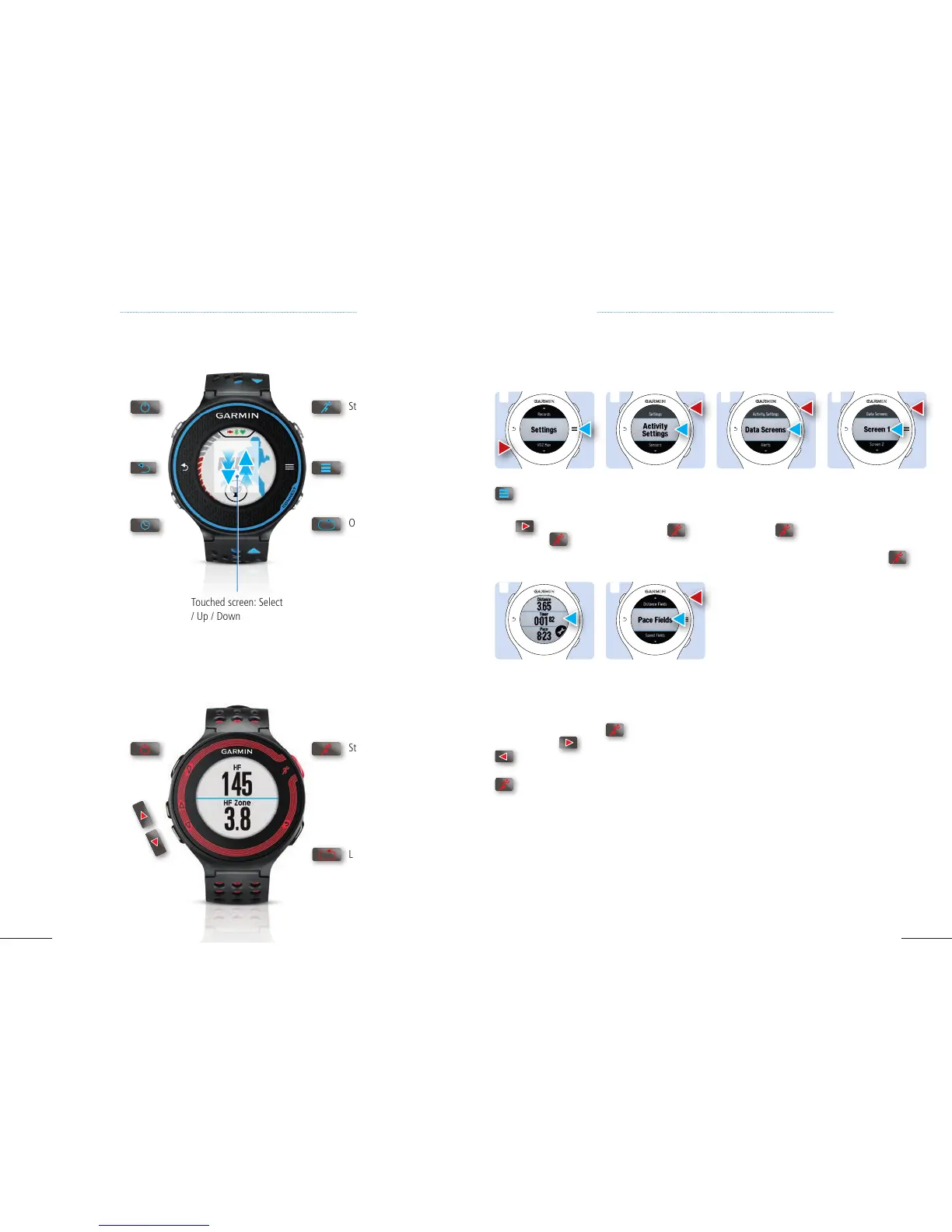
2. FR 620: Select
Activity Settings.
FR 220: Select Activity
Settings with .
3. FR 620: Select Data
Screens.
FR 220: Select Data
Screens with .
4. FR 620: Select the
screen you want to
configure.
FR 220: Select the
screen you want to
configure with .
1. FR 620: Tap on
.
FR 220: Scroll down
with
to Setting
,
select it with .
4.1 CONFIGURABLE DATA SCREENS
1 2 3 4
OVERVIEW FORERUNNER
®
220
Start / Stop / Select
Power on / off
Light on / off
Go up
and down
Lap / Reset / Go back
OVERVIEW FORERUNNER
®
620
Configurable Data fields provides you with the ability to configure screens according to your personal
preferences.
Power on / off
Light on / off
Touched screen: Select
/ Up / Down
Time, date
and battery
Go back
Start / Stop
Lap / Reset
Options
5. FR 620: Select the
data field you want to
configure (e.g. Timer).
FR 220: The screen
displays a list. Move up
and down with
or
, select the data
field you want with
.
6. FR 620: Select the
data field from the list
of options.
FR 220: Select with
the data field from
the list of options.
5
6

Other manuals for Garmin Forerunner 620

Related product manuals