2726
CHAPTER 4: FORERUNNER
®
220 / 620 CHAPTER 4: FORERUNNER
®
220 / 620
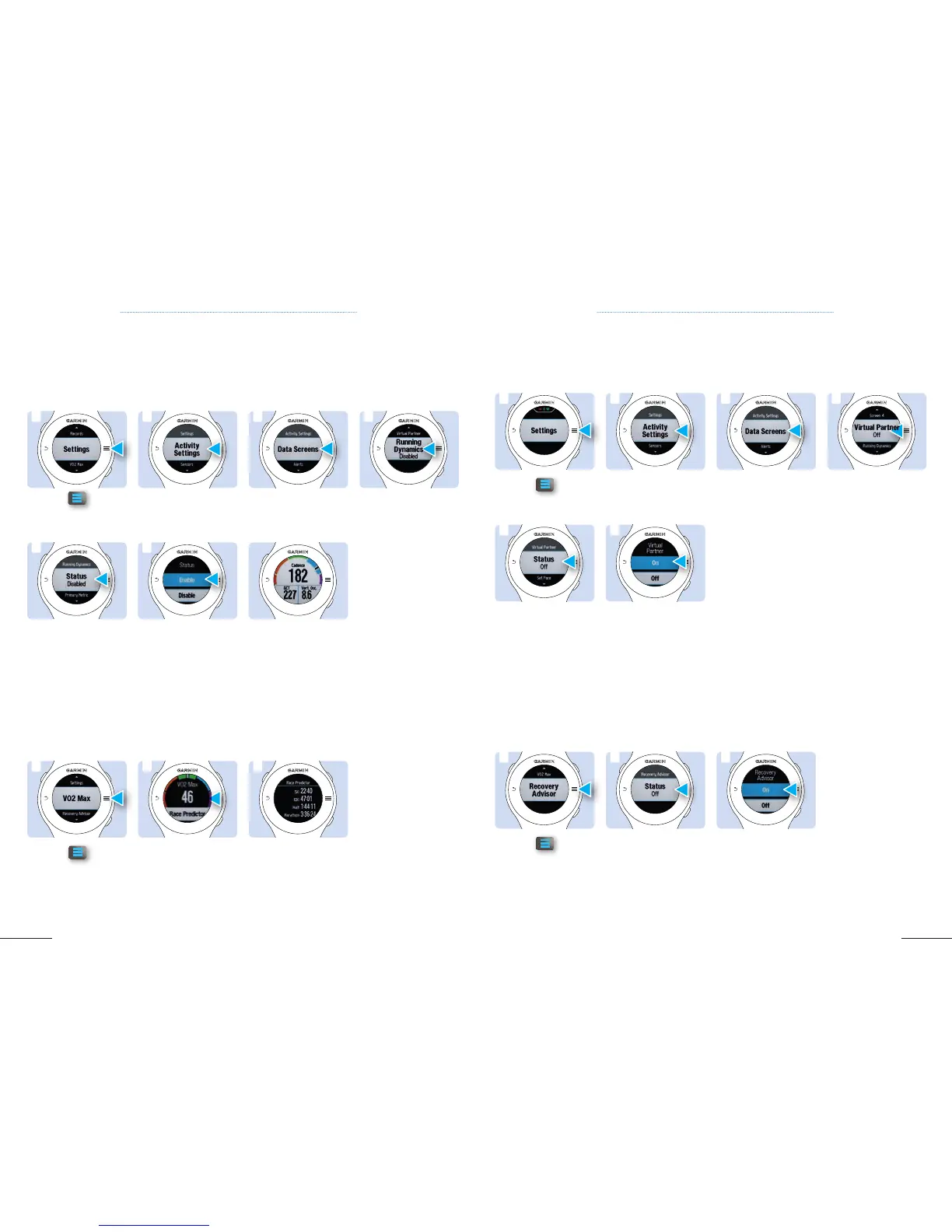
4.7 RUNNING METRICS – ONLY FR 620 4.9 VIRTUAL PARTNER – ONLY FR 620
Once paired with your heart rate monitor, your FR620 will provide you real-time feedback and be able to
calculate cadence, vertical oscillation and ground contact time.
Running Metrics require a HRM Run
Your Virtual Partner is a training tool, designed to help you improve your performance by encouraging you
to run at a specific pace set by you.
2. Select Activity
Settings.
2. Select Activity
Settings.
2. Select Race
Predictor
.
2. If Status is Off select
Status.
3. Select Data
Screens
.
3. Select Data
Screens
.
Overview of your race
predictions for 5 km,
10 km, 21 km and
42 km.
3. Select On to activate
Recovery Advisor. After
10 minutes of running,
a message indicates
your recovery status.
4. Scroll down to
Running Dynamics
and select.
4. scroll down to
Virtual Partner then
select it.
1. Tap on
, scroll
down to Recovery
Advisor and select it.
5. Select Status.
5. If status is Off, select
Status.
6. Select Enable
.
6. Select On to activate
Virtual Partner.
Screen view during
activity.
4.8 VO2 MAX AND RACE PREDICTOR – ONLY FR 620
4.10 RECOVERY ADVISOR – ONLY FR 620
1
1
1
1
5
5
6
6
2
2
2
2
3
3
3
3
4
4
The VO2 max is an indication of athletic performance and increases as your fitness level improves. Your
device uses the VO2 max estimate as well as statistical data to provide a target race time for 5k, 10k, 21k
and marathon based on your current state of fitness. To obtain your VO2 max and a prediction of your
race time, you need to run at least 10 minutes with a HRM and a heart rate above 135 bpm.
After a run with a HRM, your device can display your state of recovery. Following a run of at least 10
minutes, your device displays how much time remains before you are fully recovered and ready for the
next intensive workout.
Befor the run



 To Next Page