Position Page
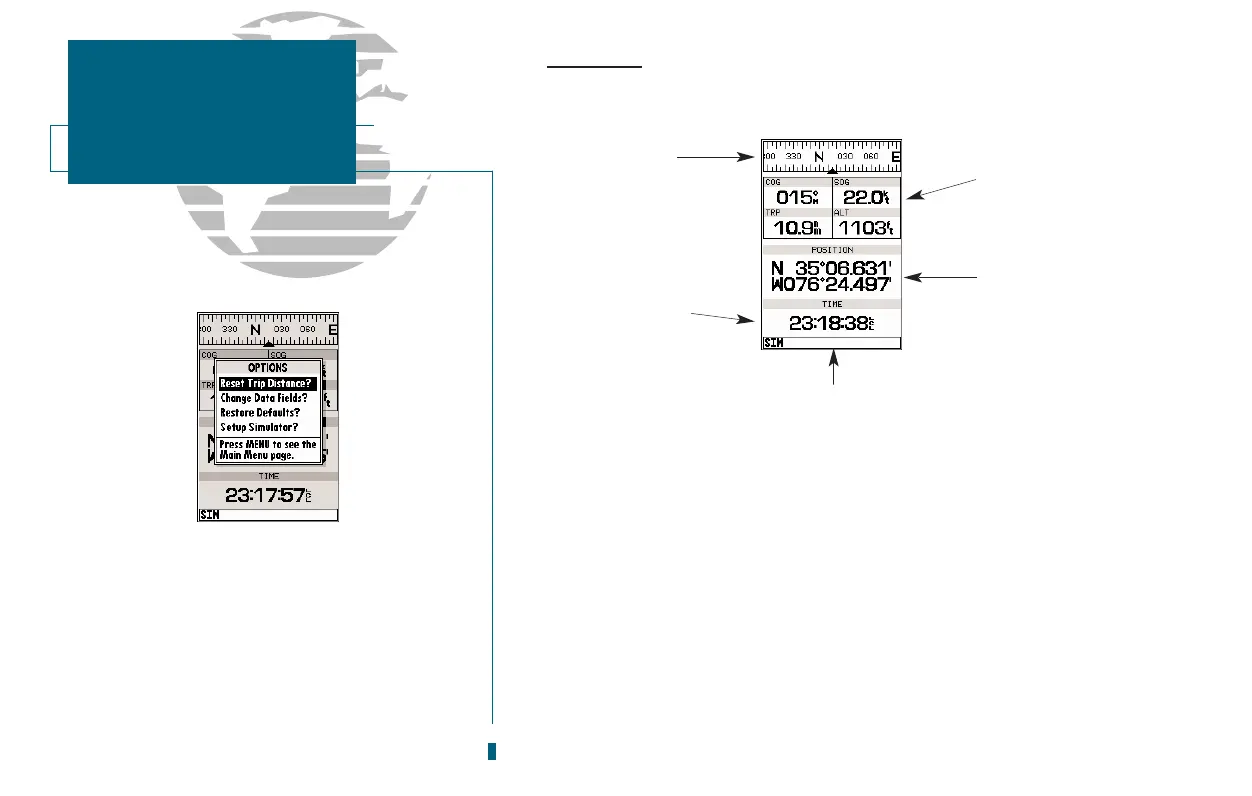
The GPSMAP 180 Position Page shows you where you are, what direction you
are heading and how fast you are going. The top of the page features a graphic
compass tape to indicate the direction youre heading (while youre moving), and
four user selectable data fields: course over ground (COG), speed over ground
(SOG), distance traveled (TRP) and altitude (ALT). The bottom half of the page
displays your present positions coordinates, along with the time of day as calcu-
lated using GPS satellites. The status bar at the bottom of the page indicates posi-
tion fix status, and is described in detail on page 18.
The units of measure for speed, distance, position, and altitude are all user-
selectable through the navigation setup option on the Main Menu Page. The time
of day, shown in UTC (Universal Time Coordinated, or Greenwich Mean Time)
may be set to display in a 12- or 24-hour time format (with a local offset) through
the system setup option on the Main Menu Page.
20
The trip odometer can be reset from the Position
Page options window. To reset the odometer,
select the Reset Trip Distance? option and press
EDIT/ENTER.
SECTION
2
POSITION PAGE
Overview
Graphic
Compass Tape
Data
Fields
Position
Coordinates
Time
of Day
Status Bar














 To Next Page