A
B
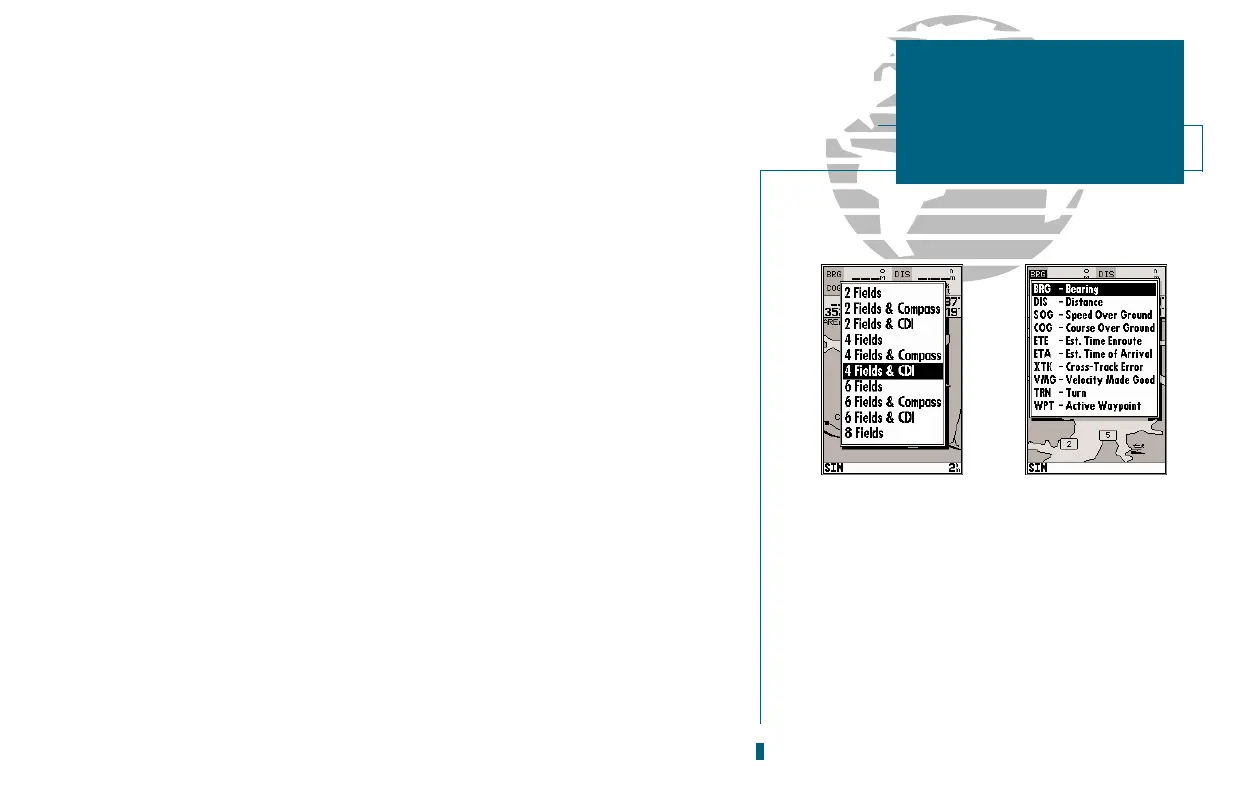
Setup Page Display? allows you to specify the number of fields displayed in the
data window section of the map page. A graphic compass tape or CDI scale may
also be displayed. The following options are available:
2 Fields 2 Fields & Compass
2 Fields & CDI 4 Fields
4 Fields & Compass 4 Fields & CDI
6 Fields 6 Fields & Compass
6 Fields & CDI 8 Fields
To select a page display option:
1. Highlight the Setup Page Display? option and press
T
.
2. Select the desired option and press
T
.
Change Data Fields? allows you to specify the data displayed in each data field
used on the map display. The following options are available:
BRG- bearing to active wpt DIS- distance to active wpt
SOG- speed over ground COG- course over ground
ETE- estimated time enroute ETA- estimated time of arrival
XTK- crosstrack error VMG- velocity made good
TRN- turn angle to wpt WPT- active wpt name
To change a data field:
1. Highlight the Change Data Fields? option and press
T
.
2. Move the field highlight to the desired field and press
T
.
3. Select a data field option and press
T
.
Restore Defaults? resets all map page options (except map configuration options,
see pages 27-28) to the factory settings.
Setup Simulator? allows you to define speed, course, and position values while in
simulator mode. See the Getting-Started Tour for more on using simulator mode.
29
A. The map page can be configured to display a
variety of navigation data.
B. Each data field can be set to display one of ten
data options.
SECTION
3
MAP PAGE
Page Display
& Data Fields














 To Next Page