AB
GOTO Key Options
The GOTO options page provides a list of additional GOTO options that let
you start a TracBack route, select a destination waypoint from the nearest way-
points list, select a route to navigate, or cancel the current GOTO destination.
To display the GOTO options:
1. Press
O
.
To select a menu option:
1. Highlight the desired option and press
T
.
The following options are available:
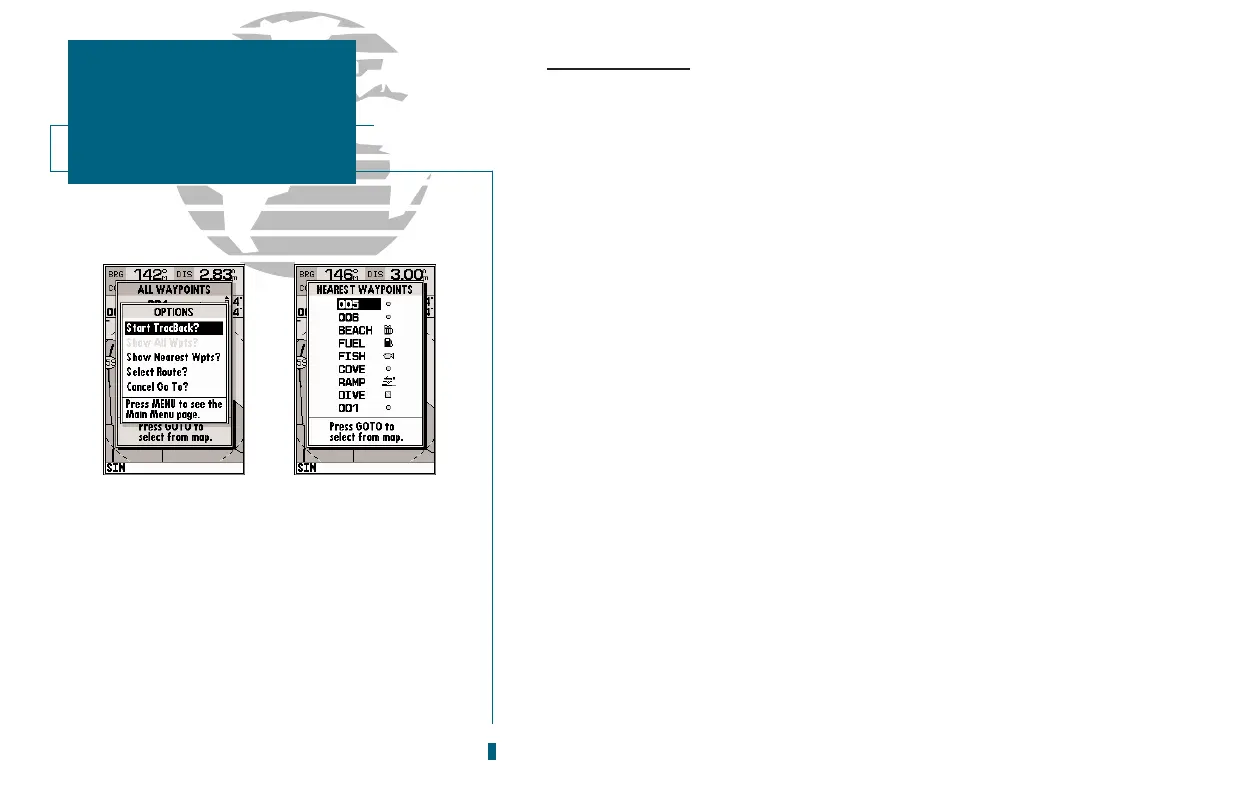
Start TracBack? allows you to create and start navigation of a TracBack route
back to the oldest track log point in memory (see pages 45-46 for more on using
the TracBack function).
Show All Wpts? displays the GOTO waypoint list.
Show Nearest Waypoints? allows you to select the GOTO destination from a list
of the nine nearest waypoints to your present position.
To select a nearest waypoint as a GOTO destination:
1. Highlight the Show Nearest Waypoints option and press
T
.
2. Select the desired waypoint and press
T
.
Select Route? allows you to quickly select a stored route for navigation.
To select a route to navigate:
1. Highlight the Select Route option and press
T
.
2. Select the desired route and press
T
.
Cancel GOTO? cancels the current GOTO destination and resumes navigation of
any previously selected route.
44
A. The GOTO options page lets you start a
TracBack route, select a destination from the
nearest list, select a route to activate, or can-
cel the current GOTO destination.
B. The nearest waypoints list limits waypoint
choices to provide quick access to nearby
anchorages, facilities, etc. which are stored as
waypoints.
SECTION
7
GOTO/MOB
GOTO Options














 To Next Page