AB
Create Waypoint
The third waypoint submenu available from the Main Menu Page is the Create
Waypoint submenu, which allows you to create a new waypoint by manually
entering coordinates. Instructions for using the create waypoint submenu are pro-
vided on page 36.
Waypoint List
The last waypoint category available from the Main Menu Page is the waypoints
list, which displays a master list of all waypoints currently stored in memory. From
the waypoints list, you may review, edit, rename, or delete individual waypoints;
or delete all user waypoints. The total number of stored and available waypoints is
displayed at the top of the waypoints page, with the stored waypoints arranged in
numerical/alphabetical order and listed in two columns in the center of the page.
To scroll through and review the waypoint list:
1. Highlight the Waypoints option from the Main Menu Page and press
T
.
2. Use the
R
keypad to scroll through the list in the desired direction.
3. Press
T
to review the highlighted waypoint.
4. Press
T
to return to the list.
To delete an individual waypoint from the list:
1. Use the
R
keypad to highlight the waypoint to be deleted and press
O
.
2. Press
T
.
3. Press the
T
key to confirm the deletion warning.
To delete the entire waypoint list:
1. Press the
O
key to select the options window.
2. Highlight the Delete All User Wpts? option and press
T
.
3. Use the
R
keypad to highlight the YES prompt and press
T
to confirm.
42
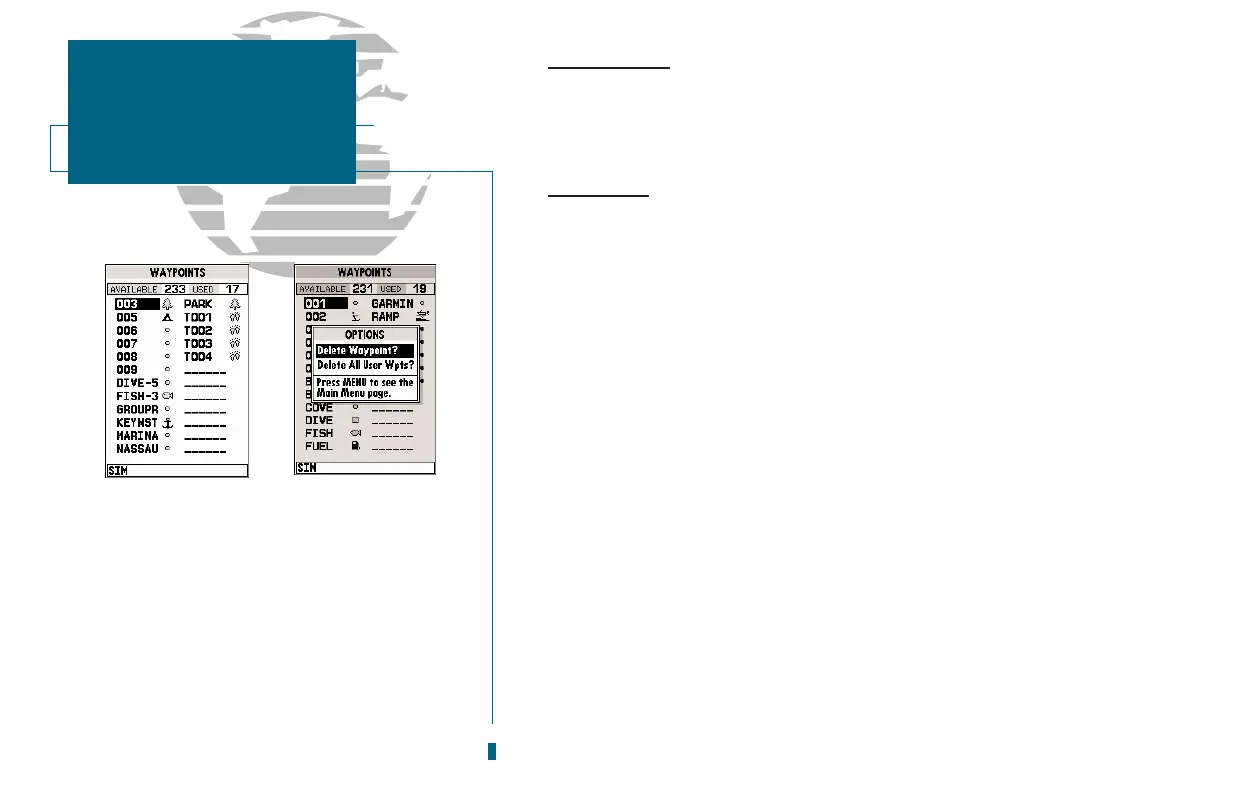
A. The waypoints list displays all waypoints
stored in memory in a two-column format.
Temporary waypoints created by the
TracBack feature are assigned a TXXX name
and a footprint symbol.
B. The waypoints list options page lets you
delete individual waypoints or the entire way-
point list.
SECTION
6
WAYPOINTS
Create Waypoint &
Waypoint List














 To Next Page