20 GPSMAP 76Cx Owner’s Manual
BASIC OPERATION > USING THE FIND MENU
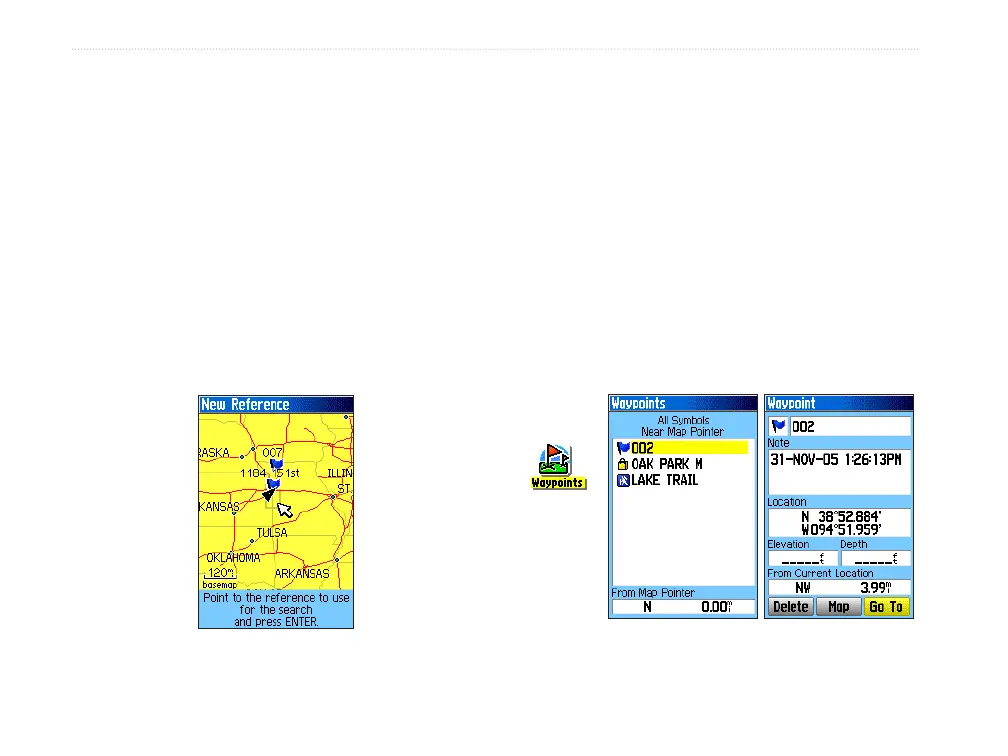
To find an item from another location on
the map:
1. Press FIND to open the Find Menu.
2. Select an icon on the Find Menu, and press
ENTER.
3. Press MENU to open the Options Menu,
Highlight Change Reference, and press
ENTER. The Map Page appears.
4. Use the ROCKER to pan the arrow (pointer) to
the map location you want, and press ENTER.
The Find list shows a list of items near the new
map location.
Finding a Waypoint
The Waypoints Page contains a list of all saved
waypoints. Waypoints are stored in alphanumeric
order and are also identified by a symbol assigned
from a list of symbol types.
To find a waypoint:
1. Press FIND to open the Find Menu.
2. Highlight the Waypoints icon, and press
ENTER to open the Waypoints Page.
3. Use the ROCKER to select a waypoint, and
press ENTER. The Waypoint Page opens.
Waypoints
icon













 To Next Page