46 GPSMAP 76Cx Owner’s Manual
MAIN PAGES > MAP PAGE
Measuring Distance
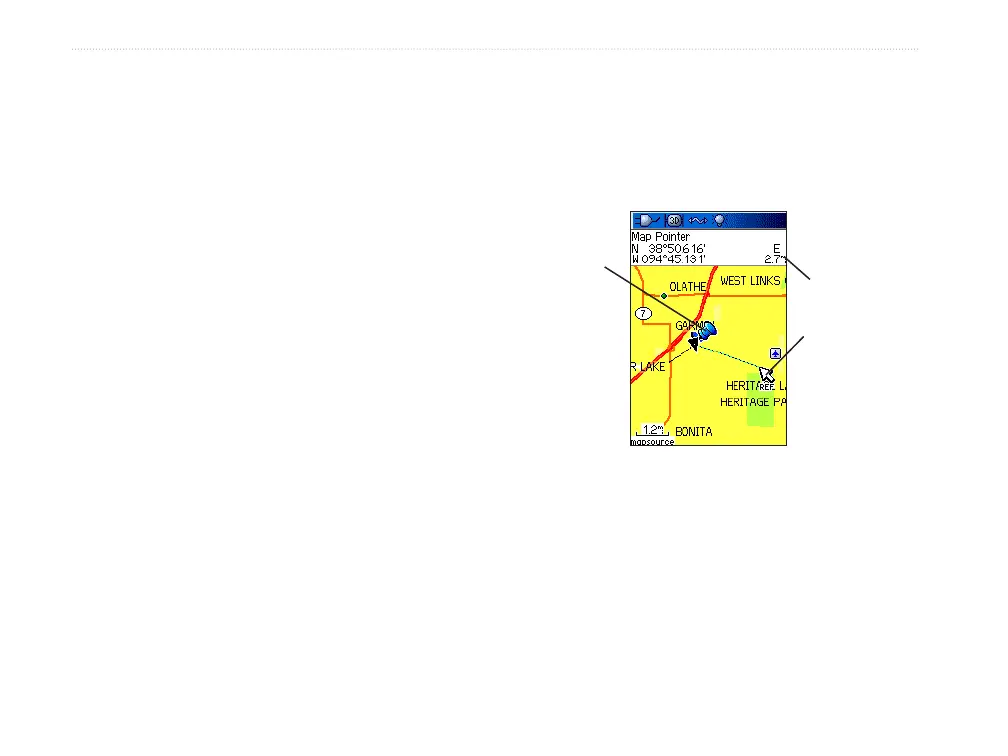
You can measure the distance between two map items.
To measure distance between two points:
1. Press MENU to open the Map Page Options
Menu.
2. Highlight Measure Distance, and press
ENTER. An on-screen arrow appears on the
map at your current location with REF below it.
3. Move the arrow to the reference point (the
starting point you want to measure from),
and press ENTER. A push pin icon marks the
starting point on the map.
4. Move the arrow to the point you want to
measure to. The distance between the two
points is shown in the upper-right corner of the
Map Page.
5. Press QUIT to cancel.
Push pin
indicating the
beginning
point of the
measurement
End point of
measurement
labeled REF
Measured
distance













 To Next Page