GPSMAP 76Cx Owner’s Manual 39
MAIN PAGES > MAP PAGE
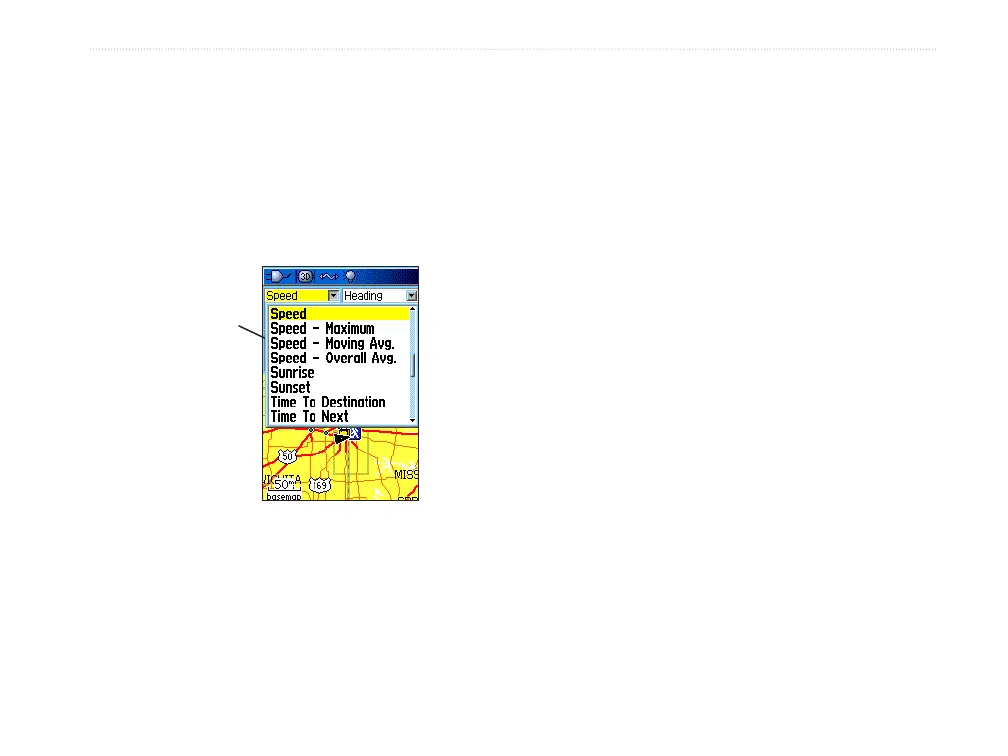
To change a data field:
1. Press MENU to open the Map Page Options
Menu.
2. Highlight Change Data Fields, and press
ENTER. The first data field is highlighted.
3. Press ENTER to open the list of data field
options.
Data field
options
4. Use the ROCKER to select an option, and
press ENTER.
5. Use the ROCKER to move to the next field
and repeat steps 3 and 4.
For an explanation of each data field option, see
page 83 in the Appendix.
Using Additional Map Data
Optional Map Source CD-ROMs enhance the
versatility of your GPSMAP 76Cx. With MapSource
CD-ROMs, you can view listings such as nearby
restaurants, lodging, shopping centers, attractions,
and entertainment, and you can retrieve addresses and
phone numbers for any listed location. With additional
BlueChart data, you can access information such as
marine navaids, wrecks, obstructions, and anchorage
locations.
You can view the data currently loaded on your
GPSMAP 76Cx unit and MicoSD card.
To review map information:
1. On the Map Page, press MENU.
2. Highlight Setup Map, and press ENTER.
3. Use the ROCKER to select the Map Setup-
information page. The list of maps stored on
the MicroSD card appears. A check mark
indicates the map is shown on the Map Page.













 To Next Page