CHAPTER 2: Checking Out Your Computer
6
www.gateway.com
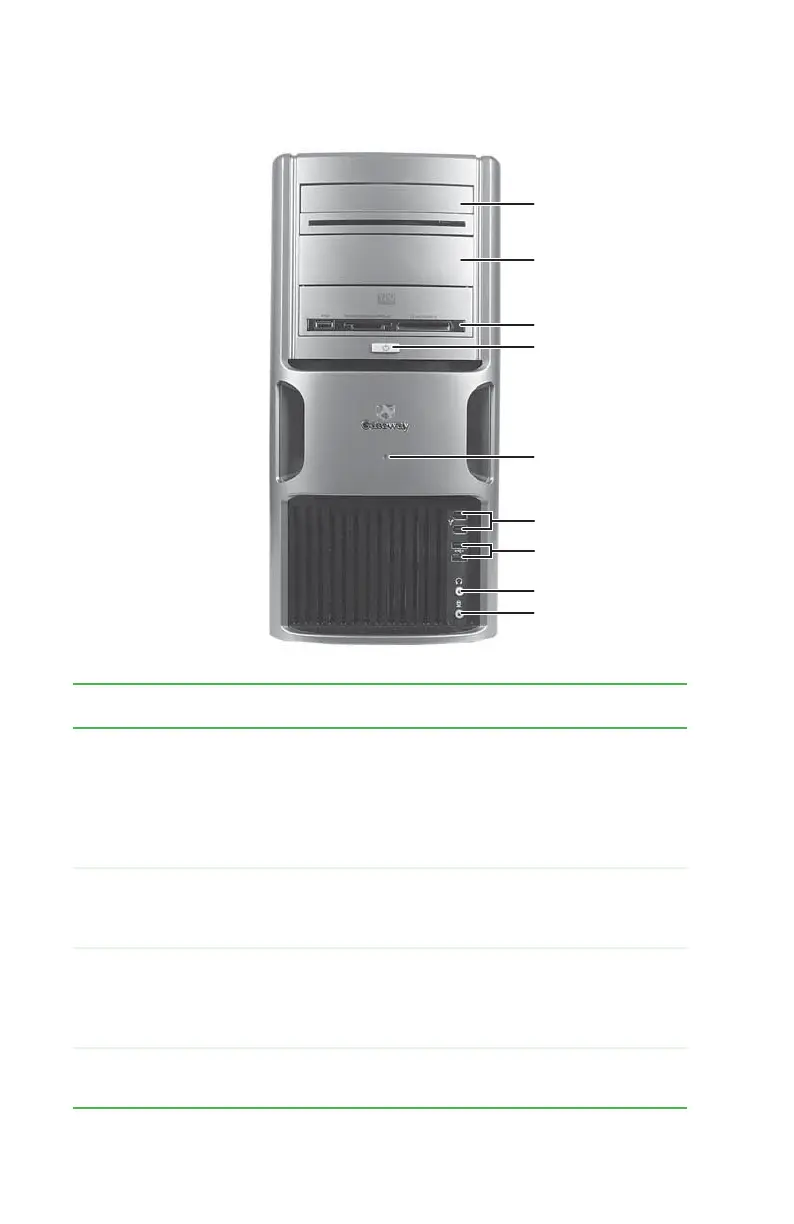
Front
Memory card reader
(optional)
Optical disc drive
Headphone jack
Power button/
power indicator
Microphone jack
IEEE 1394 ports
USB ports
Hard drive activity
indicator
Additional drive
bay
Component Icon Description
Optical disc drive Use this drive to listen to audio CDs, install games and
programs, watch DVDs, and store large files onto
recordable discs (depending on drive type). This drive
may be a CD, recordable CD, DVD, recordable DVD,
Blu-ray, or HD DVD drive. For more information about
your drive, see the online User Guide.
Memory card reader
(optional)
Insert a memory card from a digital camera, MP3 player,
PDA, cellular telephone, or other devices into the
memory card reader.
Power button/power
indicator
Press this button to turn the power on or off. You can
also configure the power button to operate in
Standby/Resume mode or Hibernate mode. The power
indicator lights when the computer is turned on.
Hard drive activity
indicator
Lights when the hard drive is active.
8511781.book Page 6 Tuesday, October 10, 2006 4:41 PM



 To Next Page