Instructions for SW400DC
www.gatexpertstore.com
5.3 Digital Screen Setting
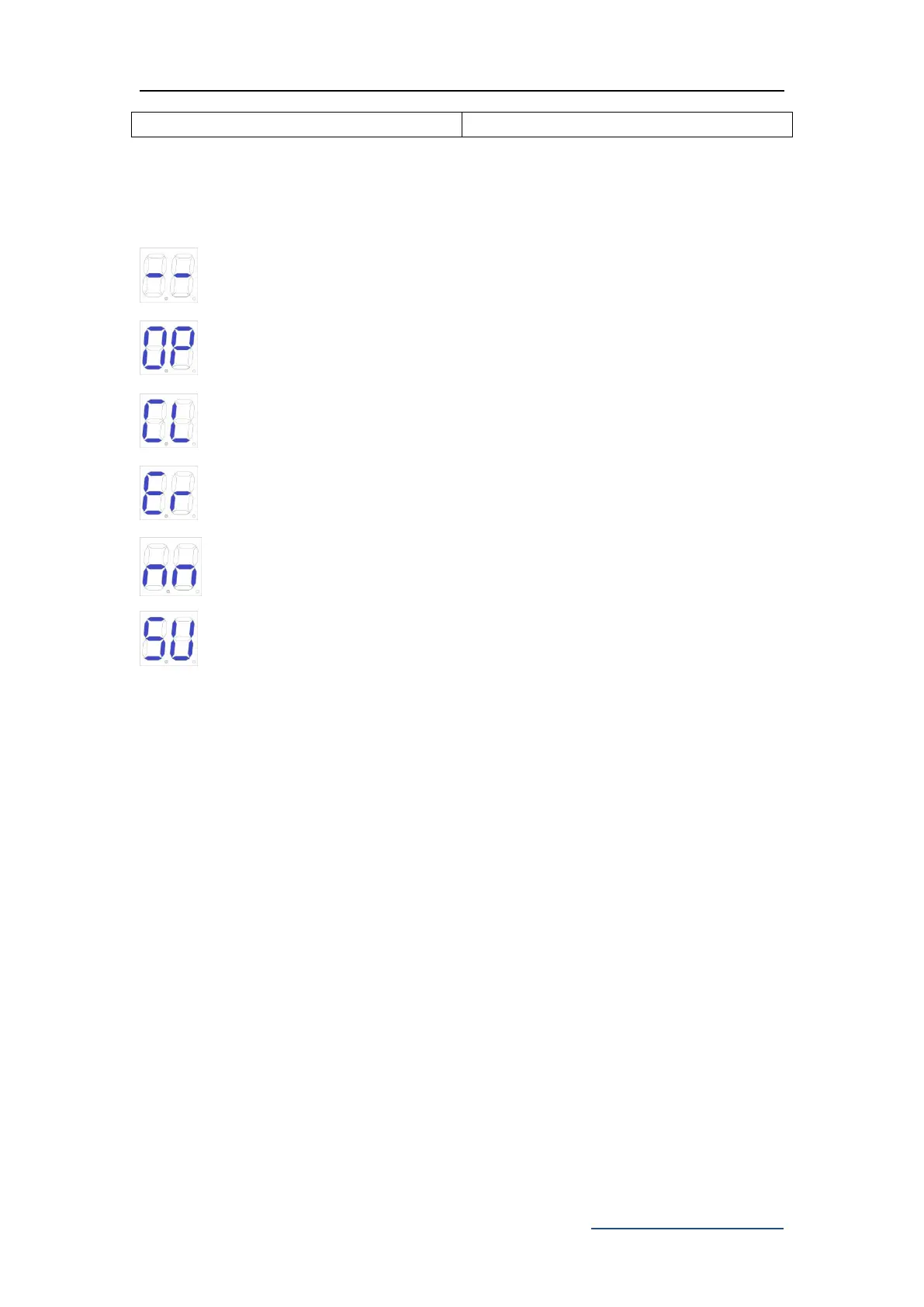
When the control board is working, the users can check working state of gate opener
by digital screen on the control board.
: no input;
: under opening state;
: under closing state;
: error;
:manual mode;
: travel setting;
5.4 Travel Setting (VERY IMPORTANT)
In the first installation of gate openers, the installer need to set open and closed
limit switch positions for running the travel.
Fully open both sides of the gate and lock the clutch, and then press and hold the "-"
button on the control board until the digital screen shows "SU". After this step, the
gate will firstly run towards the closing direction and stop, and then the gate will
automatically open. When the two swing gates are fully open, the gates will
automatically close for the second time, and the travel setting will be completed when
the gates are closed. If the distance of starting slow speed of gate is not appropriate,
adjust the "SLOW DOWN " button to revise the distance.
Note:
If the gate suddenly stops during travel setting, please increase the resistance
force.
If the gate didn’t stop when meets the obstacles during travel setting, please
appropriately reduce the resistance force.



 To Next Page