Instructions for SW400DC
www.gatexpertstore.com
5.7.4 Advanced Menu Instruction
Menu
Long press "PROG" 2
seconds to enter into
base menu.
Option
Press “+”(up) or “-”(down) to select;
Press “SET” to confirm.
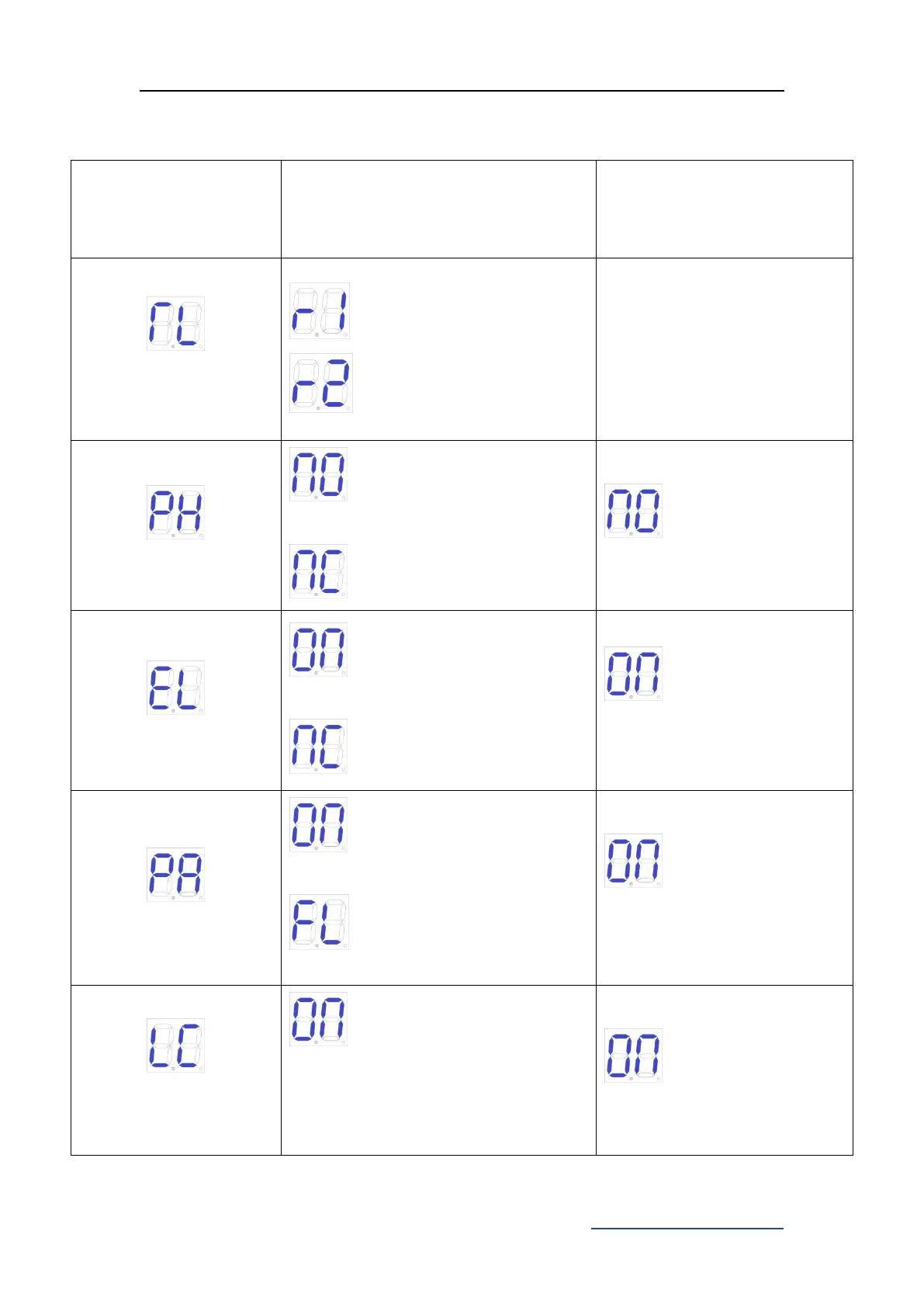
Time of of gate1
Time of of gate2
After automatic learning, the
trip is not ideal can be adjusted
manually, the shorter the time
deceleration distance is more
far.
N/C; photo sensor normally is
on.(Default)
N/O; photo sensor normally off.
N/O; photo sensor
normally on.
Electric lock normally is on.
(Default)
Electric lock normally is off.
Electric lock normally
on.
Alarm lamp normally is on. 24V
power supply. (Default)
Alarm lamp normally flashes.
24V power supply.
Alarm lamp normally is
on. 24V power supply.
Low consumption mode on.The
control board will automatically enter
low-consumption mode after one
minute when there is no operation at
the initial screen. (Default)



 To Next Page