Instructions for SW400DC
www.gatexpertstore.com
control cables separately. One PVC pipe for motor and power cables, the other one
for control cables.
Mounting brackets fixing
In order to install the SW400DC main machines firmly, it is recommended to use
the expansion screws to fix the mounting brackets.
4.3.2 Accessory Installation
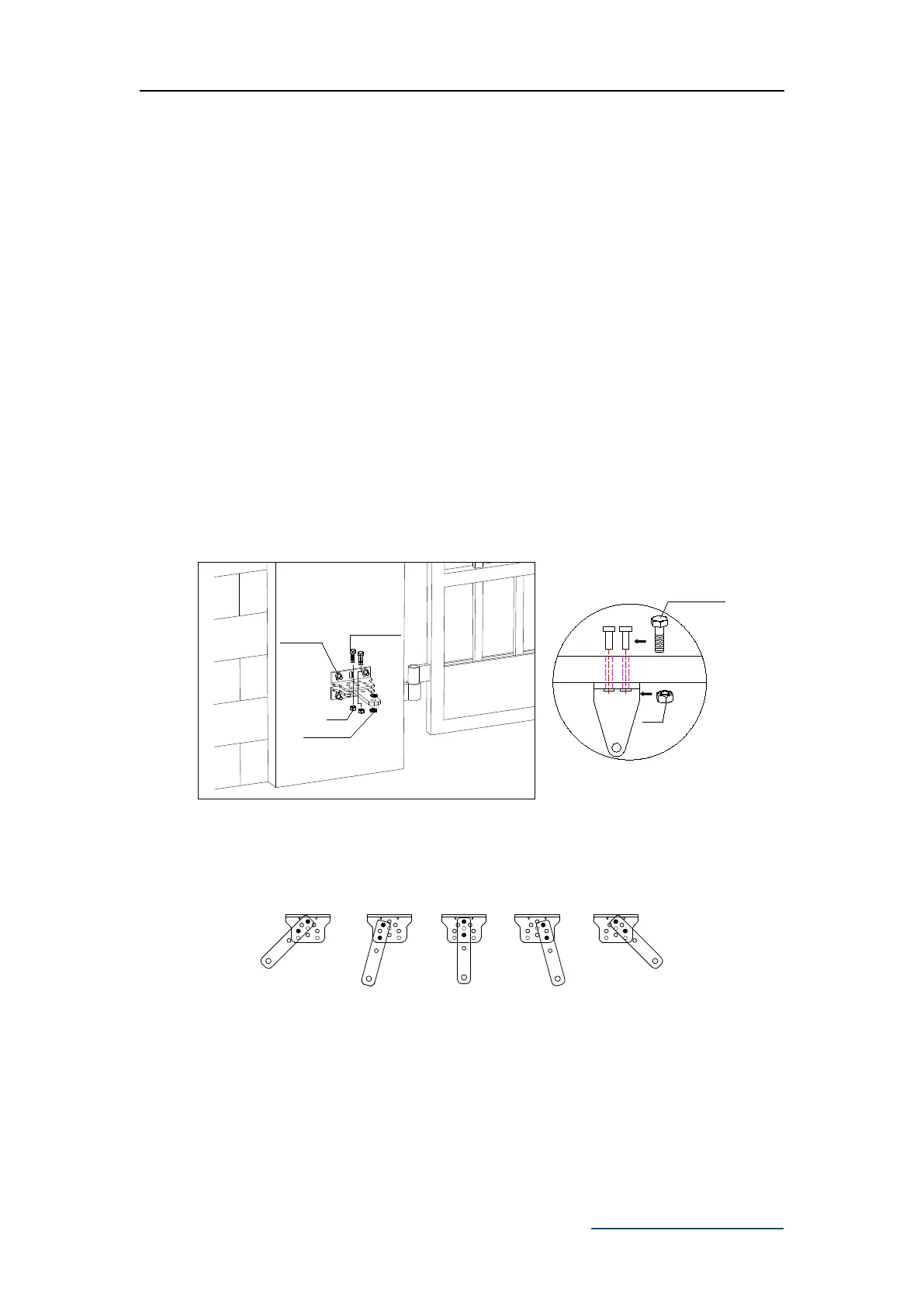
a) Before installing the main machines, please install the wall bracket on the wall first,
then fix the connecting bracket, finally install the front mounting bracket on the door.
Note: Please detect by gradienter before fixing to ensure that the front
mounting bracket and the connecting bracket are in the same level.
Expansion screw
Hexagon screw
Nut
Nut
Hexagon screw
Nylon gasket
Figure 4
b) The connecting bracket and wall bracket can be connected according to different
conditions, please refer to figure 5.
Figure 5
c) Users should prepare power cables for the control box and the main machines by
themselves due to the different installation environment. The cores for the control box
power supply cable should be more than 3, the cores for the motor cable is 2. If users
need to install external accessories like electric lock, infrared sensor, alarm lamp,
external button switch etc., please increase the embedded cables accordingly, please
make sure the sectional diameter of electric lock cable is over 1.5mm², sectional



 To Next Page