73 232001840G(08)
SmartGUARD Page
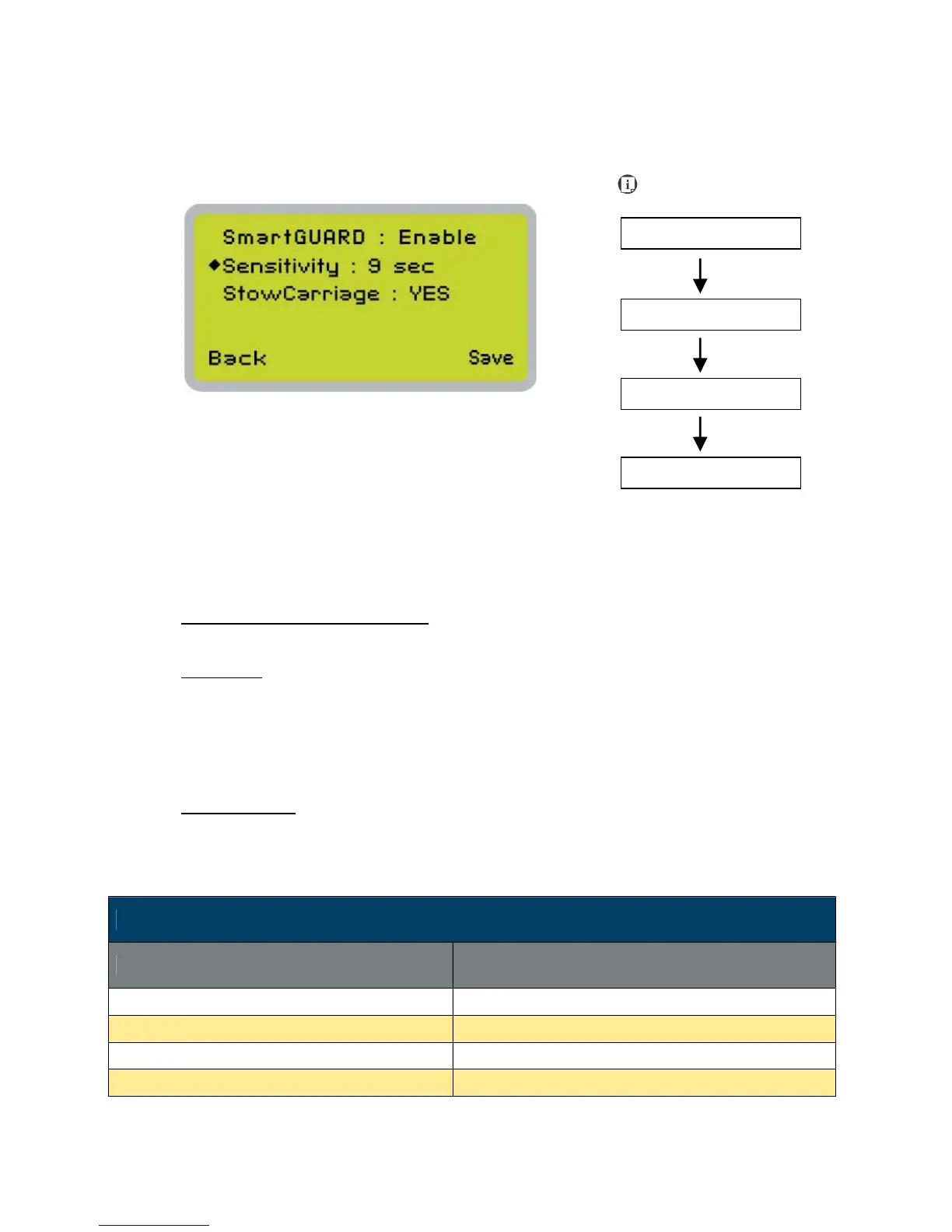
After optional SmartGUARD hardware installation, please enter the function menu on the control
panel to enable the SmartGUARD fire alarm. Note SmartGUARD fire alarm system is not a fire
extinguisher, but an fire detecting and alarm system.
SmartGUARD
Enable
/
Disable:
Press directional key (Left or Right) to enable the SmartGUARD device or disable it.
Sensitivity
烉
Press directional key (left or right) to set the sensitivity of SmartGUARD. There are five sensitivity
settings (1, 3, 5, 7, 9 seconds) that can be selected. Sensitivity defines the delay time from when
a fire is detected until the fire alarm alerts user, and automatically stop laser firing. For example, if
the sensor delay switch is set to the 3-second position, the SmartGUARD will start an alarm and
automatically stop laser firing after detecting a fire for 3 seconds.
Stow Carriage
烉
This function will decide if the lens carriage stay in the last position (set to <NO>) or move to the
opposite direction (up or down) when fire alarm is initiated. The default is <YES>, the lens
carriage will move to opposite direction when a fire detected.
SmartGUARD Setting Page
Relevant Buttons Function
F1 (Back) Back to previous page
F4 (Save) Save your current settings
U / V Directional Scroll through the menu selections
Y / Z Directional Adjust the value for that selection
Navigating to this page:





 To Next Page