CHAPTER 6: SETPOINTS S1 RELAY SETUP
345 TRANSFORMER PROTECTION SYSTEM – INSTRUCTION MANUAL 6–19
MESSAGE TIMEOUT
Range: 1 s to 65535 s
Default: 30 s
If the keypad is inactive for a period of time, the relay automatically reverts to a default
message. The inactivity time is modified via this setting to ensure messages remain on
the screen long enough during programming or reading of actual values.
SCREEN SAVER
Range: Off, 1 min to 10000 min
Default: Off
The life of the LCD backlight can be prolonged by enabling the Screen Saver mode.
If the keypad is inactive for the selected period of time, the relay automatically shuts off
the LCD screen. Any activity (keypress, alarm, trip, or target message) will restore screen
messages.
LED1(8) SOURCE
Range: Any operand from the list of logic operands
Default: Off
Selects the signal source of programmable LED 1 through 8.
LED1(8) TYPE
Range: Self-reset, Latched
Default: Self-reset
Selects the type of programmable LED 1 through 8.
LED5(8) COLOR
Range: Off, Red, Orange, Green
Default: Orange
Selects the color of programmable LED 5 through 8.
NOTE:
Note that programmable LEDs 1 through 4 have fixed colors: LED1 (Red), LED2 (Orange),
LED3 (Orange), LED4 (Orange).
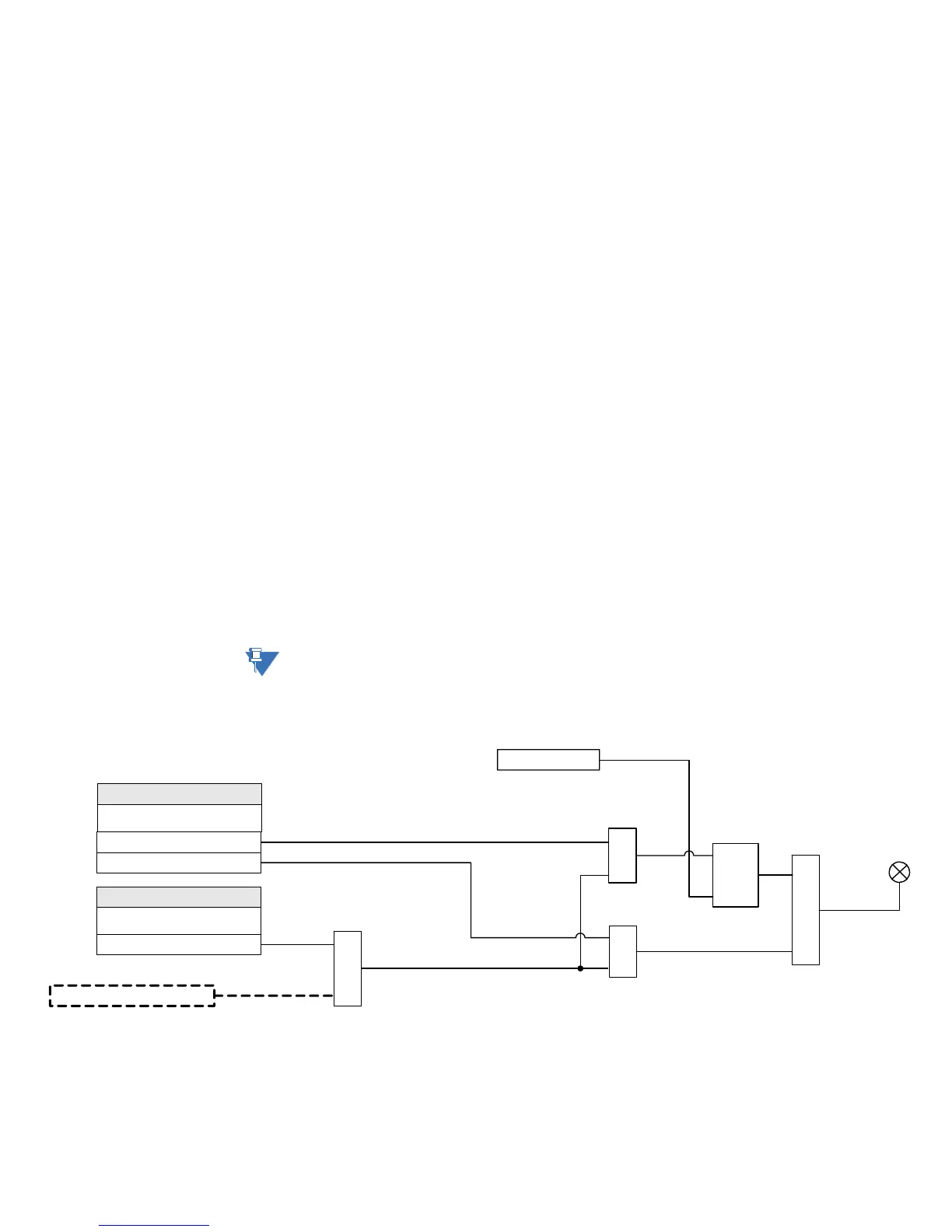
Figure 6-10: Programmable LED with Trigger SOURCE and Self-reset or Latched TYPE
When the LED TYPE is Latched, the LED stays lit even after the value of the operand (flag)
selected as a trigger drops down (resets). The LED can be turned off by either pressing the
RESET pushbutton, or by executing a reset command via communications. When the LED
TYPE is Self-reset, the LED resets after the logic operand value drops down (resets).
898863A1.CDR
SETPOINTS
LED 1 Source
Off = 0, Logic Operand =1
Logic Operand = 1
OR
AND
SETPOINT
LED 1 Type
Latched
Self-Reset
LED 1 to 8
RESET
Command
AND
S
R
LATCH
AND



 To Next Page