3–26 345 TRANSFORMER PROTECTION SYSTEM – INSTRUCTION MANUAL
SOFTWARE SETUP CHAPTER 3: INTERFACES
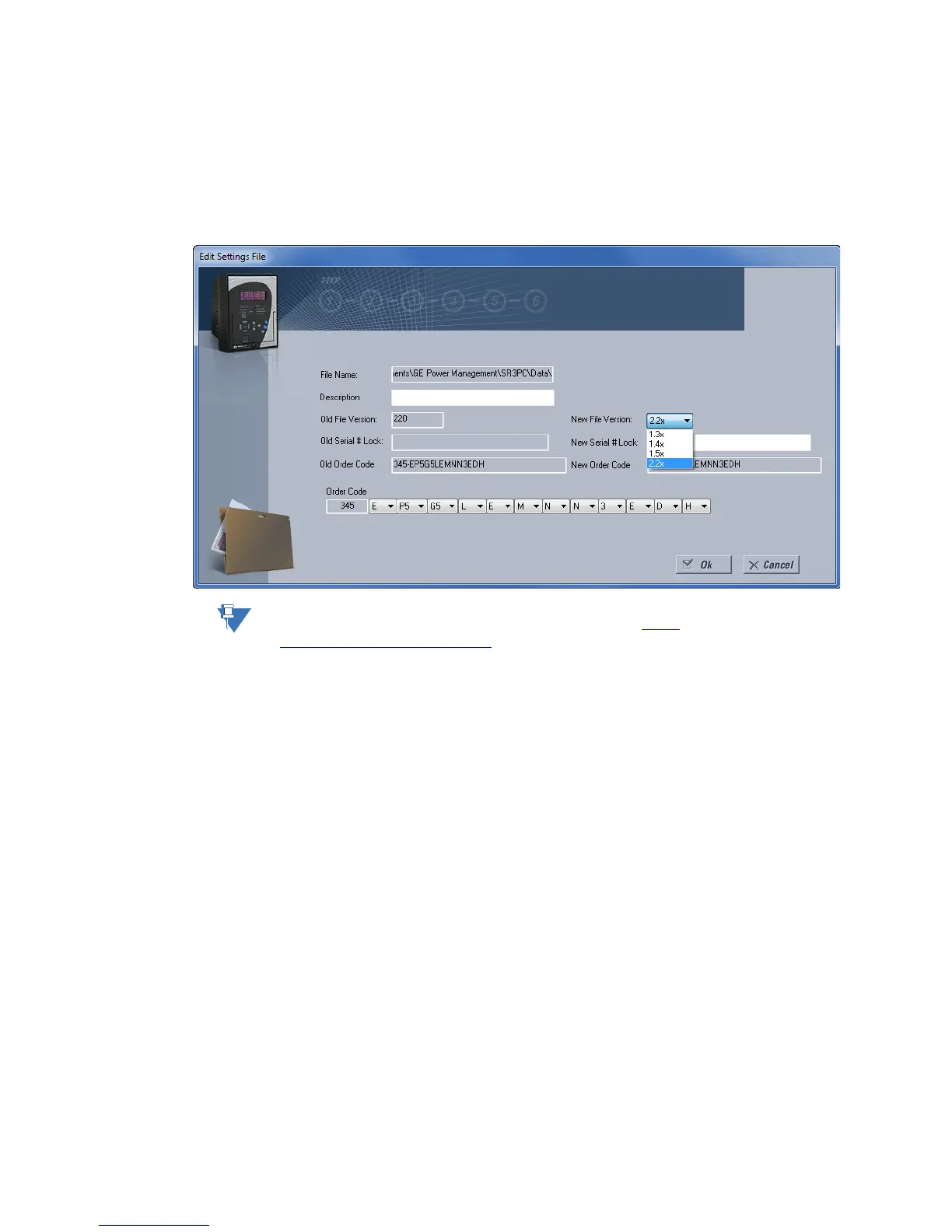
5. From the main window menu bar, select the Offline > Edit Settings File Properties
menu item and note the File Version of the setpoint file. If this version is different from
the Firmware Revision noted in step 2, select a New File Version that matches the
Firmware Revision from the pull-down menu.
6. For example, if the firmware revision is L0L01MA140.000 (Firmware Revision 1.40) and
the current setpoint file revision is 1.20, change the setpoint file revision to “1.4x”.
NOTE:
Discontinued order codes may be included to maintain back-compatibility of setpoint files.
For current order codes, refer to the GE Multilin website at http://
www.gegridsolutions.com/multilin.
7. Enter any special comments about the setpoint file in the "Description" field.
8. Select the desired firmware version from the "New File Version" field.
9. When complete, click OK to convert the setpoint file to the desired revision. See
Loading Setpoints from a File below, for instructions on loading this setpoint file into
the 345 .
Printing setpoints and
actual values
The EnerVista 3 Series Setup software allows the user to print partial or complete lists of
setpoints and actual values. Use the following procedure to print a list of setpoints:
1. Select a previously saved setpoints file in the File pane or establish communications
with a 345 device.
2. From the main window, select the Offline > Export Settings File menu item.



 To Next Page