6–36 345 TRANSFORMER PROTECTION SYSTEM – INSTRUCTION MANUAL
S2 SYSTEM SETUP CHAPTER 6: SETPOINTS
BKR CONNECTED
Range: Contact Input 5 to 10, Disabled
Default: Disabled
Select a contact input to show whether the breaker is connected (Racked-in, or
disconnect switches switched-on), or disconnected (racked-out, or disconnect switches
switched-off) to the system.
NOTE:
It is highly recommended to monitor the status of the Winding 1 and Winding 2 breakers
using both breaker auxiliary contacts 52a, and 52b; however using only one of them is also
acceptable.
The 345 can detect the breaker status by using only one contact: either 52a or 52b.
However, one should be aware that in such cases, it would be impossible to distinguish
between a breaker open state and breaker racked out state, unless another contact from
the breaker is wired to the relay.To clarify this ambiguity, the BKR CONNECTED function
under SETPOINTS/S2 SYSTEM SETUP/S2 BREAKER should be programmed to an additional
contact input. When this additional input is closed, a single 52a or 52b contact will show
both breaker states. When the breaker is racked out, this additional breaker connected
input should be open. In this case, both breaker status indicators will be off.
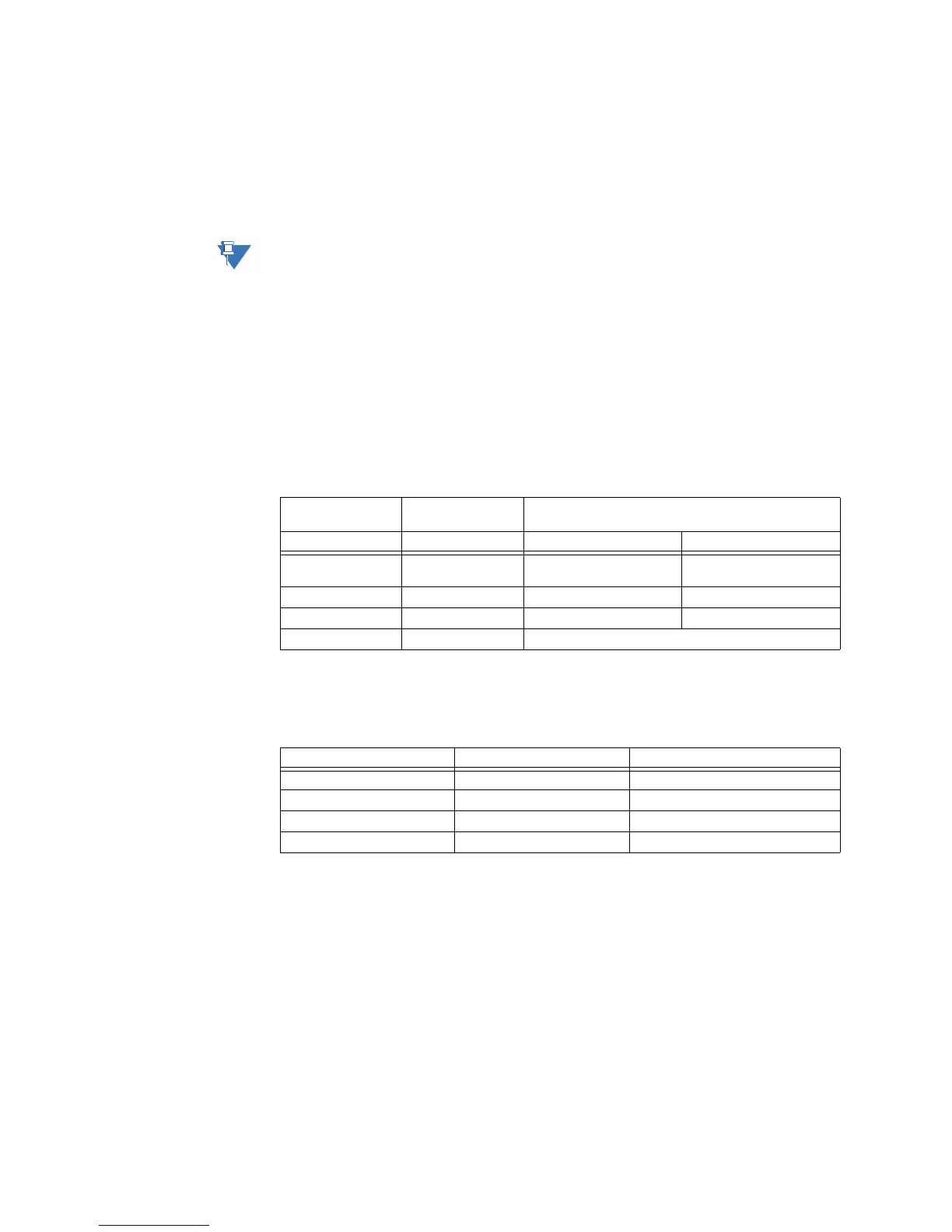
The logic for Breaker Open, and Breaker Close status is shown in the table below:
Table 6-3: Breaker open / Breaker closed status logic
If the contact input selected under BKR CONNECTED setting is asserted, the breaker is
considered connected to the primary system. When the breaker is determined
disconnected, the breaker state is shown to be neither open, nor closed.
Table 6-4: Breaker status with both contacts configured
52a contact
configured
52b contact
configured
Breaker status
Open Close
Yes Yes 52a contact open
52b contact closed
52a contact closed
52b contact open
Yes No 52a contact open 52a contact closed
No Yes 52b contact closed 52b contact open
No No Status unknown
52a contact status 52b contact status Breaker status
Off On open
On Off closed
On On BKR status failure
Off Off BKR status failure



 To Next Page