CHAPTER 4: INTERFACES WORKING WITH SETPOINTS AND SETPOINT FILES
745 TRANSFORMER PROTECTION SYSTEM – INSTRUCTION MANUAL 4–23
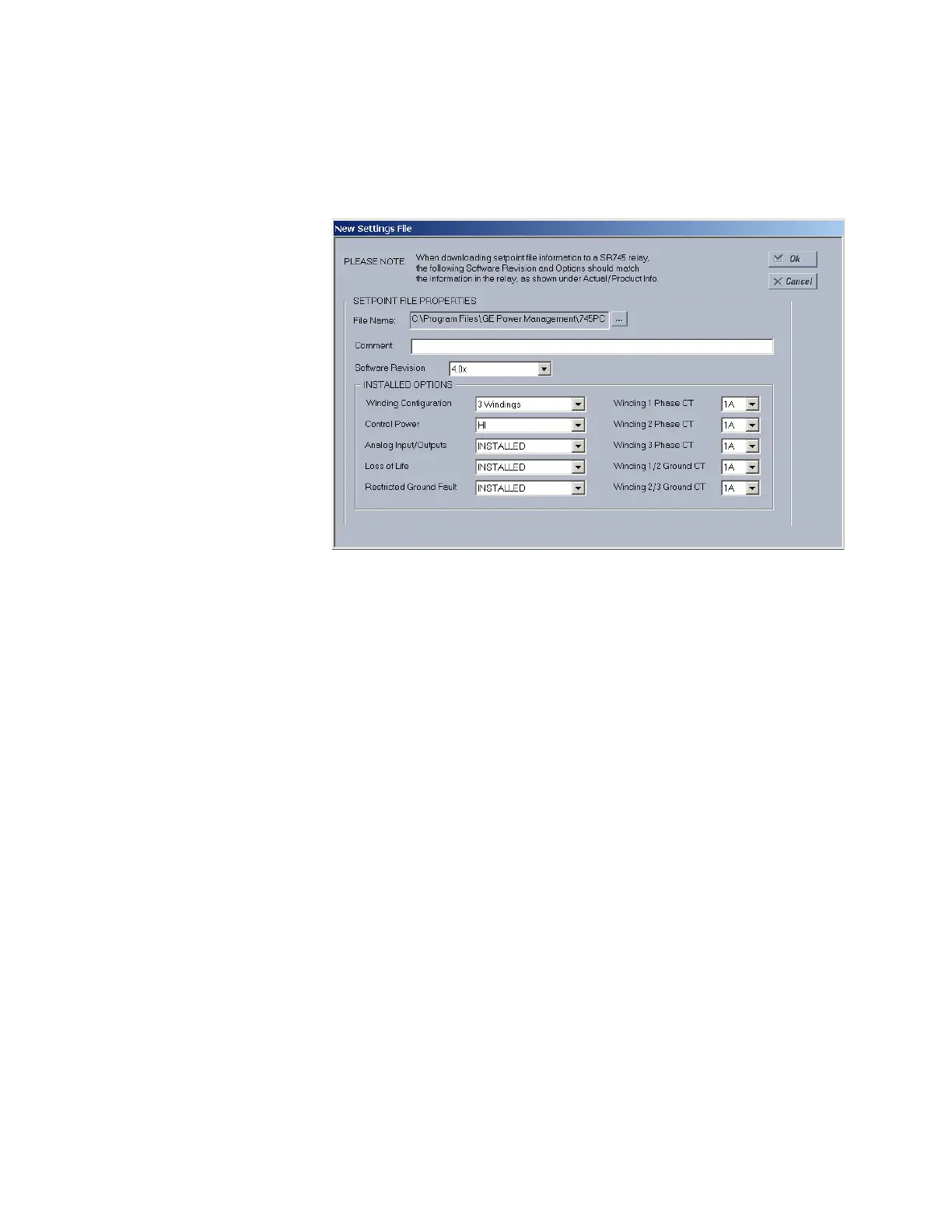
1. In the File pane, right click on ‘File’ and select the New Settings File item. The
EnerVista 745 Setup software displays the following box will appear, allowing for the
configuration of the setpoint file for the correct firmware version. It is important to
define the correct firmware version to ensure that setpoints not available in a
particular version are not downloaded into the relay.
Select the software Revision for the new setpoint file.
Configure the Installed Options as shown.
For future reference, enter some useful information in the Description
box to facilitate the identification of the device and the purpose of the
file.
To select a file name and path for the new file, click the button beside
the File Name box.
Select the file name and path to store the file, or select any displayed file
name to update an existing file.
All 745 setpoint files should have the extension ‘745’ (for example,
‘motor1.745’).
Click Save and OK to complete the process.
Once this step is completed, the new file, with a complete path, will be
added to the EnerVista 745 Setup software environment.
4.4.4.5 Upgrading Setpoint Files to a New Revision
It is often necessary to upgrade the revision code for a previously saved setpoint file after
the 745 firmware has been upgraded (for example, this is required for firmware upgrades).
This is illustrated in the following procedure.
Establish communications with the 745 relay.



 To Next Page