– 28 –
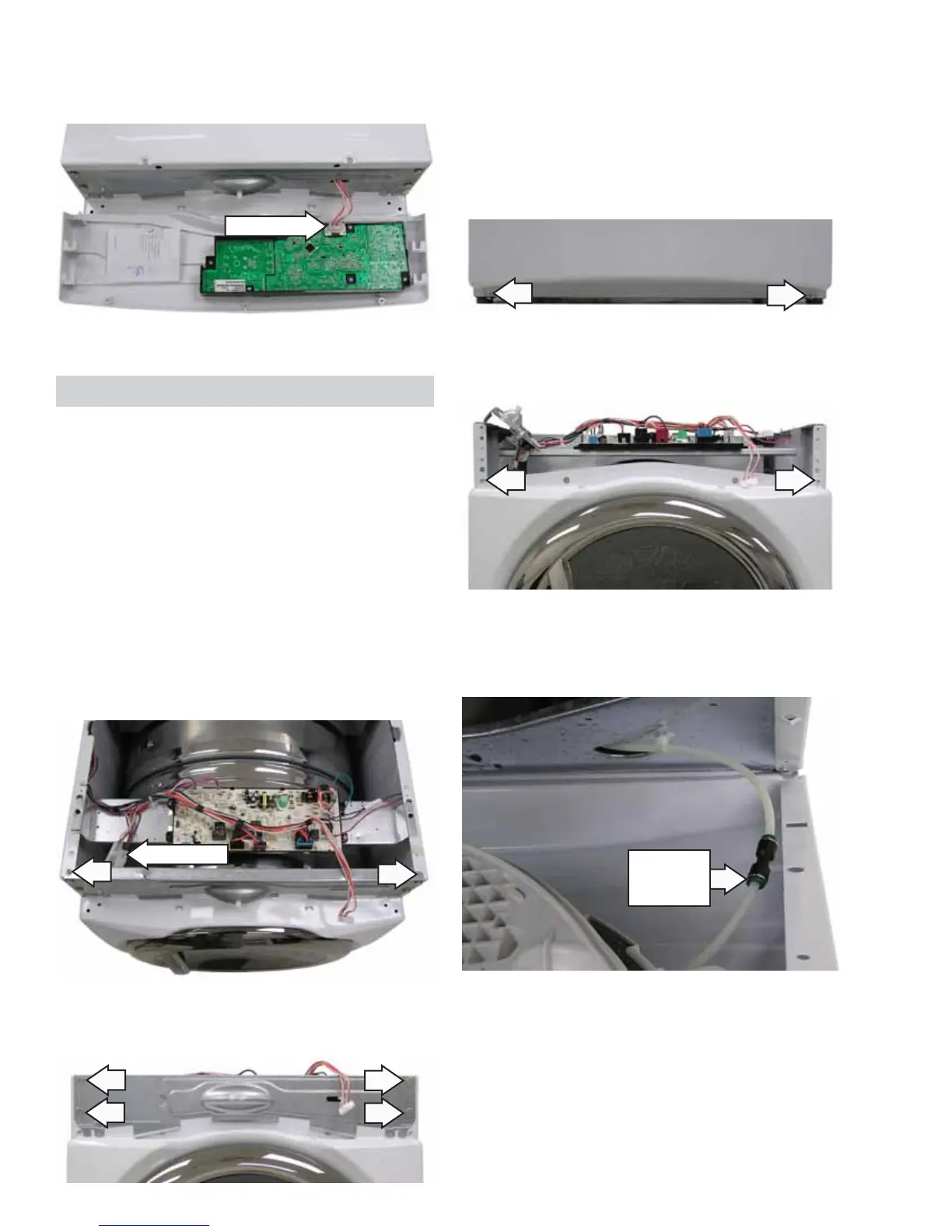
3. Lift the control panel off vertically.
4. Disconnect the wire harness.
Front Panel
Removal of the front panel provides access to the
drum and drive belt. The front panel is held in place
by 4 screws.
To remove the front panel:
1. Remove the top panel and control panel. (See
Top Panel and Control Panel.)
2. Disconnect the drum lamp / door switch wire
harness and the sensor rod wire harness
connected to the power board.
3. Remove the 2 Phillips-head screws from the
front panel bracket.
Disconnect
Disconnect
4. Remove 4 Phillips-head screws from the front
panel bracket.
5. Lift the bracket out of the hinges and set aside.
Note: In the following step it may be necessary to
raise the front of the dryer to gain access to the
screws.
6. Loosen, but do not remove, the 2 Phillips-head
screws from the bottom of the front panel.
7. Remove 2 Phillips-head screws from the top of
the front panel.
8. Tilt the top edge of the front panel out and press
on the John Guest connector collar to release
the water line.
John Guest
Connector
Collar
9. Lift front panel from the bottom two screws and
set aside.



 To Next Page