– 46 –
Troubleshooting
(Continued Next Page)
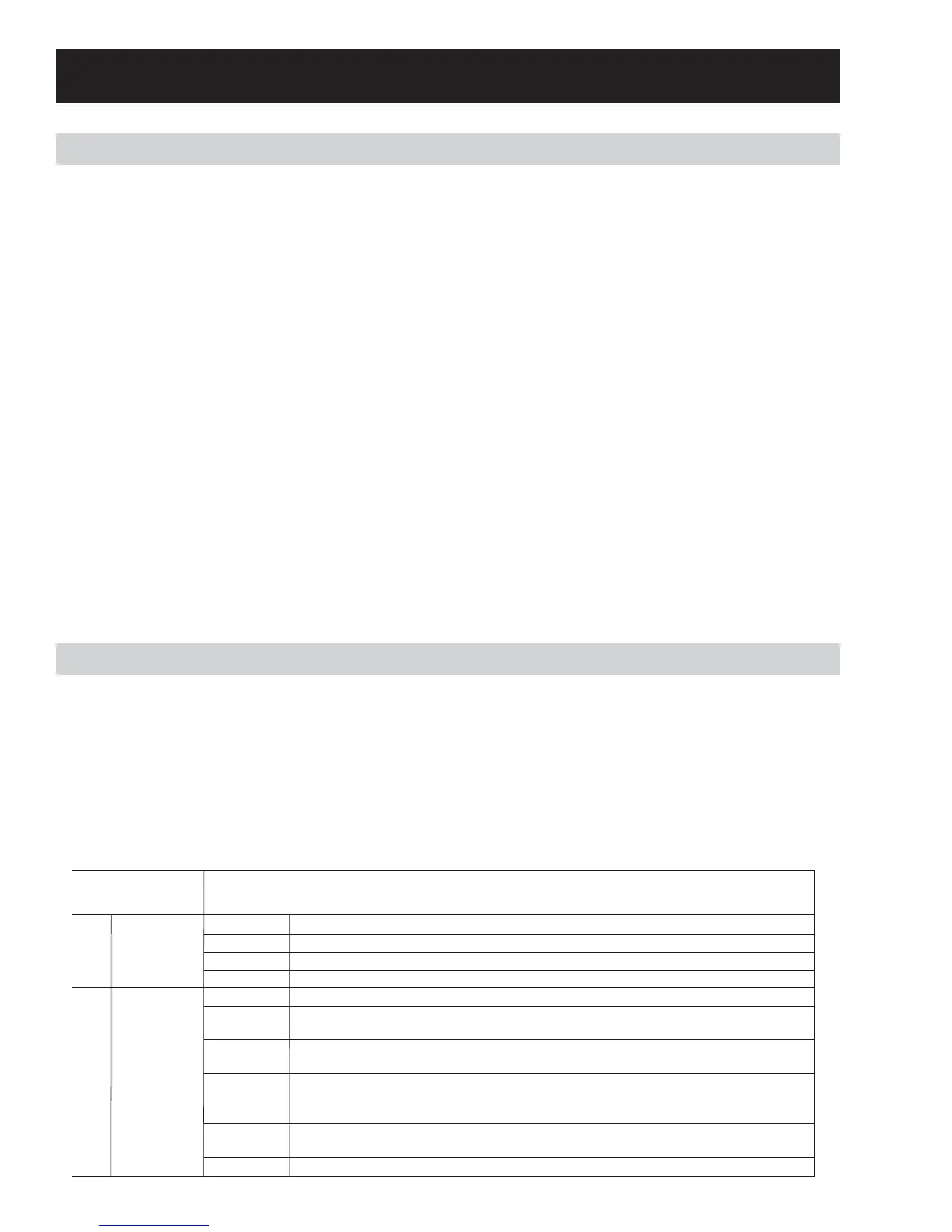
Service Test Mode
How to enter to service mode and navigate:
From idle state, press and alternate between the “My cycle” and “Delay Start” buttons to enter service mode.
Upon entering the service mode, the Control shall be in test selection mode and display the first test number
(t01). Rotating the knob counter clockwise (CCW) shall decrement the test number in the display. Rotating
the knob clockwise (CW) shall increment the test numbers in the display.
Once the test number is selected, pressing [Start/Pause] shall begin the selected test.
During a test, pressing power button shall terminate that test and bring the control to the test selection
mode (test number is displayed on the display).
Pressing Power key during the test selection mode shall exit the Service mode.
T01
Error codes
Start/Pause
Knob
Start/Pause
Power
Display error codes
The knob can be turned CCW and CW to see all logged error codes.
Clear highlighted error code from machine
Returns to service mode screen
T02
Version info
Start/Pause
Knob
Knob
Knob
Knob
Power
Display the current version of software
Turn the knob CW while the display shows the UI SW version - The display will alternate
between “SPb” and the 3 digit MC SW version, displaying each for 1 second at a time
Turn the knob CW while the display shows the MC SW version - The display will alternate
between “EUI” and the 3 digit UI Eeprom version, displaying each for 1 second at a time
Turn the knob CW while the display shows the UI Eeprom version
The display will alternate between “EPb” and the 3 digit MC Eeprom version, displaying
each for 1 second at a time
Turn the knob CCW during each of the software versions - verify that the previous display
is stored
Returns to service mode screen
SERVICE MODE
TEST
SEQUENCE
Demo Mode
To enter demo mode:
1. Turn the unit off so the screen is blank.
2. Unplug the unit from power and wait 10 seconds.
3. Plug the unit back in.
4. Open the door.
5. Within 30 seconds after plugging the unit back in, press the START/PAUSE button 4 times.
6. Close the door.
7. Press the POWER button.
To exit demo mode:
8. Repeat the above sequence.
Note: In the demo mode, the control will proceed through the selected cycle but will not activate any
components.



 To Next Page