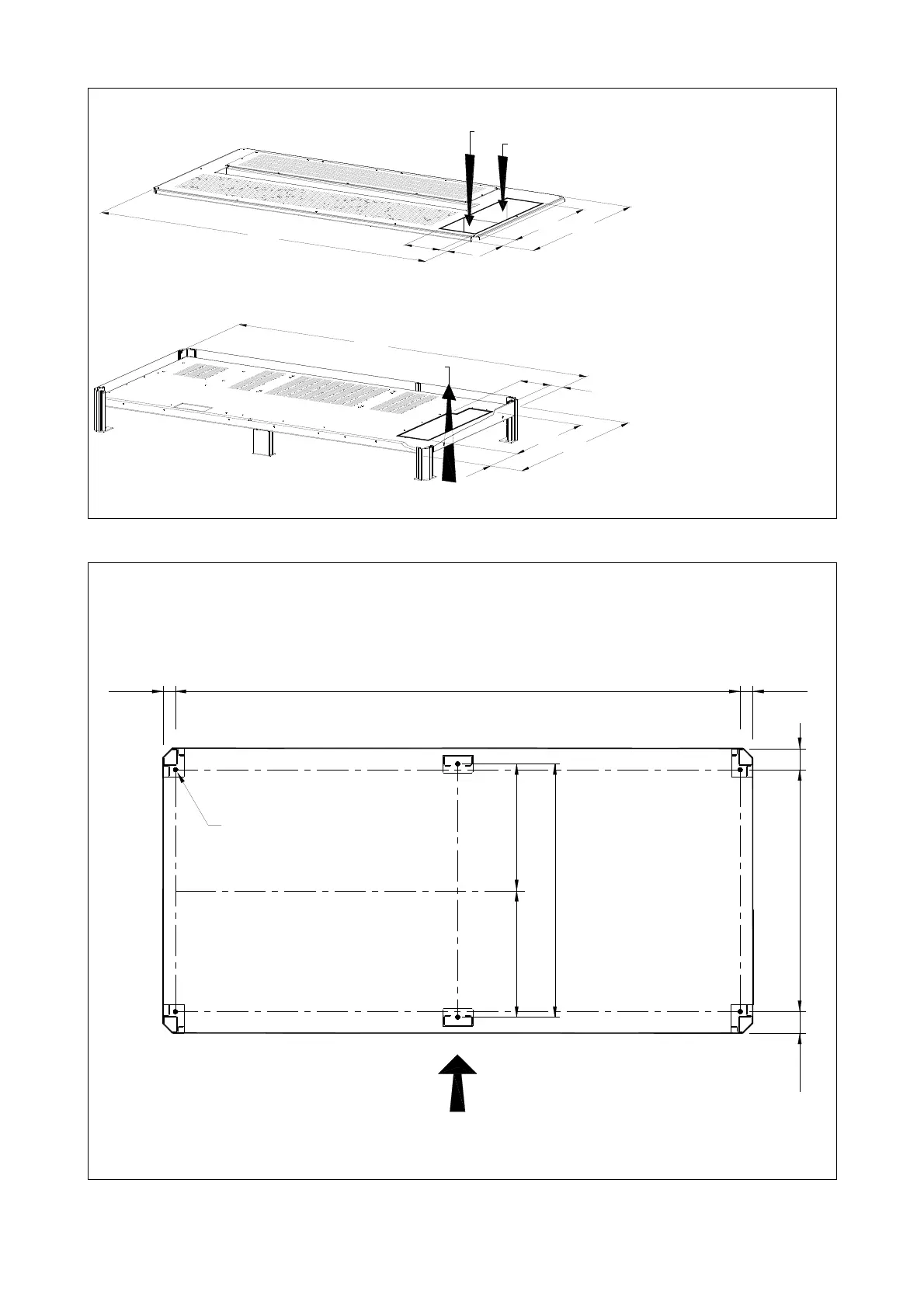
Openings for input and output cable connections
S
G
S
_
2
2
5
-
3
0
0
_
S
2
_U
P
S
vi
e
w t
o
p
_
0
1
U
S
1
,
6
5
0
m
m
6
4
.
9
6
"
1
6
0
m
m
6
.3
0
"
2
.
7
6
"
4
0
m
m
1
.5
8
"
7
0
m
m
3
1
.
5
0
"
2
1
.
6
6
"
5
5
0
m
m
8
0
0
m
m
Utility input
Output Load
Battery
Fig. 3.4.1-2 Opening on top of the cabinet for input and output cables
SG Series 225 & 300
openings are provided
on the top and the
bottom of the UPS for
the connection of input
and output cables.
Pay attention to the
position of these
openings, when
choosing the placement
of the UPS.
Utility input
Output Load
6
.
3
0
"
1
6
0
m
m
1
.7
7
"
55
0m
m
21
.
66
"
80
0m
m
3
1
.
5
0"
100
m
m
3.
94
"
1
,
6
5
0
m
m
6
4
.
9
6
"
S
G
S
_
2
2
5
-
3
0
0
_
S
2
_
U
P
S
v
i
e
w
b
o
t
t
o
m
_
0
1
U
S
4
5
m
m
Fig. 3.4.1-3 Opening on the bottom of the cabinet for input and output cables
These openings are
covered with a
protective plate.
Fixing of the UPS cabinet on the floor
The UPS cabinet is free standing and normally does not require to be bolted to the floor.
The UPS cabinet can be fixed however to the floor by bolting it with the supporting blocks to the
floor. See Fig. 3.4.1-4.
62.205"
1580mm
35mm
713mm
28.071"
60mm
2.363"
60mm
2.363"
680mm
26.772"
1.378" 1.378"
35mm
=
Ø 0.47"
Ø 12mm
=
Front side
SGS_225-300_S2_UPS view bottom_02US
Fig. 3.4.1-4 Fixing of the UPS cabinet on the floor
Modifications reserved Page 13/40
OPM_SGS_ISG_M22_M30_2US_V010.doc Installation Guide S G S e r i e s 22 5 & 30 0 UL S2





 To Next Page