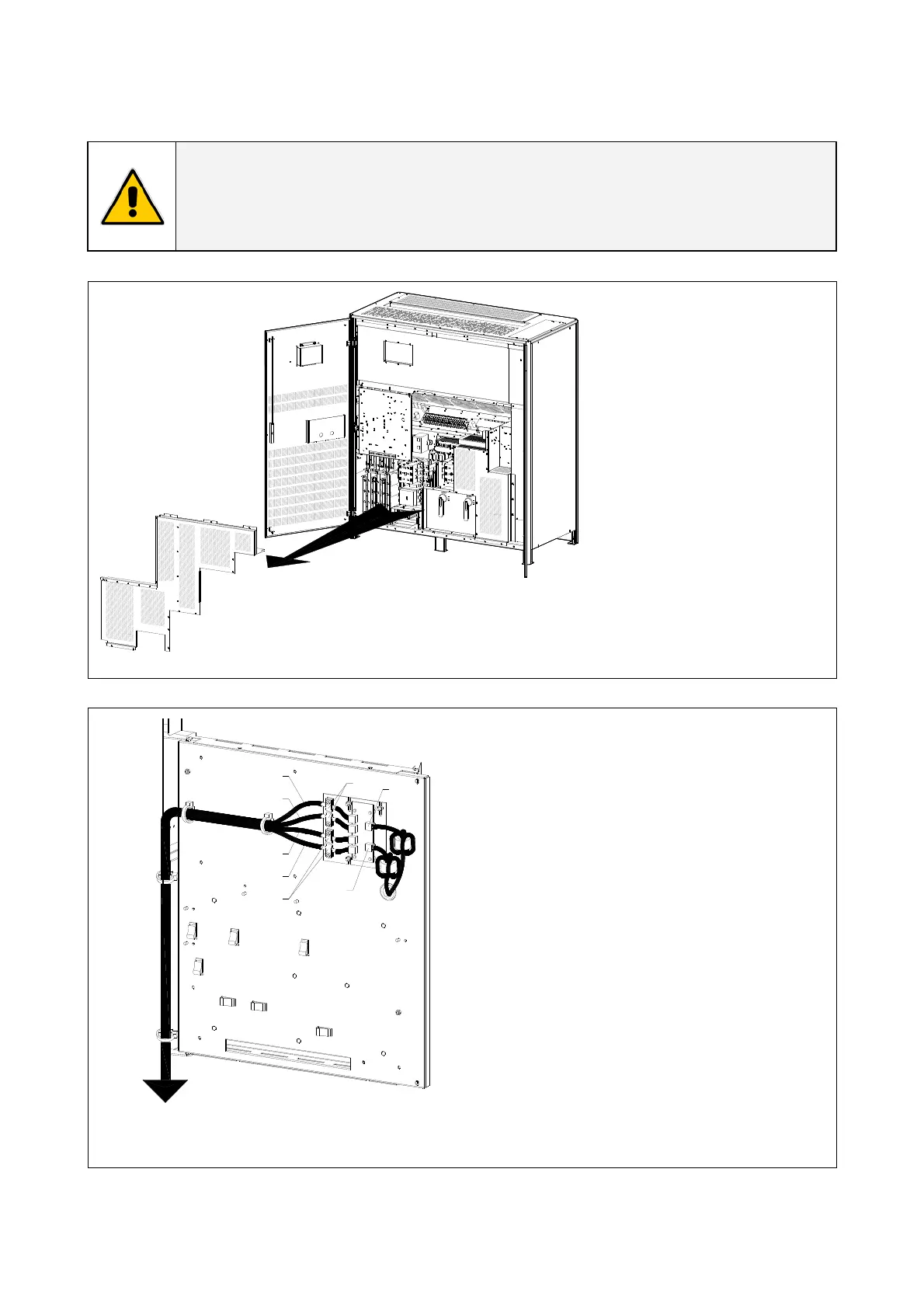
3.9.3 Control bus cable location
WARNING !
This operation must be performed by QUALIFIED SERVICE PERSONNEL ONLY before
the initial start-up.
ENSURE THAT THE UPS INSTALLATION IS COMPLETELY POWERED DOWN.
Q1
Q2
S
G
S
U
_
2
2
5
-
3
0
0
_
S
2
_
R
P
A
c
o
n
t
r
o
l
b
u
s
c
a
b
l
e
_
0
1
A
2
4
3
1
-
-
8
9
10
21
20
19
11
22
1
2
3
4
12
3
45
16
15
14
1312
6
17
7
18
Fig. 3.9.3-1 View electronic module on intermediate unit
Access to the control bus
connection.
The control bus connection
between parallel units must be
made on the front of the
electronic module fitted
behind the front doors.
To properly route the control
bus cables the safety screen
“A” must be removed.
JB1
JB2
JA1
JA2
A
Next parallel unit
A
JA
JB
S
G
S
U
_
2
2
5
-
3
0
0
_
S
2
_
R
P
A
c
o
n
t
r
o
l
b
u
s
c
a
b
l
e
_
0
2
U
S
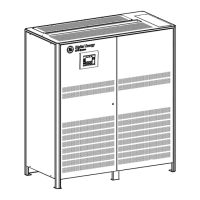
Fig. 3.9.3-2 Front view electronic module on intermediate unit
Control bus cables connection.
• Plug the cables JA (1/2/3/4/5) and JB
(1/2/3/4/5) onto the RJ connectors JA and
JB located on parallel bus PCB “P34 – Bus
Interface” (going to “P13 – RPA Board”
J52(A) and J62(B).
• Fix both cables JA (1/2/3/4/5) and JB
(1/2/3/4/5) to parallel bus socket
connecting the cable shield to ground by
means the cable clamps “A“.
Modifications reserved Page 34/40
OPM_SGS_ISG_M22_M30_2US_V010.doc Installation Guide SG S er i e s 2 25 & 30 0 UL S2





 To Next Page