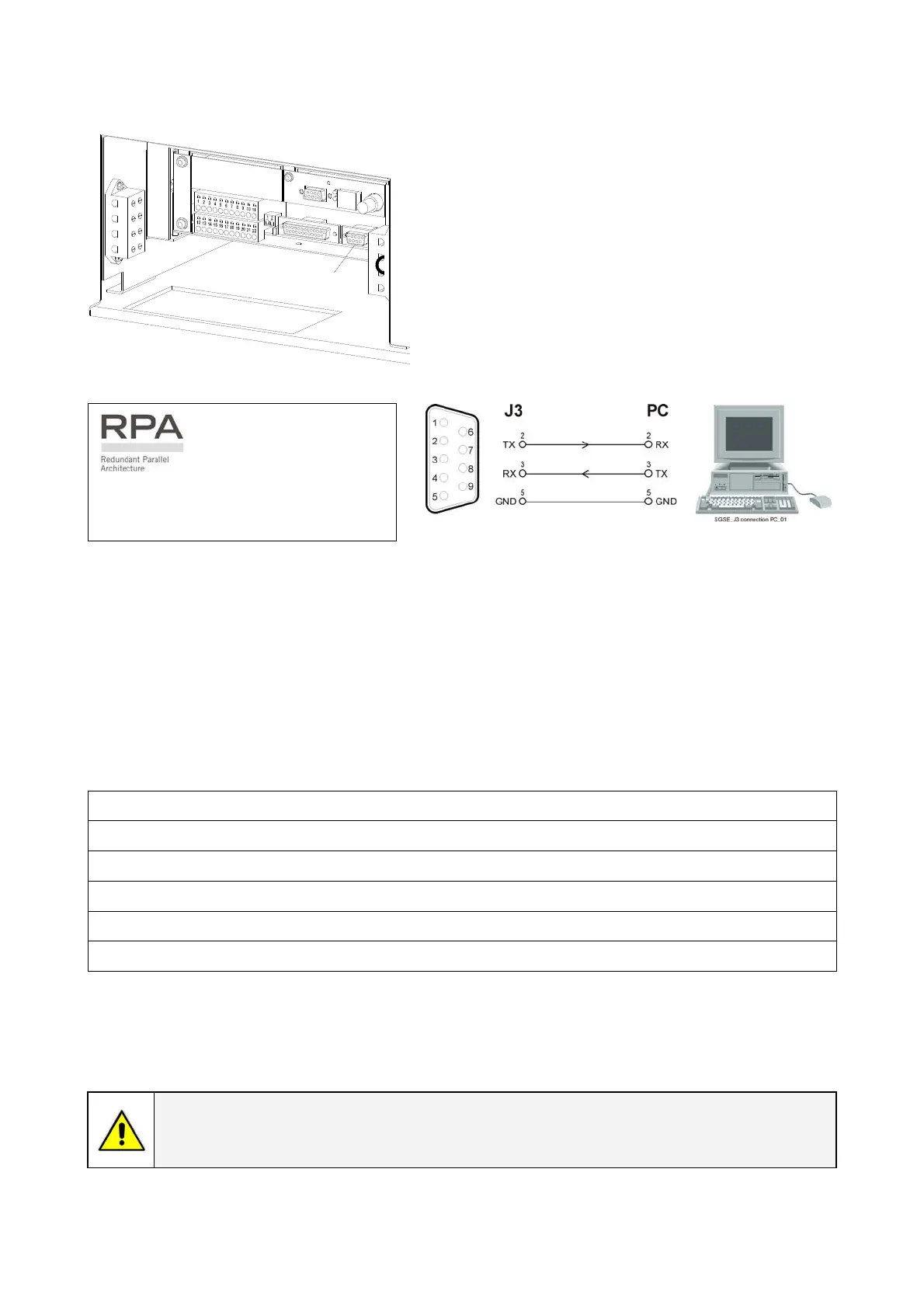
4.1.1 Serial Port J3
S
G
S
_
2
2
5
-
3
0
0
_
C
u
s
t
o
m
e
r
i
n
t
e
r
f
a
c
e
J
3
_
0
1
4
3
2
1
1
2
3
4
J3
Serial port J3 - RS-232 (sub D, female 9 pin) that
allows:
Total remote management of the system using
software GE Power Diagnostics, GE Data Protection or
GE Service Software for system protection and
management of the UPS systems.
Fig. 4.1.1-1 Serial port J3
The serial port J3 - RS232 is enabled
on all the units of the parallel system.
Fig. 4.1.1-2 Serial port J3 connection to PC with RS232 1:1 cable DB9m – DB9f
4.1.2 Output free potential contacts
The interface board provides 6 voltage free relay contacts giving some UPS critical alarms and
operation mode.
These signals are available either on connector J2- (sub D, female 25 pin) or terminal blocks X1.
The meaning of the alarms on the free contacts in standard configuration (default) is the following:
X1 / 1, 2, 3
or
J2 / 1, 2, 3 (NO, C, NC) Utility Failure
X1 / 4, 5, 6
or
J2 / 4, 5, 6 (NO, C, NC) Load on Inverter
X1 / 7, 8, 9
or
J2 / 7, 8, 9 (NO, C, NC) Stop Operations
X1 / 12, 13, 14
or
J2 / 14, 15, 16 (NO, C, NC) Load on Utility
X1 / 15, 16, 17
or
J2 / 17, 18, 19 (NO, C, NC) General Alarm
X1 / 18, 19, 20 J2 / 20, 21, 22 (NO, C, NC) Acoustic Alarm
or
In case different alarms or operating status are required, they can be configured on the same terminals
via software from the control panel.
The configuration can be changed in parameters mode by a trained operator using the appropriate
password.
NOTE !
The programmable signals on X1 and J2 will be disabled with Q1 open, with the
exception of the signals for “16 - Manual Bypass ON” and “26 - EPO”.
Modifications reserved Page 37/40
OPM_SGS_ISG_M22_M30_2US_V010.doc Installation Guide SG S er i e s 2 25 & 30 0 UL S2





 To Next Page