4 CUSTOMER INTERFACE
4.1 CUSTOMER INTERFACE
Serial port J3 - RS 232 (sub D - female 9 pin)
Modifications reserved Page 36/40
OPM_SGS_ISG_M22_M30_2US_V010.doc Installation Guide SG S er i e s 2 25 & 30 0 UL S2
Suitable for JUMP protocol
Pin 2: TX (out) Pin 3: RX (in) Pin 5: GND
J2 (subD-female 25p) – Output signals on voltage free contacts
J2/1, 2, 3
NO, C, NC Utility Failure
(default Parameter RL=1)
J2/4, 5, 6
NO, C, NC Load on Inverter
(default Parameter RL=3)
J2/7, 8, 9
NO, C, NC Stop Operation
(default Parameter RL=5)
J2/14, 15, 16
NO, C, NC Load on Utility
(default Parameter RL=2)
J2/17, 18, 19
NO, C, NC General Alarm
(default Parameter RL=4)
J2/20, 21, 22
NO, C, NC Acoustic Alarm
(default Parameter RL=6)
Signals on terminals X1 and on connector J2 are in parallel and
therefore not separated galvanically from each other.
The programmable signals on X1 and J2 will be disabled with Q1 open, with the
exception of the signals for “16 - Manual Bypass ON” and “26 - EPO”.
XB - Terminals for EPO connection
XB/1, 4 or J2/12, 25
NC EPO (Emergency Power Off) See Section 4.7.1
Note: to enable this function, remove cable short-circuiting XB / 2 – 3 and the
Jumper JP3 on P4 – Customer Interface.
X1 – Output signals on voltage free contacts - terminals
X1/1, 2, 3
NO, C, NC Utility Failure
(default Parameter RL=1)
X1/4, 5, 6
NO, C, NC Load on Inverter
(default Parameter RL=3)
X1/7, 8, 9
NO, C, NC Stop Operation
(default Parameter RL=5)
X1/12, 13, 14
NO, C, NC Load on Utility
(default Parameter RL=2)
X1/15, 16, 17
NO, C, NC General Alarm
(default Parameter RL=4)
X1/18, 19, 20
NO, C, NC Acoustic Alarm
(default Parameter RL=6)
Input contacts
X1/10, 21 or J2/10, 23
Programmable (default = RL1)
X1/11, 22 or J2/11, 24
Programmable / Generator ON (NO) (def. = RL2)
1
12 13
2
14
3
15
4
16
5
17
6
18
7
19
8
20
9
21
10
22
11
1
14
9
1
X1
J2
J3
_225-300_Customer interface_01
J5
J4
XA
21
SGS
1234
JP3
XB
1234
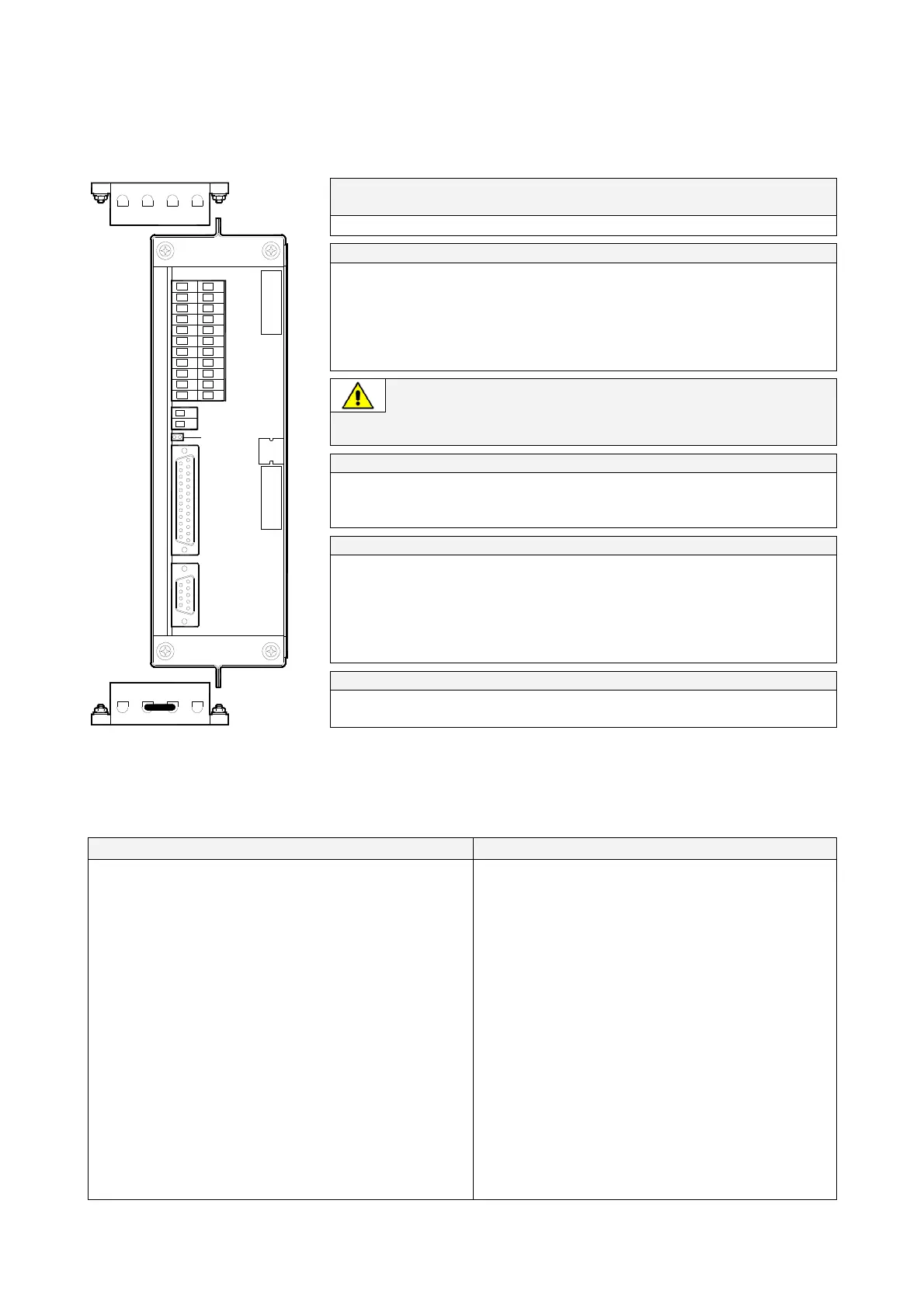
Fig. 4.1-1 Customer interface
NO = Normally Open C = Common NC = Normally Closed
The connectors J4 and J5 can be used for additional 3-ph SNMP/WEB plug-in adapter or an additional Custome
Interface (installation only when the UPS is switched Off).
XA: terminals for 24Vdc Auxiliary Power Supply connection.
XB: terminals for EPO connection.
Programmable user relays Programmable functions on contacts (X1 - J2)
On terminals X1 or J2 connector, six of the following 27
signals can be selected from the display, entering with
the appropriate password.
0- No Information
1- Buzzer
2- General Alarm
3- Load on Utility
4- Stop Operation
5- Load on Inverter
6- Utility Failure
7- DC Over Voltage
8- Low Battery
9- Overload
10- Over Temperature
11- Inverter-Utility not syncr.
12- Bypass Locked
13- Bypass Utility Failure
14- Rectifier Utility Failure
15- Battery Discharge
16- Manual Bypass ON
17- Rectifier ON
18- Inverter ON
19- Boost Charge
20- Battery Earth Fault
21- Battery Fault
22- Relay Input 1
23- Relay Input 2
24- Relay Output ON
Some UPS functions can be activated with
parameters when an external Normally Open
contact is closed on:
X1-10, 21 / J2-10, 23 or X1-11, 22 / J2- 11, 24
Selectable functions by changing parameters
(password required) are:
0 - No function 1 - Inverter ON
2 - Inverter OFF 3 - Print All
4 - Status Relay 5 - Generator ON
6 - External Bypass ON
7 - External Battery Fuses, or External K3
See Alarm 4104 - “Battery Fuses”
8 – eBoost/IEMi control
25- Relay Output OFF
Voltage free contacts: Max. DC / AC: 24V / 1.25A
IEC 60950 (SELV circuit)
Min. Signal Level: 5Vdc/5mA
26- EPO
(Emergency Power Off)
27- eBoost/IEMi mode





 To Next Page