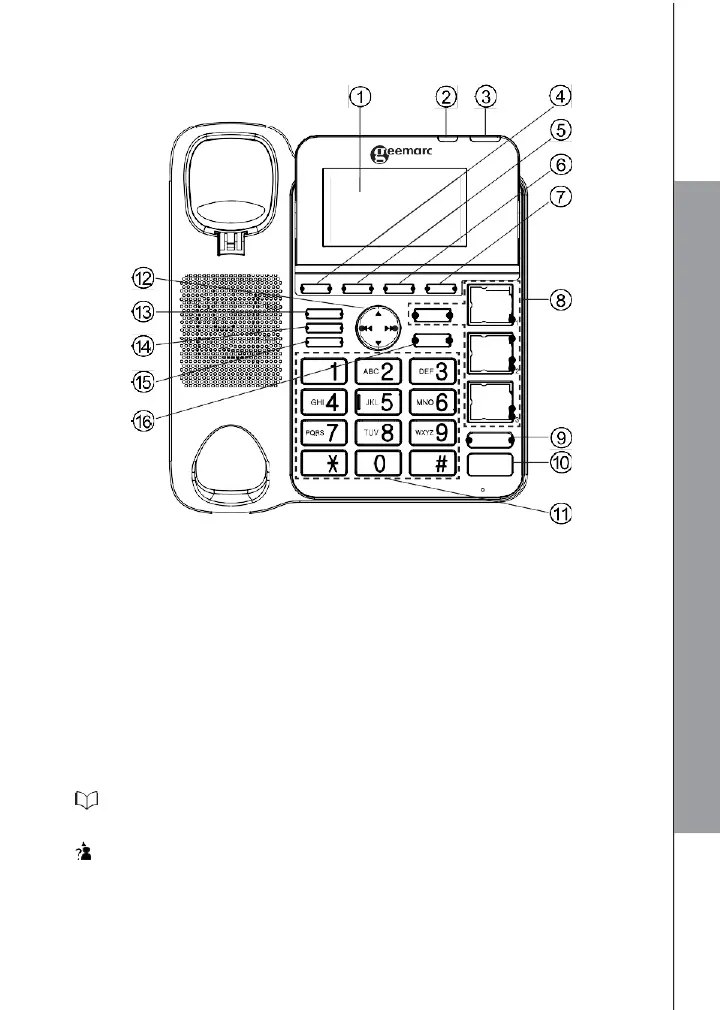
3.2 Overview of the Corded Base
IN USE RING
MENU/OK
PHON EBOO K
CALLS
INT/MUTE /CLEAR
ANS ON/OFF
M4
PLAY/STO P
DELETE
VOLUME
BOOST
SPEAKER
1. LCD DISPLAY
2. IN USE
On during a call.
3. RING light
Flashes when there is an incoming call.
Steadily on when the answering machine is turned on.
Flashes when there are new memos or messages in the answering machine.
4. MENU/OK
In idle mode: Press to access the main menu.
In sub-menu mode: Press to confirm the selection.
In Redial list / Call list: Press to store the number into Phonebook.
5. PHONEBOOK
In Idle: Press to access the phonebook.
6. CALLS (CALL LIST)
In Idle mode: Press to access the call list.



 To Next Page