R-Series v5 Instruction Manual38
© 2018 Geist
GM1196 R-Series v5 Instruction Manual
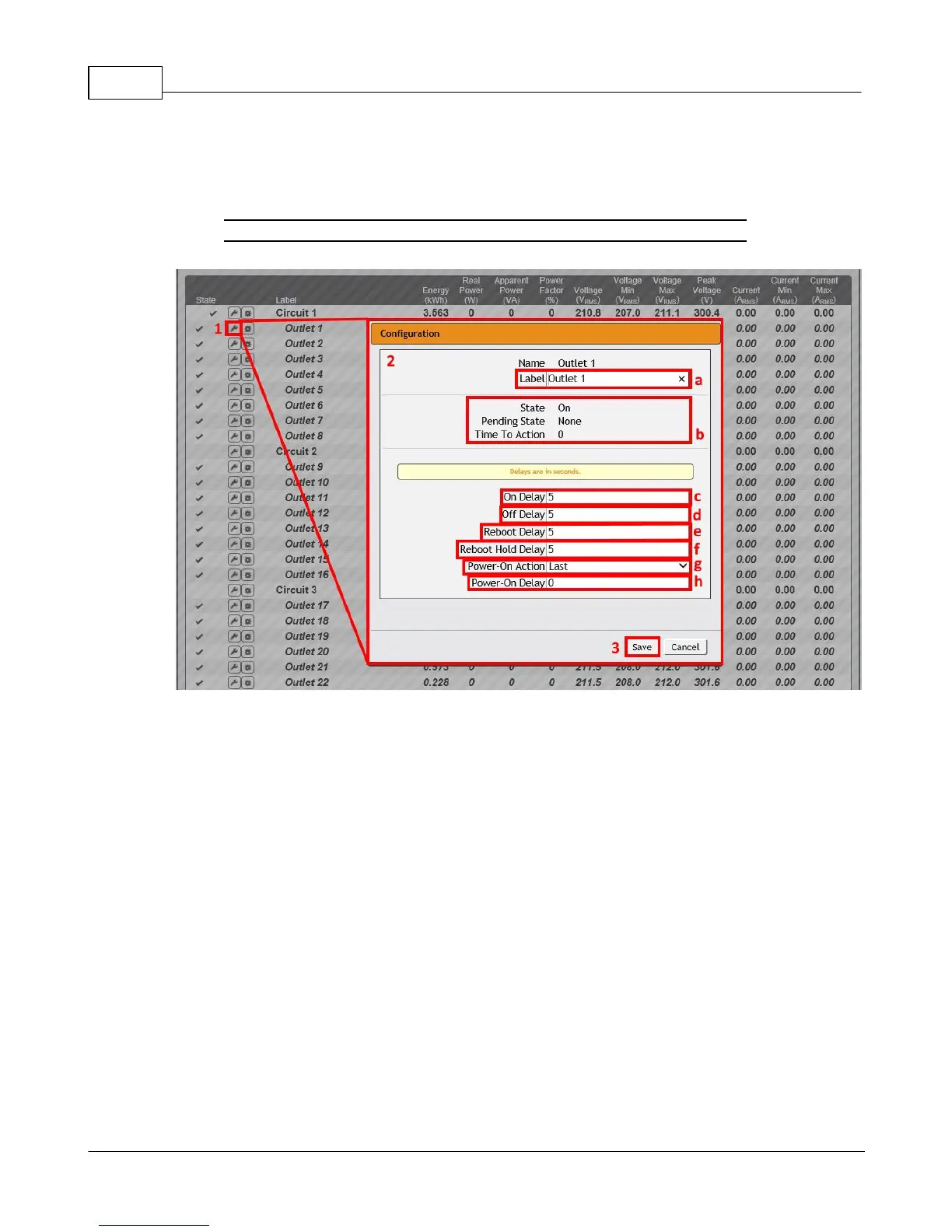
Outlet Configuration:
1. Click the desired Outlet Configuration icon.
Figure 3-4 Outlet Configuration Page
2. Configuration pop-up box will appear.
a. Use the text box to change the outlet's Label.
b. The outlet's state is described by three descriptors:
· State describes the outlet's current state (On/Off).
· Pending State describes the state the outlet is currently transitioning to, if it is in
the process of switching.
· Time To Action describes the time left before the pending action will take place.
This is adjusted using Delays.
c. On Delay is the time, in seconds, the unit waits before switching an outlet on.
d. Off Delay is the time, in seconds, the unit waits before switching an outlet off.
e. Reboot Delay is the time, in seconds, the unit waits before rebooting an outlet.
f. Reboot Hold Delay is the time, in seconds, the unit waits after switching the outlet
off, before switching an outlet back on during a reboot.



 To Next Page