DESCRIPTION:
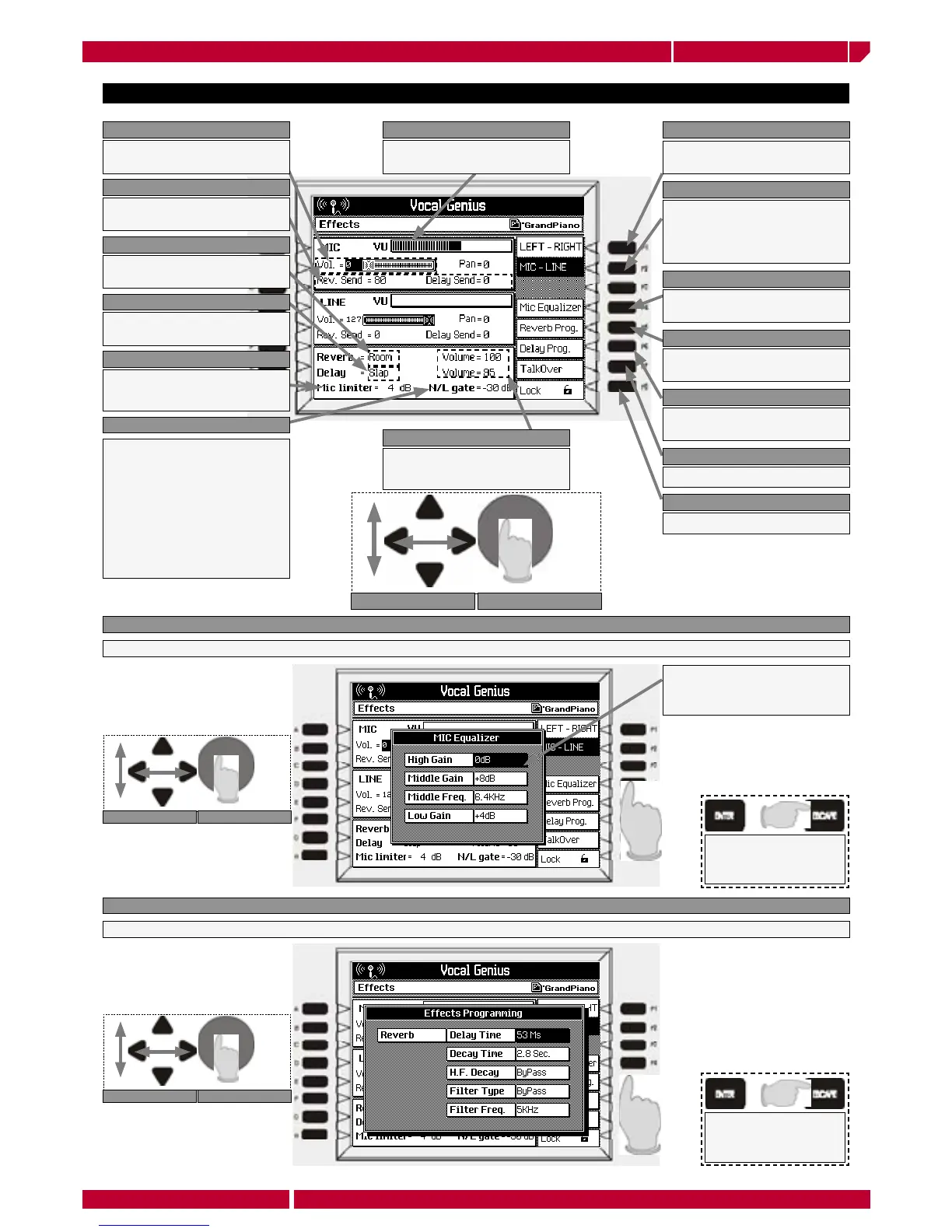
Sets the external input as a
double L/R LINE input
F1 LEFT-RIGHT
Allows to connect a
Microphone to the audio input
MIC and a LINE impedance
instrument to the LINE input.
F2 MIC-LINE
Shows the MIC equalizer
programming page.
F4 MIC EQUALIZER
Shows the Reverb parameters
programming page.
F5 REVERB PROG
Shows the delay parameters
programming page.
F6 DELAY PROG
Sets the talkover audio level
F7 TALKOVER
Locks the Vocal Genius
F8 LOCK
Visualizes the volume level
set with the MIC slider
VOL
Visualize the MIC input
volume level
VU-METER
Sets the reverb and volume
level in the microphone
REV AND DELAY SEND
Recalls 8 different reverb
presets
REVERB
Recalls 8 different delay
presets
DELAY
MIC LIMITER THRESH OLD con-
trols the internal com pres sor/
limiter circuit.
MIC LIMITER
The N/L parameter allows you
to reduce and/or eliminate the
microphone feedback (Larsen
effect). This function is very ef-
fective when the microphone is
close to the loudspeakers. This
pa ram e ter can be adjusted from
-48 to -12db. There is also an
“Off “ setting which allows this
function to be bypassed.
MIC LIMITER
MIC LIMITER THRESH OLD con-
trols the internal com pres sor/
limiter circuit.
REVERB AND DELAY VOLUME
Press F4 MIC Equalizer to enter the equalization page
F4 MIC EQUALIZER
3 band semi-parametric
equalizer to fit the microphone
tone response
Press F5 REVERB PROGRAMMING to enter the reverb programming page
F5 REVERB PROGRAMMING
Adjusts the treble, (High Gain), bass,
(Low Gain) and middle, (Middle Gain).
The Middle Frequency has a values
range from low-mid (250Hz – 1KHz)
to high-mid (1.3KHz – 6.4KHz).


 To Next Page