第 2 页 共 16 页
6
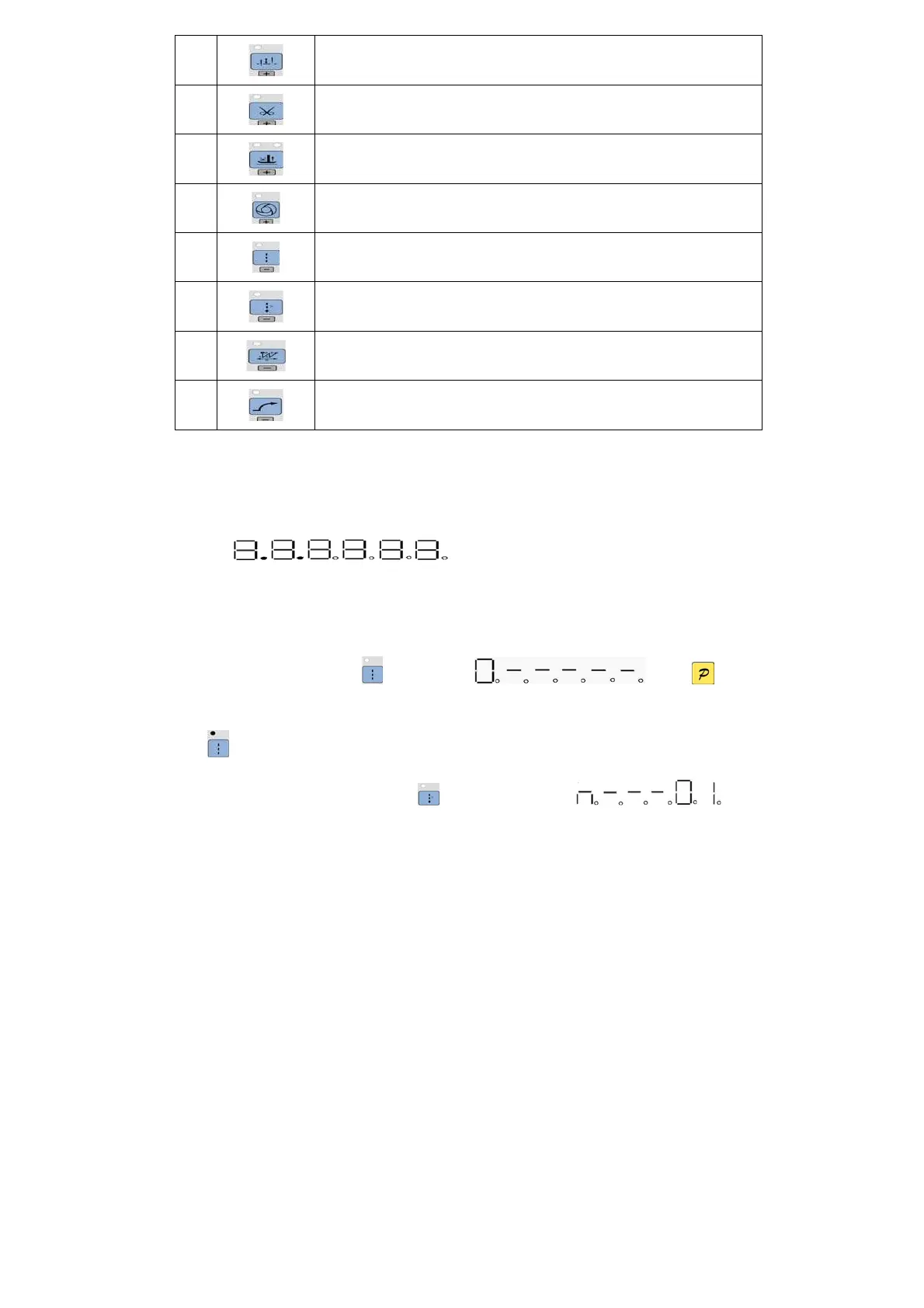
Stop position key:Select up/down stop position/Increase thousand bit. The LED at top left
corner of the key is lit if select up stop position.
7
Trimming key:Select/non-select automatic trimming/Increase hundred bit. The LED at top left
corner of the key is lit if select automatic trimming.
8
Press foot lifting key: Set up automatic press foot lifting/Increase ten bit. Select press foot lifting
and mid-press foot lifting. The 2 LED on the top of the key show current status.;
9
One-Shot-Sewing key:Select/non-select one-Shot-Sewing/ Increase Entries bit. The LED is lit
at top left corner of the key when select one-Shot-Sewing.
10
Free sewing mode key:Select free sewing mode/ Decrease thousand bit. The LED is lit at top
left corner of the key when working.
11
Multi-segment sewing mode key: Select multi-segment sewing mode/Decrease hundred bit.
The LED is lit at top left corner of the key if working.
12
W sewing mode key:Select W sewing mode/Decrease ten bit. The LED is lit at top left corner of
the key if working.
13
Soft start key: Select soft start function/Decrease Entries bit. The LED is lit at top left corner of
the key if working.
2 Optional User Mode
2.1 Operator Mode
This mode is default mode of operation panel, operation panel enter this mode after it starts. Under
this mode, the two connection decimal points will be lit from left to right in orderly during running,(LED
show as ) that means HMI is idle state.
Before performing any operation, if the long time does not press the key words, HMI will automatically
switch to the idle state; the previous operations will not be executed.
2.1.1 Sewing Mode Setup:
Free sewing mode: Press10 key, LED show as ,if press key,
confirm the operation, digital tube display returned to the idle state, and the LED on the top left of the
key is lit .
Multi-segment sewing mode: Pres11 key, digital tube display is



 To Next Page