07
7-155
Information
OJX1070232ROJX1070232R
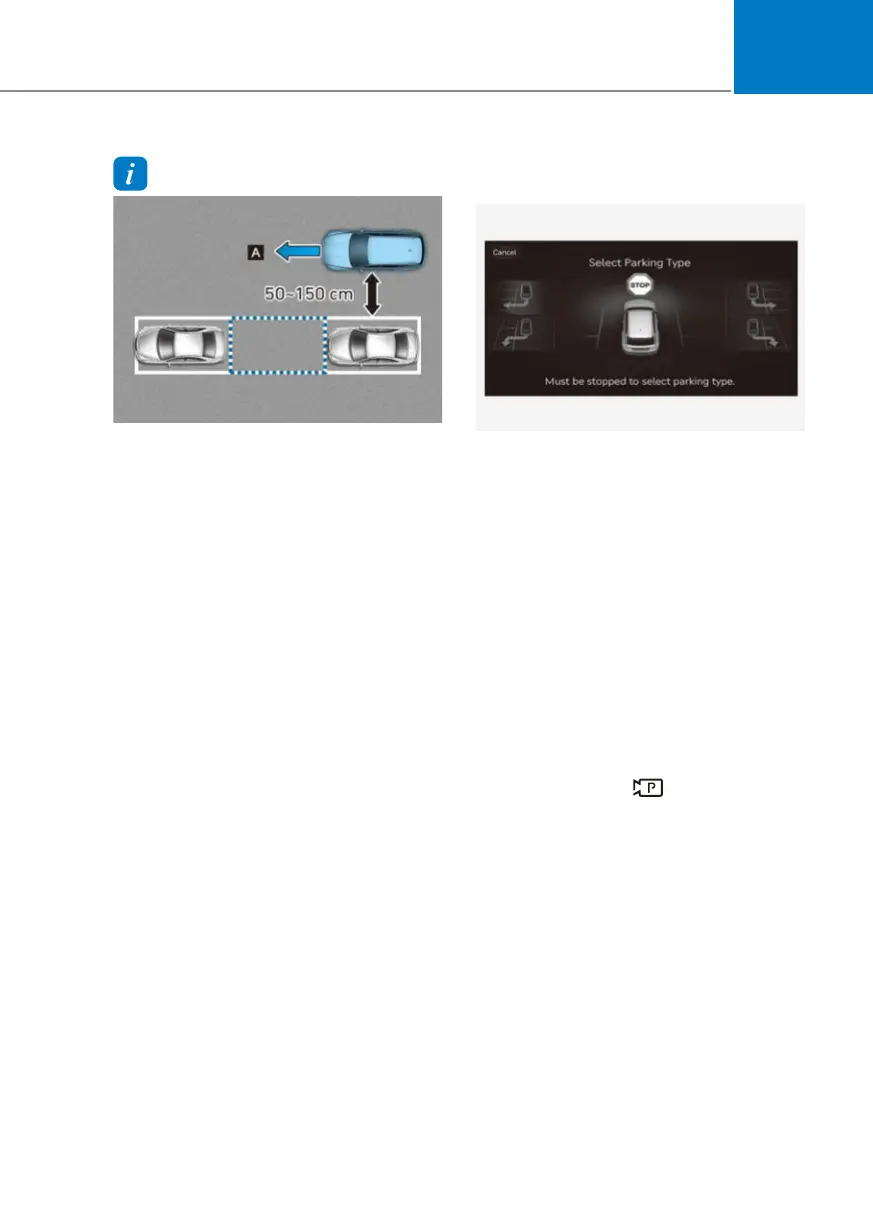
[A] : Searching for parking space
• If the distance is below 50 cm (20 in.)
or over 150 cm (59 in.), the system may
not be able to search for a parking
space.
• If you do not maintain a certain
distance from the parked vehicle, the
performance to search for a parking
space may reduce.
• When searching for a parking space,
the system may not be able to find a
parking space if there is no vehicle
parked, if the parking space is available
after driving by or if the parking space
is available before driving by.
• Even if a diagonal parking space is
searched as a parking space, parking is
not assisted normally.
• The system may not be able to search
for a parking space even if there
is a parking space, and the system
may search for a space that is not
suitable for parking in the following
circumstances:
- The parking space is narrow
- The ultrasonic sensor is frozen or
dirty
- There are objects located high or low
- There are pillars around the parking
space
- The parked vehicle has objects
attached to the bumper such as
bumper guard, trailer towbar, etc.
3. Select parking type and operating
mode
OJX1079186L OJX1079186L
(1) Parking type – Perpendicular
reverse (Left/Right), Parallel
reverse (Left/Right)
With the vehicle stopped by
depressing the brake pedal, touch
the infotainment system screen or
use the central controller to select
the desired parking type.
• If you continue to drive without
stopping after the parking type
selection screen appears, the
system will return to the previous
stage and search for a parking
space.
• If Parking function is cancelled
unintentionally by pressing the
Parking/View (
) button before
the parking type is selected, you
can return to the parking type
selection stage by pressing and
holding the button again whilst the
vehicle is stopped.



 To Next Page