26 10-1562 Issue 3-7 March 2014
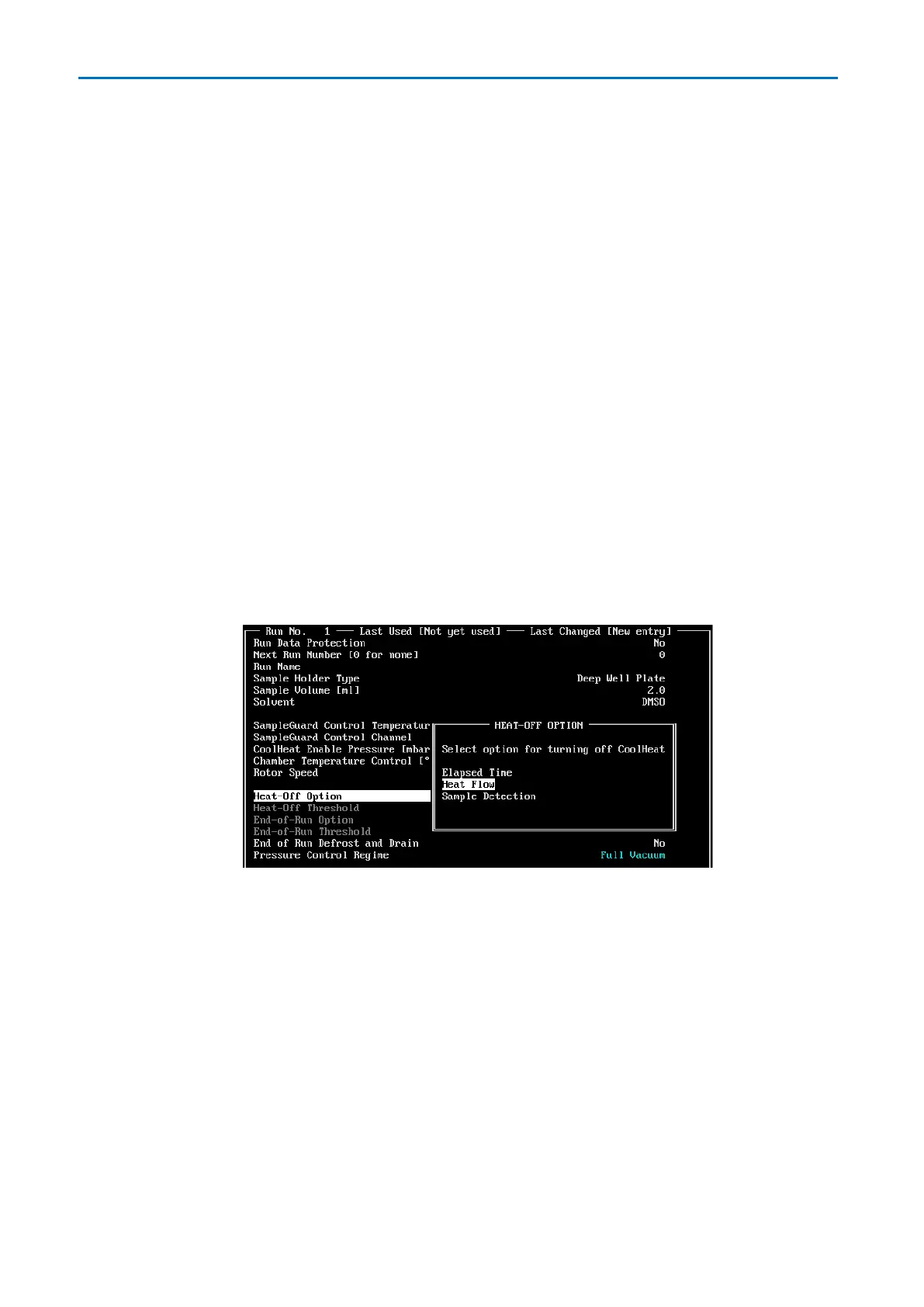
Heat-Off Option
Select from the options:
Elapsed Time
Manually enter a time for the Heat-Off Option, the evaporator turns off the IR lamps
when the time elapses and continues to run without heat input until the end-of-run time
elapses. By entering a longer time in the End-of Run Option, thermally sensitive
samples can be protected as they approach dryness while ensuring that all samples are
dried completely.
Heat Flow
The system monitors evaporative cooling by looking at the demand for heat input
required to maintain the sample holders at control temperature. When sample dryness is
detected, the system automatically turns off the IR lamps and performs a final drying
stage before stopping the run.
Sample Detection
The SampleGuard™ system monitors the temperature of a selected sample. It detects
dryness when evaporative cooling ceases, turns off the IR lamps and then stops the run.
The use of two temperature probes is necessary for Sample Detection. See
SampleGuard for details.
End-of-Run option
Only applicable if Heat-Off Option is set to Elapsed Time; manually enter a time for
End-of-Run Option.
End of run defrost and drain
Select yes to automatically defrost and drain the condenser at the end of the run (or end of
the stage if one or more runs are linked).



 To Next Page